

Sales Content Automation: Scale Personalized Outreach & Collateral Without Drowning Your Reps
Key Takeaways
– Sales content automation turns slide decks, PDFs, and emails into template-driven, data-fed assets so reps spin up personalized collateral in minutes instead of hours.
– The real ROI comes from wiring templates into your CRM and sales tools (variables, snippets, rules) and tracking rep hours saved, cost per lead (CPL) impact, and win-rate lift over time.
– AiBizBuild delivers done-for-you content automation services (audit → template architecture → integrations → training) so you get live, revenue-producing workflows in weeks, not another shelfware tool.
In This Guide:
– 🧩 What Is Sales Content Automation (And Why the Old Way Is Breaking)?
– 🕒 Manual vs Automated: How Much Time and CPL Are You Really Burning?
– ⚙️ Core Building Blocks: Templates, Variables, and CRM-Driven Snippets
– 🚫 Why DIY Sales Content Automation Usually Fails
– 🧪 Implementation Blueprint: From Content Audit to Live Workflows
– 📩 Use Case: Automated Sales Decks and Email Sequences for B2B Outbound Teams
– 📊 ROI Modeling: Time Saved, CPL Impact, and Payback Period
– 🤝 How AiBizBuild Implements Sales Content Automation for You
– ❓ FAQs on Sales Content Automation for B2B Teams
If your team is still building decks and email threads from scratch, you are paying top-of-funnel and mid-funnel tax every single week. Sales content automation is about eliminating that tax by standardizing how content is assembled, personalized, and delivered from your CRM. Instead of more tools, you need a system that gives reps on-brand, data-driven content on demand while leadership finally sees what collateral actually moves pipeline.
What Is Sales Content Automation (And Why the Old Way Is Breaking)?

In practical terms, sales content automation is a set of workflows that assemble decks, proposals, one-pagers, and emails from pre-approved modules using live CRM data. The rep selects an opportunity or account, and the system builds a tailored asset using templates, variables, and rules instead of manual copy-paste. Think of it as automated content production for sales, not marketing: high-frequency, high-stakes assets built at the speed of your pipeline.
The old way is fragile and slow. Reps dig through dated folders, clone last quarter’s deck, hack in a logo, and rewrite the same three paragraphs for industry, use case, or persona. Every “quick tweak” burns 15–30 minutes and increases branding, compliance, and accuracy risk.
Meanwhile, leadership has no clean line of sight from which content was sent to which deal and what impact it had. You might have Seismic or Mindtickle or a basic slide library, but without automation and CRM Integration & Inbox Management, it’s still a manual scavenger hunt with better UX.
Manual vs Automated: How Much Time and CPL Are You Really Burning?

Let’s quantify the manual reality. A typical AE or outbound-focused hybrid rep spends 1.5–2 hours per custom deck between hunting for slides, updating stats, and getting approvals, and another 30–45 minutes crafting semi-personalized email threads for each high-priority prospect. On a busy week, that’s 5–8 decks and 15–25 “special” email threads.
Conservatively, you lose 10–15 hours per rep per week to content assembly and one-off personalization. At a loaded cost of $75–$125/hour for experienced reps, that’s easily $750–$1,800 per rep per month in pure content labor before you even talk about opportunity cost.
Automation doesn’t remove thinking; it removes re-typing. With well-designed workflows, the same rep can knock out personalized decks in 5–10 minutes each and deploy targeted email sequences in a few clicks, not half an hour.
Manual vs Automated Sales Content Production
| Aspect | Manual Process | Automated Content Production |
|---|---|---|
| Time per sales deck | 90–120 minutes per custom deck, heavy copy-paste and slide hunting. | 8–15 minutes per deck, assembled from modules based on CRM fields. |
| Time per personalized email | 5–10 emails/hour, each written or edited from scratch. | 40–60 emails/hour using templates, variables, and snippets. |
| Accuracy & branding risk | High: outdated stats, off-brand slides, and rogue messaging slip through. | Low: reps pull from approved templates with locked sections and live data. |
| Use of CRM and firmographic data | Inconsistent: reps manually copy-paste fields, often missing key context. | Consistent: templates auto-populate from CRM and enrichment fields. |
| Rep satisfaction | Low: “deck monkey” work, repetitive writing, frustration with content chaos. | Higher: more time selling, less time formatting and hunting for assets. |
| Manager oversight & reporting | Limited: no clean mapping from specific assets to opportunities or outcomes. | Strong: tracked templates and modules tied to deals, stages, and results. |
That shift directly affects CPL. If each rep can touch 2–3x more qualified prospects with better-tailored content, you either hold CPL flat while scaling volume or more realistically see 10–25% CPL reduction from higher meeting-book rates.
If you want to see how this plugs into broader B2B sales automation workflows, sales content automation is usually one of the highest-ROI starting points.
Core Building Blocks: Templates, Variables, and CRM-Driven Snippets
Under the hood, effective sales content automation is surprisingly simple conceptually. You need well-designed templates, trustworthy data, and a way to stitch the two together based on rules. The complexity comes from doing this at scale across decks, PDFs, and cold outreach without breaking branding or compliance.
The good news: most B2B teams already have the raw materials. You have past decks, case studies, and email copy; they just aren’t modular, tagged, or wired into your CRM yet.
Modular Templates for Decks and Proposals
Start by treating every deck as a set of modules, not a fixed artifact. A typical master deck might include: cover, agenda, persona-specific problem framing, product overview, feature deep dives, 2–3 case study modules, ROI slide, implementation plan, and next steps.
In an automated system, that becomes a configurable library. For example, the “Problem” slide has SaaS, Manufacturing, and Healthcare variants, and the “Case Study” section has 8–10 options by industry and deal size.
When an opportunity is created or updated, the automation selects the right modules based on CRM fields like {{industry}}, {{employee_count_band}}, and {{primary_use_case}}. Reps adjust a few narrative elements and send, instead of rebuilding from scratch.
Dynamic Variables and Snippets in Emails
For emails, templates plus variables plus snippets do the heavy lifting. At a minimum, you should be pulling fields like {{first_name}}, {{company_name}}, {{industry}}, and {{job_title}} directly from your CRM or your B2B Lead Scraping & Enrichment stack.
Well-implemented systems go further: {{primary_pain_point}}, {{current_tool_stack}}, {{last_meeting_notes}}, and {{time_to_value}} can all be injected as variables when your data is structured correctly. Snippet libraries then let reps insert pre-vetted intros, case studies, and CTAs that adapt to those variables.
This is also where AI-assisted personalization (e.g., playbooks similar to what we detail in ChatGPT for lead generation and outreach automation) can generate first drafts that stay within guardrails.
Integrating CRM and Sales Tools
Your CRM (Salesforce, HubSpot, or similar) must be the source of truth for automation. Deck and email templates should pull from opportunity, account, and contact objects rather than random spreadsheets or slide notes.
On top of that, you need orchestration across sales engagement tools (Outreach, Salesloft, Apollo, or even Gmail/Outlook), slide tools (Google Slides, PowerPoint), and enablement platforms. The stack matters less than the workflow: triggers, data mapping, and clear ownership.
AiBizBuild is intentionally tool-agnostic. Our core value is designing and wiring the workflows via our CRM Integration & Inbox Management and Cold Outreach Automation services, so your existing platforms finally act like one system instead of a silo zoo.
Why DIY Sales Content Automation Usually Fails
Most teams try to DIY sales content automation once. They buy a tool, configure a few templates, run a limited pilot, and watch adoption fade after a quarter. The problem isn’t ambition; it’s underestimating the messy implementation work and ongoing governance.
Here are the three failure patterns we see most often when teams go it alone.
Underestimating the Content Audit and Taxonomy Work
You cannot automate chaos. Before you can build anything, you need to audit decks, proposals, one-pagers, and email sequences, then de-duplicate, retire, or refactor them into modules.
That requires a taxonomy: industries, personas, stages, regions, and product lines. Most internal teams don’t have a clear schema or the time to tag 200+ assets correctly, so they cut corners and the automation produces generic or mismatched content.
The result: reps don’t trust the output, revert to old assets, and your investment in content automation services quietly dies on the vine.
Broken Data and Field Mapping
Automation exposes data quality issues brutally fast. If {{industry}} is messy (SaaS, Software, Software/SaaS, Tech) or missing, your conditional logic will fire the wrong modules or fall back to meaningless default copy.
We’ve seen sequences go out with subject lines like “Helping {{company}} reduce costs in {{industry}}” because the field mapping was wrong or the field was empty. Embarrassing output like this destroys trust in the system overnight.
Fixing this requires deliberate work: standardizing fields, cleaning historical data, incorporating enrichment, and documenting which fields power which templates before you flip the switch.
Change Management and Adoption
Even the best-designed templates fail if reps aren’t trained and incentivized to use them. DIY projects often stop at “we built the templates” and never invest in training, playbooks, and feedback loops.
Reps default to old habits when they hit friction: a confusing template, missing module, or unclear use case. Without someone owning iteration and governance, you get slow erosion, not a sudden failure.
DIY is absolutely possible, but the reality is most B2B teams get faster and safer payoff by partnering with a done-for-you implementation team that lives and breathes this work.
Implementation Blueprint: From Content Audit to Live Workflows
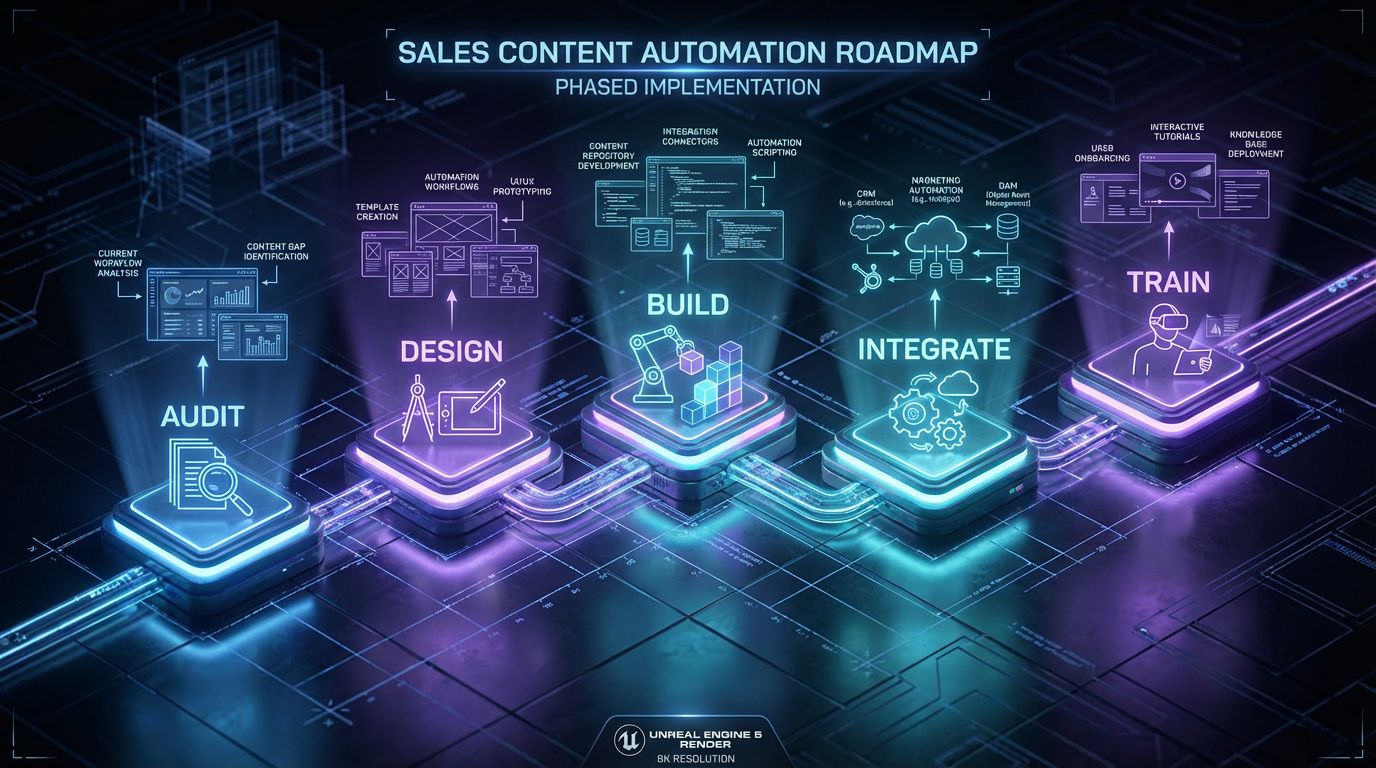
Vendors rarely show you the full path from today’s chaos to automated sales content production. To close that gap, here is the blueprint we use on real projects, typically over 30–90 days depending on scope and complexity.
Think of this as your playbook whether you work with AiBizBuild or not. The phases are the same; a partner simply accelerates execution and derisks the details.
Phase 1 – Audit & Prioritize
First, we inventory all relevant sales assets: pitch decks, discovery decks, proposal templates, one-pagers, competitive battlecards, and email sequences. We map each asset to stage, persona, industry, and region where applicable.
Then we prioritize. Late-stage proposals and core pitch decks usually get automated first because they are high-effort, high-impact assets. Early-stage outreach emails are next, especially where Cold Outreach Automation is already in focus.
The output of this phase is a short list of “Phase 1 assets” with clear owners, usage patterns, and target workflows.
Phase 2 – Template & Module Design
Next, we break those Phase 1 assets into reusable modules. For a core sales deck, that might look like: cover and intro, problem framing variants by industry, product overview, feature modules by use case, 2–3 case study modules per vertical, ROI slide, implementation timeline, and CTA/next steps.
We decide which sections are locked (brand, legal, positioning) and which are configurable (problem narrative, case studies, ROI assumptions). The same logic applies to email templates: intro variants, problem articulation blocks, case study snippets, and CTAs.
A simple output here is a documented deck template like: “Slides 1–3 are fixed, 4–7 vary by industry, 8–10 vary by persona, 11–12 vary by stage, 13 is always next steps.”
Phase 3 – Data Mapping and Rules
With templates defined, we map CRM fields to template variables. Common mappings include: {{industry}} (Account.Industry), {{segment}} (Account.Segment), {{deal_size_band}} (Opportunity.Amount bucketed), {{primary_product}} (Opportunity.Product_Line), and {{region}} (Account.Region).
We then define rules such as: if {{industry}} = “SaaS” → insert SaaS problem slide + 2 SaaS case studies; if {{deal_size_band}} = “Enterprise” → include implementation timeline module; if {{region}} = “EU” → swap in GDPR-compliant data processing slide.
This is also where enrichment fields from B2B Lead Scraping & Enrichment can supercharge personalization, e.g., matching case studies by current tool stack or key technologies.
Phase 4 – Build, Test, and Approvals
Only now do we build workflows inside your chosen stack. That might mean document automation tools, slide APIs, or integrations orchestrated via iPaaS or native CRM automation.
We test edge cases: missing fields, odd industry labels, multi-region accounts, multi-product deals. We also implement content approval workflows so high-risk modules route to managers or legal before use.
Governance is key here. We define who can edit which modules, how new variants get added, and how deprecated content is removed without breaking live automations.
Phase 5 – Rollout, Training, and Optimization
We roll out in waves: a pilot group of reps, then a team, then the whole region. Training includes live sessions, short videos, and embedded how-to docs directly in the CRM or engagement platform.
We set initial KPI targets: hours per deck, time to proposal, emails per rep per week, and meeting-booked rate. Within 4–8 weeks, we usually see clear trends in rep time saved and early CPL shifts.
Finally, we create feedback loops. Reps can flag modules that don’t land, request new variants, and share wins, while revops and marketing review performance to guide the next iteration.
Use Case: Automated Sales Decks and Email Sequences for B2B Outbound Teams
To make this concrete, let’s walk through a typical outbound-focused B2B team: 6–10 SDRs and 4–8 AEs handling discovery, demos, and proposals. Right now, they spend ~2 hours per custom deck and 30–45 minutes per tailored email thread for top accounts.
At scale, that’s dozens of hours per month per rep going into low-leverage assembly work. Automation converts that effort into a one-time implementation project and ongoing optimization.
Scenario Overview
Imagine a SaaS vendor selling into mid-market and enterprise accounts across three verticals. SDRs run outbound campaigns and book meetings; AEs own discovery, demos, and proposals.
Currently, SDRs manually cobble together sequences using generic templates and custom lines from LinkedIn research. AEs clone last quarter’s deck, swap logos, and email static PDFs to prospects, then repeat.
Leadership sees wide variation in quality, very little reuse, and no consistent linkage between assets and closed-won deals.
Automated Deck Generation Flow
With sales content automation in place, the flow looks very different. A new opportunity is created with fields like {{industry}}, {{segment}}, {{primary_product}}, {{region}}, and {{use_case}} filled either manually or via enrichment.
The rep clicks “Generate Discovery Deck” or a workflow auto-triggers when the opportunity hits a certain stage. Behind the scenes, the system assembles a deck: appropriate cover slide, industry-specific problem framing, product overview tuned to the use case, 1–2 relevant case studies, and the right regional compliance slide.
The AE then spends 5–10 minutes reviewing and tweaking a few narrative paragraphs rather than building from a blank file. For proposals, the same logic applies with pricing and implementation modules.
Automated Email Sequences Linked to CRM Stages
On the outbound side, Cold Outreach Automation connects CRM stages and lead lists to email sequences that use dynamic variables and snippets. When a lead is enriched and added to a specific campaign, the system chooses the right sequence based on persona and industry.
As opportunities move from “Discovery Scheduled” to “Proposal Sent” to “Contract Review,” different follow-up sequences trigger automatically. Each email includes tailored messaging, case studies aligned to {{industry}}, and a clear 24/7 Appointment Booking link so prospects can self-schedule follow-ups.
AI voice agents and SMS can layer on for multi-channel follow-up, but the core value is still the same: consistent, structured, personalized content deployed without manual assembly every time.
Before/After: Time and CPL
Let’s run quick math for a 10-rep team (SDR + AE mix). Before automation, each rep spends ~12 hours/week on decks and tailored emails → ~48 hours/month. At a $90/hour loaded cost, that’s ~$4,320/month per rep or ~$43,200/month across the team.
After automation, you realistically reclaim 6–10 hours per rep per week from content work. Even at 7 hours/week saved, that’s ~28 hours/month and ~$2,520/month per rep in reclaimed time, or ~$25,200/month across 10 reps.
If that reclaimed time goes into additional qualified outreach and faster follow-up, it’s common to see CPL drop 10–20% over a few months, not because you slashed media spend, but because your reps are doing more, higher-quality touches with the same prospects.
ROI Modeling: Time Saved, CPL Impact, and Payback Period
Executives don’t buy “cool automation.” They buy payback. The good news is that sales content automation is one of the easier initiatives to model because the time waste today is obvious and repeated every week.
The key is to stay conservative. Model only the time savings you’re confident in and modest CPL improvements, then compare against implementation and ongoing support costs.
Time Saved per Rep per Week
Across dozens of teams, we see similar patterns. For reps who truly own decks and tailored emails, a realistic range is 5–15 hours per week reclaimed from manual content work once automation is adopted.
For a 10-rep team, that’s 50–150 hours/week or roughly 200–600 hours/month. At a $90/hour blended cost, you’re looking at $18,000–$54,000/month worth of labor either unlocked for more selling or avoided as future headcount.
Even if you haircut those numbers by 50% for conservatism, the reclaimed capacity typically dwarfs the cost of implementing and maintaining the workflows.
Impact on CPL and Revenue Velocity
CPL impact comes from two drivers: more touches per rep and higher conversion per touch. When follow-up content is faster to produce and consistently on-message, you reduce leaks between hand-raisers and meetings held.
For example, if your current outbound program generates leads at $250 CPL with a 5% meeting-book rate, small changes add up. Increasing meeting-book rate to 6–6.5% (thanks to better, faster follow-up) effectively reduces CPL to ~$192–$208 per meeting-booked, a 15–23% improvement.
Revenue velocity improves as well: if time from discovery call to proposal shrinks from 7 days to 2–3 days because content is ready instantly, you both improve close rate and pull revenue forward, even if total deal count stays constant in the first few months.
Simple Payback Example
Consider again a 10-rep team. You invest, say, $60,000 over a quarter to design and implement sales content automation workflows with a partner like AiBizBuild, including CRM integration, template architecture, and training.
Post-rollout, you conservatively reclaim 6 hours/week per rep. That’s 60 hours/week or ~240 hours/month. At $90/hour loaded cost, you’re saving or repurposing ~$21,600/month in rep time alone.
Even ignoring CPL improvements, that implies a simple payback period of ~3 months. If CPL drops by a modest 10–15% on top of that, the effective payback is even faster.
Sample ROI: Rep Time vs Automation Cost
| Scenario | Manual | With Sales Content Automation |
|---|---|---|
| Monthly rep hours on content (10 reps) | ~480 hours/month (12 hours/week per rep). | ~240 hours/month (6 hours/week per rep after automation). |
| Estimated loaded cost (@ $90/hour) | ~$43,200/month spent on manual content work. | ~$21,600/month spent on content tasks, remainder reallocated to selling. |
| Approximate CPL (example) | $250 CPL with 5% meeting-book rate. | Effective CPL per meeting-booked improves to ~$210–$225 (10–15% better). |
| Simple payback period on $60k implementation | N/A – no automation, ongoing waste. | ~3 months based on rep time savings alone. |
None of this is magic. It’s disciplined template design, data mapping, and workflow implementation. The teams that move first in your space will compound these gains over quarters, not days.
Ready to see what this looks like against your own numbers? If you want to shortcut the modeling and get specific, Book a Workflow Audit with AiBizBuild to review your current deck/email process, or Request a Demo of Sales Content Automation Workflows to see real flows wired into typical B2B stacks.
How AiBizBuild Implements Sales Content Automation for You
—IMAGE_BLOCK: Futuristic Glass & Metal Product Shot showing a sleek stack of glass data chips labeled CRM, Email, Slides, and Automation, connected by glowing traces. Represents AiBizBuild as the workflow engine wiring existing tools together. Cinematic lighting, Unreal Engine 5 render, futuristic corporate aesthetic, glowing cyan and purple accents, shallow depth of field, 8k resolution—
AiBizBuild is not another platform vendor. We are a premium, done-for-you automation agency focused on turning your existing tools into a cohesive sales content automation system that your reps actually use.
We close the implementation reality gap: content audits, taxonomy, template architecture, data mapping, approvals, and ongoing optimization. You keep your stack; we make it work like it should have from day one.
What We Actually Do
Our work sits at the intersection of revops, enablement, and engineering. For sales content automation specifically, we combine:
CRM Integration & Inbox Management – We connect Salesforce/HubSpot objects to templates, set up triggers, and orchestrate email sending across Gmail/Outlook or sales engagement tools. This is the backbone of your automation.
Cold Outreach Automation – We design and implement outbound sequences that leverage automated content production, dynamic snippets, and, where appropriate, AI-assisted personalization. This directly increases high-quality touches per rep.
B2B Lead Scraping & Enrichment – For teams that want deeper personalization, we enrich accounts and contacts so sequences and decks can reference tech stack, size, growth signals, or other firmographics without manual research.
SEO Content & Blog Automation and Social Media Workflow Automation – When needed, we align your top-of-funnel content (blogs, social posts) with the narratives used in decks and emails so prospects see a consistent story from first touch to proposal.
Engagement Model and Timelines
Most sales content automation projects follow a clear 4–8 week initial rollout, then an 8–12 week optimization period. The exact timeline depends on how many assets you want to automate and the state of your CRM data today.
On your side, we typically need a sales leader or CRO sponsor, a marketing/content owner, and a revops/IT point person. Expect 2–4 hours/week of stakeholder time during design and testing, then lighter involvement during stabilization.
Our deliverables include audited and modularized templates, documented variable and rule maps, built and tested workflows, rep training sessions, and initial KPI dashboards so you can monitor rep hours saved and CPL shifts.
Risk Reduction and Governance
Because we work in compliance-heavy and multi-region environments, we design for controlled automation, not “fire-and-forget.” That means locking sensitive sections, routing risky content through approvals, and version-controlling modules.
We also implement monitoring: logs of which templates and modules are used for which deals, and simple alerting when error rates or anomalies appear. This makes audits and leadership reviews far easier than chasing local files and screenshots.
If you want a structured, low-risk way to explore this, Book a Workflow Audit with AiBizBuild. We’ll review your current process, identify 2–3 high-ROI workflows, and outline a realistic 30–90 day implementation plan. If you prefer to see it in action, you can also Request a Demo of Sales Content Automation Workflows tailored to your stack.
FAQs on Sales Content Automation for B2B Teams
How long does it take to implement sales content automation for a typical B2B team?
For a focused initial scope (a few high-impact deck templates and core outbound sequences), we usually see teams go live in 4–8 weeks. More complex setups with multi-region content, multiple product lines, and heavier data cleanup typically take 8–12 weeks, with ongoing optimization as reps adopt the system.
Do we need a specific sales content platform, or can you work with our existing tools?
You do not need to rip and replace your stack. AiBizBuild is tool-agnostic and can work with your existing CRM, slide tools, email platforms, and enablement software.
The real value is in the workflow design and our CRM Integration & Inbox Management capabilities, which turn those tools into a unified sales content automation system.
How do you keep our automated content on-brand and compliant?
We start from your approved brand and compliance guidelines, then build templates and modules that encode those rules by default. Sensitive content, such as legal language or regulated claims, can be locked or limited to approved variants.
We also set up automated content approval workflows so new or high-risk modules route to the right reviewers before reps can use them.
Will our reps lose control over personalization if everything is automated?
No. Well-designed sales content automation handles the repetitive, structural work while leaving room for smart human judgment. Reps still control key narrative elements, custom notes, and the decision to send or edit output.
Instead of starting from a blank page, they choose from vetted snippets and modules and make targeted tweaks, which actually increases personalization consistency without turning them into robots.
How do you measure success after implementing sales content automation?
We track operational and revenue-adjacent KPIs. Operationally, that includes rep time spent on content, time to proposal, and emails sent per rep per week.
On the revenue side, we monitor meeting-booked rate, CPL trends, and close rate changes for deals that use automated content vs control groups. AiBizBuild sets up dashboards and periodic reviews so templates and workflows evolve based on real performance, not opinions.