

AI Cold Calling Bots: How to Automate Outbound Calls, Cut CPL, and Grow Pipeline Faster
Key Takeaways
- Understand how an ai cold calling bot can increase call volume, reduce cost per lead (CPL), and protect your reps from low-value dials.
- See how to architect end-to-end workflows: from list building to dial logic, AI conversations, CRM updates, and follow-up automation.
- Use a simple ROI model to decide when to keep calls manual, where to add AI, and when it makes sense to book a workflow audit with AiBizBuild.
In This Guide:
📞 Manual Cold Calling vs AI Cold Calling Bots – Call volume, CPL, and conversion math.
🛠️ How AI Cold Calling Software Actually Works – Call flows, CRM integration, and compliance.
⚠️ Why DIY AI Voice Setups Fail – Tech, legal, and adoption landmines.
📈 Outbound Use Case: From Manual Calling to AI Voice Agents – A concrete B2B scenario with before/after KPIs.
🚀 When to Bring in AiBizBuild – Done-for-you AI voice agents, CRM integration, and outreach automation.
If you run outbound today, you already feel the friction: manual cold calling is slow, expensive, and drains your team’s energy long before it drains your list.
An ai cold calling bot is simply an AI voice agent that can dial prospects, hold a focused conversation, qualify interest, and either book a meeting or get out of the way quickly.
This guide avoids tool hype and Reddit-style “just try this app” advice, and instead walks through the math, workflows, and risks so you can decide when manual, AI, or hybrid calling makes financial sense.
Manual Cold Calling vs AI Cold Calling Bots
Most outbound teams still rely on a human-only process: export a list, load a dialer, click-to-call, leave voicemails, type notes, then try to remember to update the CRM.
On a good day, a focused SDR might hit **60–100 dials**, see a **5–15% connect rate**, and book **2–5 meetings per 100 dials** depending on list quality and offer.
The control and nuance are real advantages, but the model does not scale linearly; reps burn out, calls get rushed, and cost per lead climbs as you add more heads instead of more leverage.
The Reality of Manual Cold Calling Today
Manual outbound looks like this: someone pulls a list, checks LinkedIn, dials, listens to ringing, gets voicemail, leaves a message, types notes, and then updates the CRM if they remember.
Every context switch – from dialer to LinkedIn to CRM – adds seconds that compound into hours, which is why your actual talk time per rep often sits under **1.5–2 hours per day**.
Manual gives you nuance on complex calls, but when most conversations are quick yes/no qualifications, you end up paying fully loaded SDR salaries for a lot of waiting, ringing, and data entry.
What an AI Cold Calling Bot Actually Does
At a practical level, ai cold calling software is an AI voice agent connected to your telephony and CRM that can dial automatically, detect humans vs voicemail, carry a structured conversation, and log outcomes.
There are three patterns you should distinguish clearly before buying anything.
- Full AI agent – The AI does the dialing, intro, qualification, objection handling for common cases, and booking or routing.
- AI-assisted human caller – A human still talks, but AI handles notes, summaries, sentiment, and next-step suggestions.
- Dialer-only stack – You use a power dialer or predictive dialer with no real AI on the conversation side.
The healthy expectation: use AI to handle **high-volume, lower-complexity conversations and first-touch qualification**, while humans own nuanced discovery, demos, and closing.
Comparing Volume, CPL, and Conversion Potential
Let’s anchor this with a simple scenario: you have a list of 1,000 B2B prospects that fit your ICP and you want to know whether to put humans, AI, or a mix on it.
A typical manual SDR might push through **80 dials/day**, with **10% connects**, and book **3 meetings per 100 dials** at an all-in cost (salary, tools, overhead) of roughly **$40–$60/hour**.
A well-architected AI agent can safely attempt **250–400 dials/day per line**, run outside rep hours, and keep your humans only on the calls that actually warrant a real conversation.
| Approach | Typical Calls/Rep/Day | Estimated Cost per Lead | Pros | Cons |
|---|---|---|---|---|
| Manual Only | 60–100 dials | $120–$220 CPL on qualified meetings | High nuance, human judgment, easier coaching on complex conversations | Low scalability, rep burnout, inconsistent CRM data, hard to run after-hours campaigns |
| Full AI Agent | 250–400 calls per line | $60–$120 CPL with good targeting | **3–5x more calls/day**, 24/7 availability, perfect logging, consistent messaging | Needs careful design; weaker on complex, multi-threaded deals; compliance must be tightly managed |
| Hybrid (AI + Human) | 150–250 combined effective touches per rep/day | $80–$150 CPL with improved conversion | AI handles volume and first-pass qualification, humans focus on high-intent and complex calls, better use of senior reps | Requires integration and routing logic, more moving parts than either extreme |
The exact numbers will vary by industry and ACV, but the pattern is consistent: AI drives **3–5x more attempts** and **20–40% lower CPL** when implemented as part of a system, not as a bolt-on toy.
How AI Cold Calling Software Actually Works
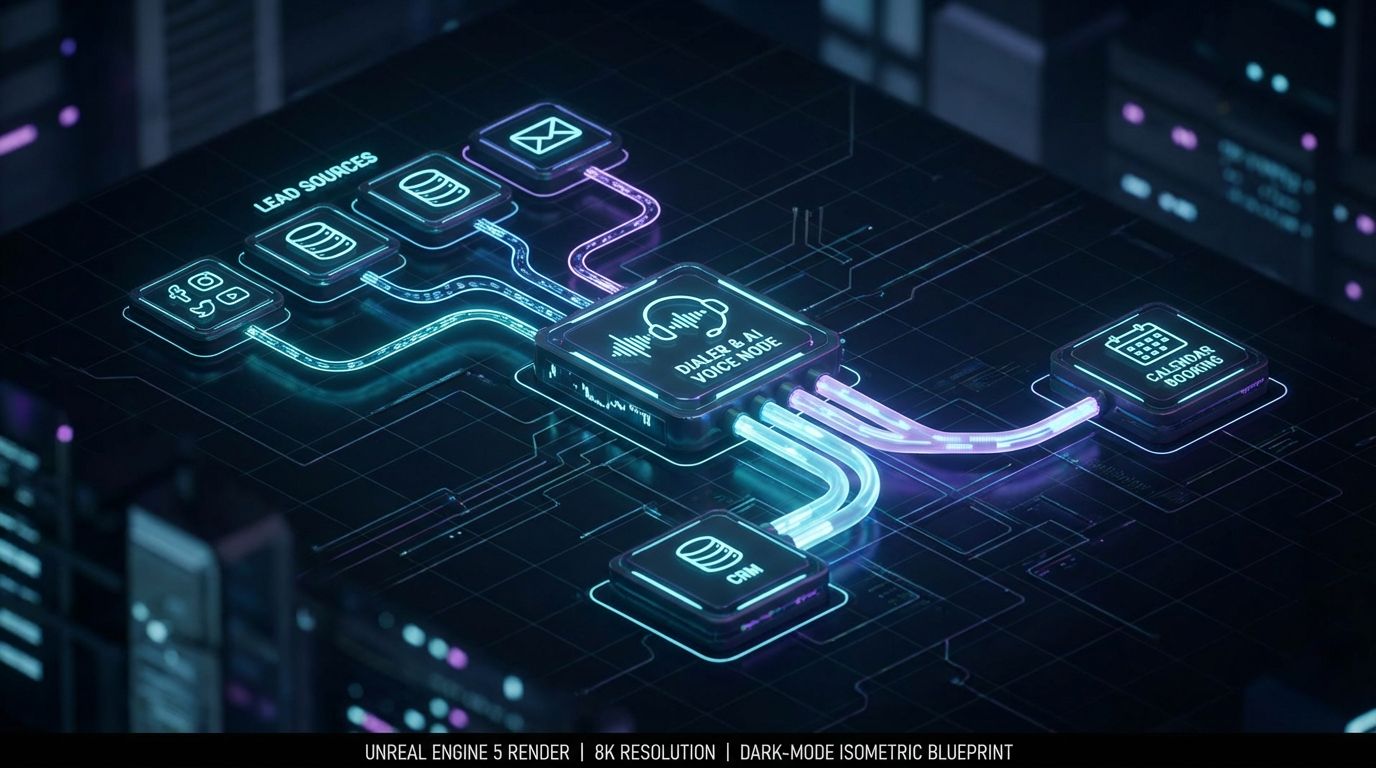
If you strip away the branding, every serious AI calling deployment is just plumbing: data in, calls out, outcomes back into your CRM and sequences.
This is where most Reddit threads and tool demos fall short; they show you the shiny agent, not the workflow that makes it economically useful.
Below is a simplified blueprint you can hand to RevOps, IT, or a partner like AiBizBuild.
Core Components of an AI-Driven Outbound Call System
- Lead source (B2B Lead Scraping & Enrichment) – Pulls and cleans your target accounts/contacts, enriches with firmographic and contact data so you’re not burning AI minutes on bad records.
- Dialer/telephony layer (SIP/VoIP) – Provides the phone numbers, caller ID strategy, concurrency limits, and call routing the AI will sit on top of.
- AI Voice Agent (Outbound) – Handles real-time speech recognition, intent detection, scripted flows, objection handling, and escalation/booking logic.
- CRM Integration & Inbox Management – Captures call outcomes, notes, recordings/transcripts, and ensures tasks and follow-ups are routed to the right owner.
- 24/7 Appointment Booking System – Connects calendars, routing rules, and meeting types so the AI can book cleanly without back-and-forth emails.
Designing an Effective AI Call Flow
A good AI call is short, clear, and purpose-built; a bad one meanders and feels like a robocall testing its vocabulary on your prospects.
Design your flow as a series of explicit states, not as one long monologue.
- Dial from the list using local presence or trusted branded caller ID where available.
- Detect human vs voicemail; leave a tight, value-focused voicemail or send a follow-up email/SMS if allowed.
- On human pickup, the AI introduces itself and the company in one sentence, states the reason for the call, and immediately asks permission to continue.
- The AI asks 1–2 qualifying questions tied to your ICP and offers concise responses to 2–3 common objections (e.g., timing, budget, existing vendor).
- On positive intent, the AI proposes a specific meeting slot, checks availability against the integrated calendar, and books the meeting.
- After the call, the system writes a structured summary, disposition code, and next steps into the CRM, and triggers or suppresses outreach sequences accordingly.
Guardrails matter: set a maximum call length (often **2–4 minutes**), ensure polite exits on disinterest or confusion, and log opt-outs at both the contact and domain level immediately.
Integrating With Your CRM and Outreach Stack
Without CRM integration, you are flying blind; you can’t trust your CPL, conversion, or even whether you’re double-calling people who already said no.
At minimum, sync the following for every AI call: contact, account, disposition (e.g., not interested, call back later, qualified, booked), summarized notes, and any follow-up tasks.
Once this data flows reliably, you can orchestrate Cold Outreach Automation so that email/SMS sequences branch based on call outcomes, instead of blasting everyone with the same generic cadence.
For a deeper dive into sourcing and warming up leads before calls, see our guide on AI lead generation tools and automated prospecting.
Tracking the Right Metrics: CPL, Conversion Uplift, and Time Saved
More calls do not equal more revenue unless you track the right conversion points and costs.
The core metrics that matter are: calls/hour, connect rate, qualification rate, meetings booked per 100 connects, CPL, and rep hours saved per month.
- CPL formula: (Total monthly cost of calling stack – tools, minutes, AI + human time) ÷ (Number of qualified meetings sourced by calls).
- Time saved: (Old dials/month ÷ manual dials/hour) – (New human-involved calls/month ÷ hybrid calls/hour).
- ROI: ((Incremental meetings × average deal value × close rate) – incremental stack cost) ÷ incremental stack cost.
Baseline these numbers for at least one full cycle before turning on AI, then compare 30–90 days after launch; you want to see **CPL trending down** and **rep time shifting from dials to real conversations**.
Why DIY AI Voice Setups Fail (And Cost More Than They Save)
Most failed AI calling experiments I see have nothing to do with model quality and everything to do with workflow and ownership.
Someone in sales ops spins up a trial, wires it into a cheap VoIP number, and manually moves CSVs around – then declares “AI doesn’t work” when it doesn’t magically drop CPL.
The problem is not the concept; it’s the lack of architecture, compliance thinking, and ongoing tuning.
Tool Sprawl Without a Workflow
The DIY stack usually looks like this: one AI voice tool, a separate power dialer, CRM in another tab, Calendly somewhere else, and email sequences in yet another platform.
Data leaks everywhere – call outcomes don’t make it back into the CRM, booked meetings are missing context, and no one trusts the numbers in the weekly pipeline review.
You end up with a graveyard of half-used licenses and no defensible CPL because you can’t confidently attribute meetings to specific workflows.
Hidden Technical & Compliance Landmines
When you wire this yourself, it’s easy to ignore things that regulators and carriers care a lot about.
There are different expectations for B2B vs B2C calling, rules around consent, opt-outs, and increasingly direct attention on AI-generated or prerecorded voices.
This is not legal advice, but you should assume you need: clear identification at the start of the call, fast and honored opt-out, controlled call frequency, warmed caller IDs, and monitoring for spam labels on your numbers.
Call Quality, Objection Handling, and Edge Cases
Naive ai cold calling software fails the moment someone speaks quickly, interrupts, or throws an unexpected objection.
Out of the box, most tools give you generic responses; without domain-specific objection libraries and escalation rules, the bot either waffles or loops itself into awkward silence.
The consequences are very real: damaged brand, frustrated prospects, and wasted leads that will be harder to recover later with human outreach.
DIY vs Done-For-You: Where the Real Cost Hides
The hourly cost of your sales engineer, RevOps lead, and your own time is part of your CPL, whether you account for it or not.
Spending months in trial-and-error to save a few hundred dollars on implementation is rarely rational once you put numbers on opportunity cost and risk.
This is where a done-for-you partner like AiBizBuild usually wins: you pay more upfront in cash, but far less in delay, missteps, and bad data.
| Option | Upfront Effort | Ongoing Maintenance | Risk Level | Time to First Results |
|---|---|---|---|---|
| DIY AI Tool Stack | High – 40–100+ internal hours for eval, integration, and scripting | Medium/High – RevOps and engineers constantly patching edge cases | High – compliance missteps, data loss, poor call quality hurting brand | Often 2–6 months before stable, measurable performance |
| Done-For-You with AiBizBuild | Moderate – focused workshops and approvals over 2–4 weeks | Low/Medium – AiBizBuild owns tuning, monitoring, and updates | Lower – workflows designed with best-practice compliance and QA processes | 2–4 weeks to first measurable uplift in calls and meetings |
When you quantify internal hours at realistic blended rates, a premium implementation partner is usually cheaper than a year of stop-start DIY experimentation.
Outbound Use Case: From Manual Calling to AI Voice Agents
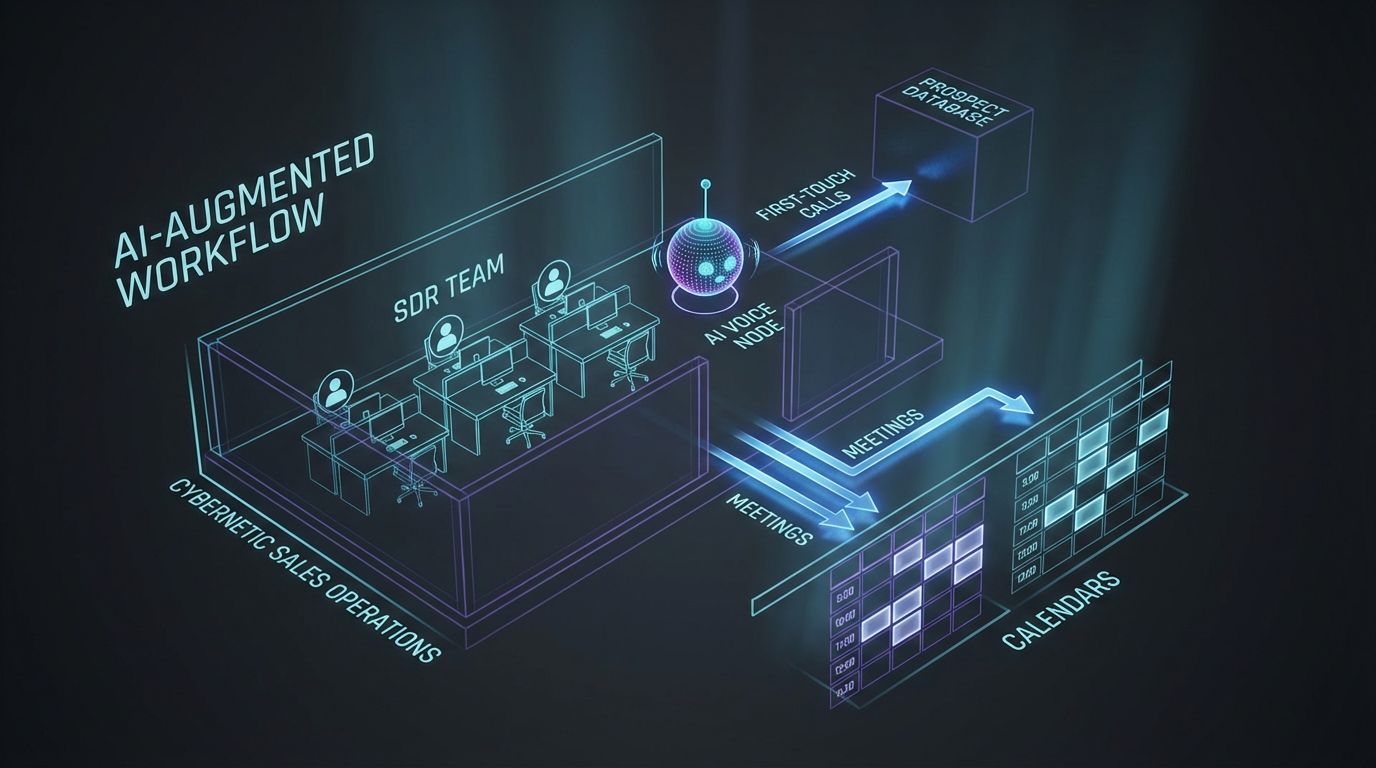
Let’s walk a concrete scenario that looks a lot like what we implement for small B2B teams.
Assume a founder-led company with a founder + 2 SDRs, targeting mid-market B2B accounts with a list of about 2,000 prospects refreshed quarterly.
The ACV is meaningful (say **$10k–$30k**), and the goal is simply more qualified meetings without doubling headcount.
Starting Point – A Small B2B Team Dialing Manually
In the baseline state, each SDR does **70 dials/day**, **10% connect rate**, and books **4 meetings per 100 connects** on average-quality lists.
Across two SDRs over 20 working days, that’s about **2,800 dials/month**, **280 connects**, and roughly **11 meetings** from cold calls.
At a fully loaded cost of **$8,000/month per SDR**, your effective CPL from calls alone is roughly **$1,450–$1,600 per meeting**, before you factor in tools or the founder’s time.
The New Stack – AI Voice Agents + Outreach + CRM
AiBizBuild would not just “turn on a bot”; we’d re-architect the outbound motion around your CRM.
- B2B Lead Scraping & Enrichment to keep your 2,000-contact list clean, de-duplicated, and enriched with direct dials and key firmographics.
- Cold Outreach Automation to run email/SMS cadences that warm up accounts before and after calls, instead of relying on one-and-done phone touches.
- AI Voice Agents (Outbound) to handle first-touch or reactivation calls, qualify basic fit and interest, and route only positive signals to humans.
- CRM Integration & Inbox Management so every call, outcome, and meeting is logged automatically, and reps see a single source of truth.
- 24/7 Appointment Booking System that lets AI book directly into SDR calendars using routing rules by territory, product, or deal size.
Humans still handle live discovery and demos; they just stop burning cycles dialing people who clearly aren’t a fit or aren’t ready.
To see how this plugs into broader B2B workflows, you can cross-reference our playbooks on B2B sales automation and scaling outbound sequences.
Before/After Metrics: Calls, CPL, and Pipeline
With a properly tuned AI agent, you might conservatively target **3x more call attempts** while holding or slightly improving meeting conversion.
In our example, the system might now drive **8,000–9,000 calls/month** across AI lines, with humans only joining or handling high-intent callbacks and scheduled meetings.
If that yields **30–35 qualified meetings/month** and your all-in outbound stack (AI, telephony, tools, and SDR time) is **$15,000–$18,000/month**, your CPL drops into the **$430–$600** range and each rep frees up **20–30 hours/month** from pure dialing.
The upstream effect is a larger, more predictable top-of-funnel without bloating headcount, and a calendar filled with calls that actually resemble real sales conversations.
Step-by-Step Implementation Blueprint (2–4 Weeks)
This is roughly how a 2–4 week implementation with AiBizBuild unfolds.
- Week 1 – Discovery & Mapping
We audit your CRM, lists, current dialer, and outreach flows, clarify ICP and qualification criteria, and map the most common objections and compliance constraints. - Week 2 – Configuration & Integration
We configure the AI Voice Agent, set up telephony (numbers, caller ID, concurrency), wire it into your CRM and calendars, and define routing and appointment rules. - Week 3 – Pilot & Tuning
We roll out to a small segment of leads, review real call recordings/transcripts, refine scripts, objection handling, and guardrails, and adjust dialing logic. - Week 4 – Rollout & Dashboards
We expand to the full target list, finalize dashboards for CPL, connect rate, meetings per call, and rep time saved, and hand over operating procedures.
The result is not “another tool” but a working revenue system that your team can manage without needing to be AI engineers.
How to Decide If an AI Cold Calling Bot Is Right for Your Team

AI calling is not a universal yes; for some teams, the complexity isn’t worth it yet.
The right lens is not “is AI cool?” but “does this improve my unit economics and reduce operational risk?”
Use the following questions and simple math as a filter before you invest.
Questions to Evaluate Fit
- List volume: Are you working through at least a few thousand new or recycled prospects per quarter, or are you in a small, highly bespoke market?
- Deal size & cycle: Is a qualified meeting worth enough (e.g., **$1k+ of expected value**) to justify system design, but not so high-touch that every first call must be bespoke?
- Conversation repeatability: Do 70–80% of first conversations follow similar patterns of questions and objections?
- Regulatory environment: Are you mostly B2B, with clear internal guidelines and legal counsel to sanity-check the workflow?
- Current outbound strain: Are reps stuck at low call volumes, skipping notes, or unable to keep up with follow-ups?
AI tends to make the most sense where conversations are repeatable, lists are large, and current manual processes are clearly under-leveraged.
Calculating Your Breakeven and ROI
You don’t need a complex model; a back-of-the-envelope view is enough to sanity check the move.
- Estimate value per qualified meeting: (Average deal size × close rate from meeting) – e.g., $15k ACV × 20% = $3,000 value per meeting.
- Calculate current CPL: (Rep cost + dialer + data) ÷ meetings from calls – if you spend $12k/month and get 15 meetings, CPL = $800.
- Project AI impact: Assume AI/hybrid can increase meetings by 1.5–3x and reduce manual time by **20–40%**; plug in conservative numbers.
- Include implementation cost: Add AiBizBuild implementation + ongoing fees to your stack cost and recompute CPL.
- Breakeven check: If new CPL is meaningfully lower and you reach breakeven on implementation within **3–6 months**, it’s usually a rational move.
Document your assumptions; they’ll become the success criteria you use to judge the system after launch.
Common Mistakes to Avoid in Your First 90 Days
- Going 100% AI on day one – Instead, start with a subset of personas or segments and keep humans in the loop for review and escalation.
- Not listening to early calls – Treat the first few weeks like SDR onboarding; review recordings and transcripts daily and tune aggressively.
- Ignoring compliance and caller ID reputation – Warm numbers, monitor spam labels, and respect opt-outs from day one.
- Skipping CRM integration – Do not run production calls if outcomes are not flowing cleanly into your CRM with clear dispositions.
- Chasing too many tools at once – Commit to an architecture, then optimize within it instead of constantly swapping platforms.
- Not defining success metrics – Before launch, agree on target CPL, connect rate, and meetings/month so you can tell if it’s working.
Handled well, the first 90 days are where you capture most of the learning and de-risk the rollout for the rest of your team.
When to Bring in AiBizBuild
—IMAGE_BLOCK: Futuristic glass and metal product shot of a modular AI outbound calling system represented as interlocking glass cubes labeled leads, dialer, AI voice, CRM, and calendar on a dark desk. Cinematic lighting, Unreal Engine 5 render, futuristic corporate aesthetic, glowing cyan and purple accents, shallow depth of field, 8k resolution—
The biggest trap in this space is mistaking a tool trial for a revenue strategy.
You don’t need another dialer in your stack; you need a system that turns data into conversations into revenue with controllable risk and measurable CPL.
This is exactly where AiBizBuild operates as a premium implementation partner, not a SaaS vendor.
From Shiny Tools to Working Revenue Systems
Most AI vendors will show you an impressive live demo and leave you to figure out how to plug it into your outbound motion.
AiBizBuild starts from the opposite direction: we map your existing process, your targets, and your constraints, then choose and configure ai cold calling software as just one component of a full workflow.
The outcome we optimize for is not “bot deployed” but **lower CPL, more qualified meetings, and fewer manual hours spent on low-value tasks**.
What AiBizBuild Implements for Outbound Teams
- B2B Lead Scraping & Enrichment – We build and maintain clean, targeted lists so you’re not wasting calls on bad data.
- Cold Outreach Automation – We orchestrate multi-step email/SMS sequences that surround and support your calling strategy.
- AI Voice Agents (Inbound/Outbound) – We design, script, and deploy agents that qualify, handle common objections, and book meetings compliantly.
- 24/7 Appointment Booking Systems – We connect calendars and routing logic so meetings land with the right rep automatically.
- CRM Integration & Inbox Management – We ensure every call, email, and response is logged and actionable, with clear owner and next steps.
Together, these components become an outbound engine that is measurable, tunable, and aligned with your revenue targets, not a collection of disconnected apps.
How to Engage: Workflow Audit or Demo
If you’re serious about cutting CPL and scaling outbound without overwhelming your team, the right next step is a structured workflow audit.
On that call, we’ll review your current outbound and calling process, identify bottlenecks in dialing, qualification, and follow-up, and sketch a high-level AI-assisted workflow with rough time and cost savings.
If you want this built without wrestling the telephony, integrations, and AI tuning yourself, book a workflow audit or request a demo with AiBizBuild and we’ll show you what an implementation tailored to your stack could look like.
FAQs: AI Cold Calling Bots for B2B Outbound Teams
Is using an AI cold calling bot legal for B2B outbound?
Legality depends on your jurisdiction, who you’re calling, and how you handle consent, identification, and opt-outs.
In B2B environments, AI-assisted calling can be operated within existing telemarketing and privacy frameworks if you design flows carefully and follow local rules.
AiBizBuild designs workflows with best-practice compliance in mind, but you should always have your legal team review your specific use case.
How long does it take to implement AI cold calling software in an existing sales stack?
With a focused, done-for-you approach, most teams can go from discovery to a live, measurable pilot in about 2–4 weeks.
That includes discovery, call flow design, telephony setup, CRM and calendar integration, and at least one tuning cycle using real calls.
DIY efforts often stretch into several months because the same people responsible for hitting quota are also trying to be system integrators.
Do we need engineering resources to maintain an AI calling system?
You need technical capabilities somewhere, but they don’t have to live on your internal roadmap.
AiBizBuild handles the heavy lifting on APIs, integrations, telephony configuration, and AI tuning, so your sales and RevOps leaders can focus on strategy and performance, not code.
Day-to-day, your team mainly manages lists, messaging, and performance reviews, just as they would with any other outbound program.
Will AI cold calling bots replace my SDRs?
For B2B teams, AI is far more effective as a force multiplier than a one-to-one replacement.
The AI takes over repetitive, low-complexity dials and qualification, freeing SDRs to focus on higher-leverage conversations, follow-up, and pipeline advancement.
Teams that use AI well usually end up with more human conversations that matter, not fewer.
How do we measure success after launching an AI cold calling bot?
Track the same core metrics you use today, but compare them rigorously before and after launch: calls/hour, connect rate, qualification rate, meetings booked, CPL, rep hours saved, and pipeline generated.
Success usually looks like **more calls and meetings** at a **lower or similar CPL**, plus a clear shift in human time from dialing to meaningful sales activity.
If you can’t see these numbers clearly, fix your data and dashboards before scaling the program.