

Ecommerce Automation Software: Streamline Operations, Listings, and Order Workflows
Key Takeaways
– Ecommerce automation software can cut 10–40 hours/month of manual order handling, inventory syncing, and listing updates when implemented as a system, not just a tool.
– The real ROI comes from connecting your store platform, marketplaces, WMS/3PL, and support tools into end-to-end workflows for orders, returns, and stock, not from a single app.
– Most DIY builds stall or break; a done-for-you automation architecture delivers faster time-to-value and more reliable results than stacking random plugins yourself.
In This Guide:
📦 What Is Ecommerce Automation Software? – Definitions and core building blocks.
🧮 Manual vs Automated Ecommerce Operations – Where the hours and errors really are.
🧰 Key Ecommerce Automation Tools & Platforms – Tool categories, pros/cons, and fit.
⚠️ Why DIY Ecommerce Automations Fail – Hidden complexity most teams underestimate.
🔗 Implementation Blueprints for Common Stacks – Shopify, Magento, BigCommerce + marketplace workflows.
💸 ROI Breakdown: Time and Cost Savings Per Month – Concrete numbers for leadership.
🧪 Use Case: Automating Multi-Channel Orders and Returns – End-to-end example.
🧭 How AiBizBuild Implements Ecommerce Automation Systems – Process, timelines, and what you actually get.
❓ FAQs on Ecommerce Automation Software – Technical and strategic questions answered.
If you’re doing $50k–$500k+ per month and still babysitting spreadsheets, CSV uploads, and copy-paste orders, your real constraint isn’t headcount; it’s broken workflows. Ecommerce automation software is the toolkit, but the value comes from designing how orders, inventory, listings, and returns move across your stack without human heroics.
This guide is built for founders and operators who are tired of “just install this app” advice and want blueprints, timelines, and ROI they can defend to a CFO.
What Is Ecommerce Automation Software?
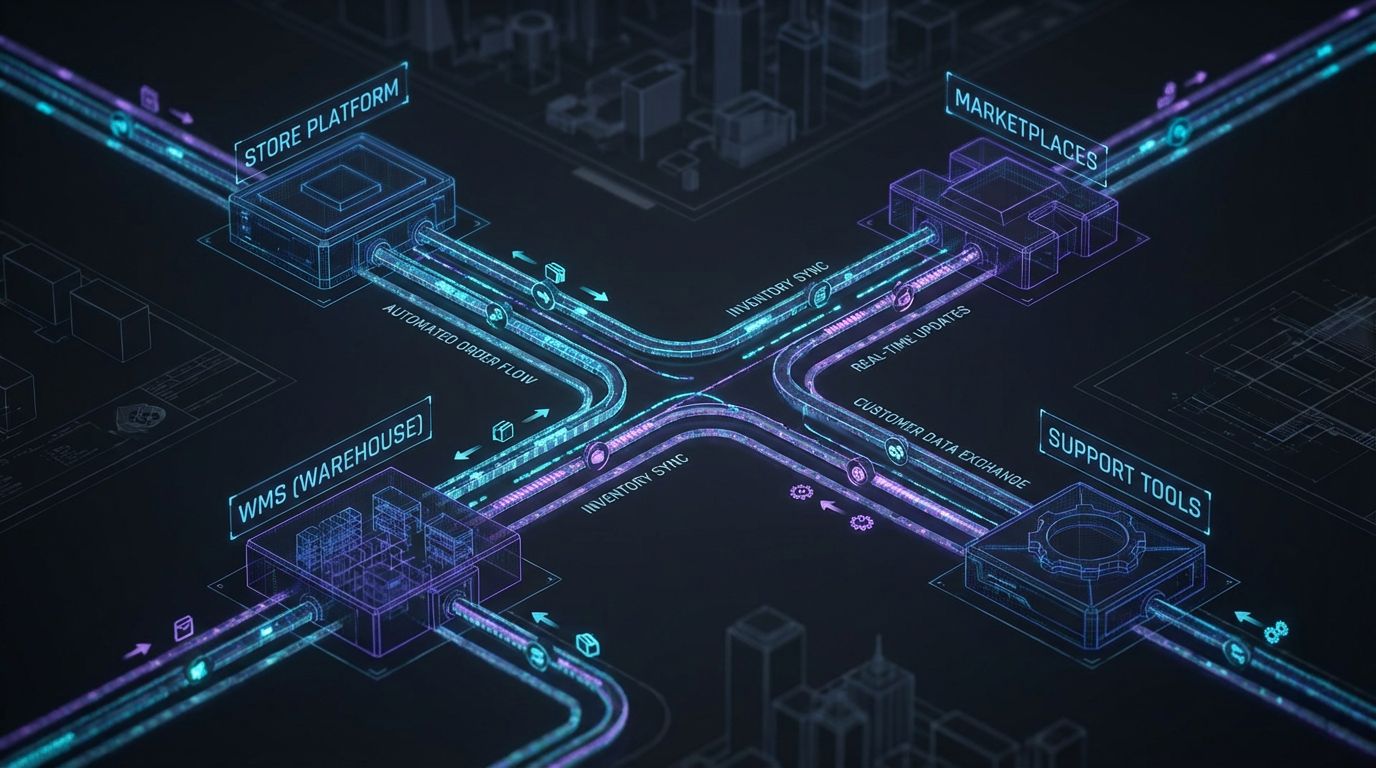
In practical terms, ecommerce automation software is the set of tools that takes repetitive, rules-based work off your team’s plate. It automates how orders, inventory, listings, customer notifications, and returns flow between your ecommerce systems.
It is not one magic app. It’s usually a combination of ecommerce automation tools orchestrated into end-to-end workflows tailored to your business rules.
At a high level, you’re working with three layers that can be mixed and matched.
Platform-Native vs Integration Layers vs Services
Platform-native automations live inside your core commerce platform.
- Shopify Flow, order and shipping rules, basic tag-based routing.
- BigCommerce’s built-in rules, scripts, and marketing automations.
- Magento’s native rules, plus extensions that help automate Magento for pricing, promotions, and basic flows.
Integration/automation layers sit between systems.
- No-code/iPaaS tools like Zapier, Make, SyncSpider, etc.
- Channel management tools connecting Shopify/Magento to Amazon, eBay, Walmart, and others.
Custom workflows delivered as services are where an agency like AiBizBuild comes in. Our E-commerce Operations (Shopify/Amazon) service uses your existing stack and an ecommerce automation platform layer to design, build, and maintain business-specific logic you won’t get from a generic app.
Core Components of an Ecommerce Automation Platform
Under the hood, every serious automation setup uses the same building blocks. If your team doesn’t understand these, DIY will hurt.
- Triggers: Events that start a workflow, such as order_created, order_fulfilled, refund_issued, inventory_level_changed, listing_updated.
- Conditions: Filters and rules, such as “if channel = Amazon FBA,” “if inventory < 10,” or “if order value > $300 and destination = international.”
- Actions: What happens next: create shipment in WMS/3PL, adjust stock, update listing, send email/SMS, open support ticket.
- Data mappings: How SKUs, variants, warehouse locations, marketplace listing IDs, and customer data match across systems.
- Error handling: What to do when an API call fails, a SKU is missing, or a 3PL rejects an order.
- Logging & monitoring: Central logs, alerts, and dashboards that tell you when a workflow silently dies instead of discovering it via angry customers.
Good ecommerce automations don’t just move data; they codify your business rules into these components in a way that’s observable and maintainable.
Manual vs Automated Ecommerce Operations

The “old way” is familiar: download orders from Amazon, upload to Shopify or Magento, email CSVs to the 3PL, manually update tracking, and try to keep a Google Sheet version of inventory alive. Every marketplace promotion triggers another round of spreadsheet surgery.
The “new way” is an ecommerce automation platform orchestrating those same steps automatically: orders route based on rules, inventory syncs in near real time, listings update without manual edits, and returns push back to stock correctly.
This is not about vanity metrics. It’s about cutting 10–40 hours/month of repetitive work and drastically reducing error-induced revenue leaks.
Where Manual Work Hides in a Typical Store
Most teams underestimate how many tiny cuts they’ve normalized. Here’s where manual work usually hides once you pass $50k/month.
- Marketplace order intake: Staff copying Amazon/eBay/Walmart orders into Shopify/Magento/ERP or re-downloading CSVs daily.
- Order splitting and routing: Manually deciding which warehouse or 3PL gets which orders, especially for multi-location or dropship setups.
- Stock level updates: Editing inventory counts in multiple admin panels after every receiving, return, or adjustment.
- Price changes and promos: Manually updating prices and sale periods on each channel, sometimes per-region.
- Listing updates: Copy-pasting product details, images, and attributes to marketplaces whenever something changes.
- Returns processing: Email-based RMAs, manual refunds, and ad-hoc notes in spreadsheets.
- Customer notifications: One-off emails about delays, stock-outs, or partial shipments that should be rule-based.
Add these up and you’re looking at 10–40 hours/month of work that should be automated once your GMV crosses six figures.
Manual vs Automated Workflows (Comparison)
Here’s how the old way compares to a properly automated setup.
| Manual Process | Automated Workflow |
|---|---|
| Order intake & routing: Staff download orders from each marketplace daily and manually re-enter or import into Shopify/Magento/ERP. 8–15 hours/month, high risk of missed or duplicated orders. | Unified order feed from all channels into a central system with rules that auto-route by channel, SKU, region, or warehouse. <1 hour/month of exception handling, low error risk. |
| Inventory & stock syncing: Manually adjusting stock levels in multiple dashboards after receiving shipments or processing returns. 6–12 hours/month, frequent oversells/stock-outs. | Inventory changes in WMS/3PL or primary store automatically sync to all connected channels within minutes. 1–2 hours/month to monitor alerts, dramatically lower oversell risk. |
| Marketplace listing & price updates: Copy-pasting titles, descriptions, images, and prices into each marketplace UI. 5–10 hours/month, inconsistent content and missed promo timings. | Listings and prices managed centrally (e.g., in Shopify or Magento) and pushed out automatically to marketplaces. <2 hours/month managing exceptions and new SKUs. |
| Returns & refunds: Email-based RMA requests, manual approval, ad-hoc refund processing, and separate inventory adjustments. 6–10 hours/month, high risk of missed restocks and inconsistent rules. | Returns portal triggers rules-based approvals, label generation, refund actions, and stock adjustments across channels. 2–3 hours/month overseeing edge cases. |
| Customer notifications: Manual emails/calls for delays, backorders, partial shipments, and refunds. 3–6 hours/month plus support tickets created by inconsistent communication. | Automated, event-driven notifications with channel-aware messaging (email/SMS/support ticket). <1 hour/month to adjust templates and rules, far fewer “where is my order?” tickets. |
If this table looks uncomfortably familiar on the left-hand side, you’re overdue for a system, not just another app.
Key Ecommerce Automation Tools and Platforms
Let’s be blunt: the internet doesn’t need another list of “Top 27 ecommerce automation tools.” You’ve already heard of most of them.
What matters is understanding the landscape well enough to pick the right building blocks and then focusing your energy on how they’re connected, not on chasing new logos.
Think of these as layers you can combine, depending on your stack and complexity.
Platform-Native Ecommerce Automations
If you’re on Shopify, BigCommerce, or Magento, you already own some automation capability. Most teams just underuse or misuse it.
- Shopify Flow and native rules: Tag-based routing, fraud checks, VIP handling, internal alerts, basic inventory-driven flows.
- BigCommerce automations: Cart and order rules, promotions, scripts, plus marketing automations for BigCommerce tied to customer behavior and order events.
- Magento automations: Price rules, catalog rules, and events that can be extended with modules to automate Magento around stock updates, order statuses, and exports to other systems.
Pros: Tight integration, usually included in your plan, low friction for simple rules.
Cons: Limited cross-platform visibility, and once you introduce multiple marketplaces, 3PLs, or ERPs, you’ll quickly outrun what native tools can safely manage alone.
Integration-Focused Ecommerce Automation Software
This is where most teams go when platform-native tools hit a wall. These are your connectors and orchestration layers.
- No-code/iPaaS tools: Zapier, Make, SyncSpider, etc. Good for wiring up “when X happens in Shopify, do Y in Tool Z.”
- Channel management platforms: Tools that centralize listing, pricing, and inventory across Amazon, eBay, Walmart, and your DTC store.
The value here is in multi-channel order routing, stock sync, listing sync, and centralized error logging, not in one-click setup promises.
Used well, this layer becomes your ecommerce automation platform that sits between store, marketplaces, WMS/3PL, ERP, and support.
Specialist Ecommerce Automation Services & Platforms
On top of general-purpose tools, there are specialized platforms and agencies offering ecommerce automation services for operations.
- Order orchestration engines: Rules-based engines deciding where and how to fulfill each order across warehouses, 3PLs, and dropshippers.
- Returns portals: Self-service workflows for RMAs, labels, and refunds that plug into your store and marketplaces.
- 3PL/ERP connectors: Middleware focused on keeping orders and inventory in sync across operational systems.
Even with these, the missing piece is the business-specific logic: your bundles, your regional rules, your preorders, your exception handling.
This is exactly the gap AiBizBuild’s E-commerce Operations (Shopify/Amazon) service is designed to fill.
Tool Choice vs System Design
Here’s the part most teams don’t want to hear: the specific tools matter less than the system design.
You can build a robust stack with Shopify Flow + a channel manager + a good 3PL integration, or you can build a fragile mess with the same tools. The difference is the architecture, mapping, and testing, not the logo.
Once you understand that, the conversation shifts from “Which app should we buy?” to “What are the workflows we need, and what’s the safest way to implement them in our stack?”
Why DIY Ecommerce Automations Fail
Most automation tools market themselves as “simple,” “no code,” and “plug-and-play.” In a single-channel, low-volume store, that’s sometimes true.
In a $100k–$500k/month multi-channel stack, that promise becomes dangerous. DIY ecommerce automations tend to fail for the same set of reasons.
Hidden Complexity Behind “No Code” Automation
“No code” does not mean “no logic.” It just means the logic is hidden in dropdowns instead of actual code files.
- You still have to understand events like order_created, order_fulfilled, refund_issued, inventory_adjusted, and how they differ by platform.
- You still have to map SKUs, variants, warehouses, and marketplace listing IDs that almost never match one-to-one out of the box.
- You still have to handle edge cases: partial shipments, backorders, split orders across warehouses, returns initiated on marketplaces, and more.
One wrong rule can quietly oversell a top SKU across three marketplaces in a weekend. You won’t care that the workflow was “no code” when support tickets spike and marketplace penalties hit.
Maintenance, Drift, and Silent Failures
Even if you get a DIY setup working, it won’t stay that way by itself.
- APIs change, apps update permissions, fields get renamed, and old Zaps or scenarios start failing.
- Ops teams change processes but forget to update the workflows that assumed the old process.
- New channels get added “temporarily” with manual workarounds that never get automated properly.
Without logging, alerting, and regular QA, workflows can silently fail for days or weeks. That’s how you wake up to 200 unshipped orders or prices that never updated for your biggest promo.
Opportunity Cost: Why DIY Becomes More Expensive
Every hour a founder, COO, or senior ops lead spends tinkering in Zapier or Shopify Flow is an hour not spent on merchandising, sourcing, or growth initiatives.
If your blended leadership rate is $100–$200/hour, it doesn’t take many weekends of “just fixing that integration” to surpass the cost of a done-for-you build. And you still inherit the maintenance risk.
This is exactly where bringing in ecommerce automation services like AiBizBuild’s E-commerce Operations (Shopify/Amazon) is usually cheaper than DIY within 3–6 months.
Implementation Blueprints for Common Stacks

Tools only create value when they’re wired into a coherent architecture. Let’s walk through a few practical blueprints you can map onto your own stack.
These are not theoretical diagrams. They’re based on real-world rebuilds of fragile automations across Shopify, Magento, BigCommerce, Amazon, and multi-marketplace stacks.
Shopify + Amazon + 3PL: Multi-Channel Order Routing
This is a common pattern for brands that started DTC on Shopify and added Amazon later, with a 3PL in the mix.
- Trigger: Order created in Shopify or Amazon.
- Step 1 – Unified order intake: An integration layer pulls orders from Shopify and Amazon into a central hub (could be Shopify, an ERP, or a dedicated OMS).
- Step 2 – Routing logic: Rules decide if the order ships from your own warehouse or the 3PL, based on SKU, destination, shipping service level, or channel.
- Step 3 – Push to fulfillment: The workflow creates the order in the correct WMS/3PL with all necessary data (SKUs, addresses, packing notes, marketplace identifiers).
- Step 4 – Tracking sync: Once shipped, tracking flows back from the 3PL to the central hub, and from there back to Shopify and Amazon automatically.
- Step 5 – Notifications: Customers get channel-appropriate shipping and delivery emails/SMS without manual intervention.
Inventory sync runs alongside this: any stock changes at the 3PL (receiving, cycle counts, returns) push updated availability back into Shopify and Amazon to avoid oversells.
Automate Magento: Inventory Sync and Marketplace Listings
Magento stacks often suffer from “integration fatigue” because the core platform is powerful but rarely configured cleanly.
- Step 1 – Magento as the source of truth: Product catalog, pricing, and base inventory live in Magento.
- Step 2 – Integration layer: A connector or middleware listens for product and inventory changes in Magento and synchronizes them to Amazon/eBay/Walmart.
- Step 3 – Listing automation: When a new product is created or updated in Magento, corresponding marketplace listings are created/updated with mapped titles, bullets, and attributes.
- Step 4 – Order import: Marketplace orders flow into Magento as sales orders, with tags or attributes indicating channel, fees, and required handling.
- Step 5 – Inventory protection: When inventory drops below a certain threshold in Magento, updates are pushed to all marketplaces within minutes to prevent oversells.
To automate Magento properly, you need strict SKU discipline and tested mappings between Magento attributes and each marketplace’s requirements.
Get that right, and you reclaim 10+ hours/month of manual listing edits and inventory firefighting.
Marketing Automations for BigCommerce (Tied to Ops)
Most teams think of marketing automations for BigCommerce as email-only. That’s leaving money on the table.
- Stock-aware campaigns: Promotions only trigger for SKUs with sufficient stock and margin, avoiding hype for items that will immediately sell out or tank your fulfillment SLAs.
- Post-purchase flows: A BigCommerce order event can trigger both a marketing series and internal automations, like creating an internal replenishment task when a fast-moving SKU dips below a threshold.
- Abandoned cart logic: Cart reminder flows check real-time inventory before sending, swapping products or offers if the original item went out of stock.
This is where marketing and operations automations need to share the same data rather than being two separate worlds.
It’s the same philosophy we use when building SEO Content & Blog Automation workflows that tie content to real inventory and offers.
Returns Automation: From RMA to Restock
Returns are where many DIY systems break, because they involve money, stock, and customer experience all at once.
- Step 1 – Request capture: A returns portal or form connected to your store and marketplaces collects RMA requests, reasons, and items.
- Step 2 – Rules-based approval: Business rules decide if a return is auto-approved, needs manual review, or is rejected (e.g., final sale, outside window, damaged).
- Step 3 – Label & instructions: Approved returns trigger label generation and clear instructions, reducing support back-and-forth.
- Step 4 – Receipt & inspection: When the return hits your warehouse/3PL, staff log condition and disposition (restock, refurbish, discard).
- Step 5 – Stock & refund sync: Inventory updates propagate to all sales channels and refunds/credits get issued automatically according to rules and channel policies.
The key is ensuring that a restocked item on one channel doesn’t stay “phantom out of stock” elsewhere because nobody updated the listing.
This alone can protect thousands per month in recovered, sellable inventory in a mid-sized brand.
ROI Breakdown: Time and Cost Savings Per Month
—IMAGE_BLOCK: Futuristic Glass & Metal Product Shot of a sleek, physical “automation engine” device on a dark desk with glowing interfaces and data chips symbolizing ROI and efficiency. Cinematic lighting, Unreal Engine 5 render, futuristic corporate aesthetic, glowing cyan and purple accents, shallow depth of field, 8k resolution—
This is the section your COO or CFO cares about. Nice workflows are irrelevant if they don’t translate into time savings, protected revenue, and a clear payback period.
The good news: operations-focused ecommerce automation software has some of the cleanest ROI math in your stack. You’re replacing very measurable manual work and very expensive errors.
Time Saved from Key Automations
Depending on your current maturity, a realistic first pass at operations automations typically delivers:
- Order intake & routing: 5–15 hours/month saved by eliminating manual imports, exports, and routing decisions.
- Inventory & listing sync (2–5 channels): 5–12 hours/month saved by removing spreadsheet updates and ad-hoc listing edits.
- Returns processing: 4–10 hours/month saved by automating RMA capture, approvals, label generation, and refunds.
- Customer notifications and exceptions: 2–5 hours/month saved by replacing one-off emails with triggered communications.
For a store in the $200k–$400k/month range, it’s very normal to reclaim 15–35 hours/month of operations time within the first 60–90 days.
At a blended $30–$60/hour for ops staff, that’s $450–$2,100/month in direct labor, not counting leadership time freed up from “babysitting automations.”
Protected Revenue and Fewer Costly Errors
The harder cost to quantify, but usually larger, is avoided revenue loss and penalties.
- Fewer oversells on high-velocity SKUs, which means fewer canceled orders and bad reviews.
- Fewer late shipments and marketplace SLA breaches, reducing penalties and suspension risks.
- More accurate restocking from returns, turning what would be write-offs into resellable inventory.
For example, a Magento store doing ~$300k/month across its site and Amazon cut manual order entry by ~25 hours/month and reduced stock-out complaints by roughly 40% after implementing proper order routing and inventory sync automations.
Even a conservative 1–2% revenue protection on $300k/month is $3k–$6k/month of value, on top of the labor saved.
DIY Automations vs Done-for-You with AiBizBuild
Here’s how a typical DIY approach compares to bringing in AiBizBuild for a structured implementation of ecommerce automations.
| DIY Ecommerce Automations | Done-for-You with AiBizBuild |
|---|---|
| Upfront time to go live: 6–16 weeks of part-time effort spread across founders/ops/IT, with frequent context switching. | Upfront time to go live: Structured 4–6 week project with clear milestones, led end-to-end by AiBizBuild. |
| Required skills: Deep understanding of APIs, platforms, SKU mapping, edge cases, and QA on top of existing responsibilities. | Required skills: Your team focuses on business rules and approvals; AiBizBuild handles architecture, implementation, and technical mapping. |
| Monthly maintenance time: 5–15 hours/month troubleshooting failed workflows, updating rules, and putting out fires. | Monthly maintenance time: 1–4 hours/month of review from your side; AiBizBuild can handle ongoing tuning and fixes. |
| Error risk: Higher, especially around promotions, new channels, and returns; limited monitoring and alerts. | Error risk: Lower, with deliberate logging, alerting, and tested fallback paths designed into workflows. |
| Approximate cost range: Low direct tool spend but high hidden cost in leadership and ops time; easily $3k–$10k+ in internal time over a few months. | Approximate cost range: Project-based investment with predictable scope; tools remain in your ownership and are right-sized to your stack. |
| Typical payback period: Unclear; benefits often delayed or reduced by partial, fragile implementations. | Typical payback period: 3–9 months, combining labor savings and avoided errors once fully rolled out. |
If you’re already spending nights and weekends wrestling with workflows, you’re in the “expensive DIY” zone. This is usually the right moment to schedule a no-obligation Automation Workflow Audit and see what a clean, done-for-you architecture would look like.
Use Case: Automating Multi-Channel Orders and Returns
To make this concrete, let’s walk through a realistic case: a brand doing ~$250k–$350k/month across its own store and marketplaces, stuck in manual chaos.
Details will vary, but the symptoms are nearly identical in every engagement.
Before Automation: Manual Chaos
This brand ran its main site on Shopify and sold heavily on Amazon and eBay. A regional 3PL handled most fulfillment.
- One ops coordinator spent ~20 hours/month downloading Amazon/eBay orders, massaging CSVs, and re-uploading into Shopify and the 3PL portal.
- Inventory was “managed” via a shared spreadsheet that never matched reality, causing repeated oversells on top SKUs each promo cycle.
- Returns came in via email; refunds were often issued before inventory was processed, leading to shrink and stock inaccuracies.
- Support tickets about “Where is my order?” and “You said this was in stock” were growing 20–30% quarter over quarter.
Leadership knew they needed ecommerce automation software, but all they saw were tool lists and case studies that glossed over architecture and effort.
The Automation Blueprint We Implemented
Through AiBizBuild’s E-commerce Operations (Shopify/Amazon) service, we designed an end-to-end automation blueprint using the client’s existing platforms plus a right-sized integration layer.
- Unified order intake: We set up an integration layer to pull orders from Shopify, Amazon, and eBay into a central hub, tagging each by channel, SLA, and fulfillment preference.
- Automated routing: Rules determined whether orders went to the 3PL or an in-house micro-warehouse, based on SKU set, shipping method, and destination country.
- 3PL integration: Orders were automatically created in the 3PL system with full data, and tracking numbers fed back into the hub, then out to each sales channel.
- Inventory sync: We made the 3PL the inventory source of truth for stocked SKUs. Changes there pushed into Shopify and marketplaces every few minutes.
- Returns automation: A returns portal fed RMA data into Shopify, triggered appropriate labels, and updated inventory and refunds when the 3PL scanned items back in.
We also wired in basic exception handling: alerts for failed orders, mismatched SKUs, and unusually large orders for manual review.
On the content side, the brand later layered in using ChatGPT for SEO safely to drive more traffic into this now-stable fulfillment machine, but the foundation was operations.
Results After 60–90 Days
After a 6-week build and rollout period, we tracked results over the next 60–90 days.
- Time savings: Manual order and returns handling dropped by ~22 hours/month, freeing the ops coordinator to focus on vendor management and forecasting.
- Error reduction: Oversell incidents on key SKUs fell by ~70%, and support tickets related to stock issues and late shipments dropped by roughly 30–40%.
- SLAs: The percentage of orders shipped within 24 hours increased from ~78% to ~93%, improving marketplace metrics and review profiles.
None of this came from a shiny new SaaS subscription. It came from designing and implementing solid ecommerce automations around the stack they already had.
How AiBizBuild Implements Ecommerce Automation Systems
AiBizBuild is not another app vendor. We’re a tool-agnostic, done-for-you automation & workflow agency that turns your current tech stack into a reliable operations system.
Our flagship offer in this context is E-commerce Operations (Shopify/Amazon), but the same principles apply when you’re running Magento, BigCommerce, or other marketplaces and back-office tools.
Our 4-Phase Implementation Process
We don’t “poke around and see what happens.” We run a structured, 4–6 week implementation designed for six-figure-per-month brands.
- Discovery & Audit (Week 1)
- Map current systems: Shopify/Magento/BigCommerce, Amazon/eBay, 3PL/WMS, ERP, support tools.
- Identify manual steps, error hotspots, and high-ROI automation opportunities.
- Define success metrics: hours saved, error reduction targets, on-time shipment SLAs.
- Architecture & Blueprint (Week 1–2)
- Design target-state workflows for orders, inventory, listings, and returns with clear triggers and conditions.
- Select or validate the ecommerce automation tools and connectors we’ll use (native vs iPaaS vs specialized middleware).
- Present a documented blueprint and get sign-off so everyone knows what “done” looks like.
- Build, Integrate & QA (Week 2–4)
- Implement workflows in your chosen stack, with proper field mappings and SKU logic.
- Set up logging, dashboards, and alerts for key failure modes.
- Run test orders and returns across channels, iterating on edge cases and exception rules.
- Go-Live, Monitor & Optimize (Week 4–6 and beyond)
- Roll out workflows in a staged or big-bang fashion, depending on your risk tolerance.
- Monitor execution closely for the first 30 days, with rapid response to anomalies.
- Adjust thresholds, rules, and routing based on real data and your team’s feedback.
This replaces months of ad-hoc DIY experimentation with a clear, time-boxed path to stable ecommerce automations.
The same patterns we use to streamline ecommerce operations also apply to internal systems like automated approval workflows, which is why a lot of our clients expand scope once they see the impact on operations.
Where AI Fits Into Ecommerce Automations
AI is not a magic wand here, but used correctly, it makes your system smarter and your team faster.
- Exception handling suggestions: AI can flag unusual order patterns (e.g., potential fraud, botched promos, channel-specific anomalies) for human review instead of relying purely on static rules.
- Operational insights: AI-assisted reporting can surface patterns in delays, returns reasons, or stock-outs that help refine rules and buffer levels.
- Support augmentation: When paired with CRM Integration & Inbox Management or AI Voice Agents, AI can answer common order status questions based on your automated workflows’ data.
We treat AI as an accelerator layered on top of robust workflows, never as a replacement for good process design.
When to Talk to Us (And When DIY Might Be Fine)
Not every store needs a partner like AiBizBuild yet. It’s better to be honest about that.
- DIY is usually fine if: You’re single-channel, sub-$50k/month, with simple fulfillment (one warehouse, no 3PL, no marketplaces). Native tools plus light Zapier/Make usage will carry you for a while.
- AiBizBuild is a better fit if:
- You’re selling on multiple channels (e.g., Shopify/Magento + Amazon/eBay/Walmart).
- You use a 3PL/ERP/WMS and feel constant friction at the handoff points.
- You’re losing time or revenue to operational errors, oversells, and manual band-aids.
If that sounds like you, the fastest, lowest-risk next step is to Book a Workflow Audit. We’ll map your current operations, identify the highest-ROI automations, and outline what a 4–6 week implementation would look like in your actual stack.
FAQs on Ecommerce Automation Software
This section is for the people who have to sign off on budget and risk: founders, COOs, and heads of ecommerce/ops.
1. How long does it take to implement ecommerce automations across my store and marketplaces?
For a relatively simple stack (one store platform + one marketplace + one 3PL), you’re usually looking at 2–3 weeks for a focused first phase. For more complex, multi-system stacks with nuanced business rules, expect 4–8 weeks from audit to stable go-live, depending on decision velocity and testing rigor.
2. Do we need to switch platforms or can you work with our current stack?
In most cases, no replatforming is required. AiBizBuild works with Shopify, Magento, BigCommerce, Amazon, common ERPs, WMS/3PL tools, and popular support platforms.
Occasionally we’ll recommend swapping a brittle point-solution (e.g., a weak connector) for something more robust, but wholesale platform changes are a last resort, not a default.
3. Is this secure, and who owns the data?
Your data stays in your systems. We configure integrations and workflows using secure authentication, least-privilege access, and platform-recommended best practices.
We also prioritize audit logs and role-based access so you can see who changed what and when, which matters as automations touch orders, payments, and customer data.
4. Do we need in-house developers to maintain these automations?
Generally, no. Most of the automations we build are on no-code/low-code platforms or native tools, so day-to-day adjustments don’t require a full-time developer.
AiBizBuild can handle ongoing changes as part of an ongoing engagement, so your internal team focuses on business rules and approvals instead of debugging APIs.
5. How do we measure ROI from ecommerce automation software?
We recommend tracking three buckets: hours saved/month (by role), error reduction (oversells, late shipments, stock-out incidents, returns issues), and revenue preserved (improved SLAs, fewer cancellations, better marketplace scores). Plug those into a simple model against your implementation and maintenance cost to get a payback period.
For most six-figure-per-month brands, well-designed ecommerce automations pay for themselves in 3–9 months, with upside increasing as volume grows.
Bottom line: don’t just buy more tools. Design a system. If your team is already stretched thin and you’re serious about stabilizing and scaling, Book a Workflow Audit with AiBizBuild and let’s turn your stack into an asset instead of a liability.