

Best Customer Service Automation Software: Buying & Implementation Guide
Key Takeaways
• The best customer service automation software for you depends less on feature checklists and more on how cleanly it fits your channels, data, and existing stack.
• Real results come from implementation: integrating ticketing, CRM, phone, and AI workflows typically takes 4–12 weeks and cross‑functional effort.
• Instead of trial‑and‑error DIY, you can get a done‑for‑you automated customer service system by booking a Customer Service Automation Workflow Audit with AiBizBuild.
In This Guide:
💡 What Counts as Customer Service Automation Software – Core categories and how they fit together
🆚 Top Customer Service Automation Platforms Compared – Side‑by‑side tools, strengths, and trade‑offs
⚠️ The Hidden Costs of DIY Customer Service Automation (Why DIY Fails) – Where internal projects stall or blow up
📊 Implementation Timelines, TCO, and ROI Benchmarks – What to expect in time and budget
📋 Customer Service Automation Evaluation Checklist – 20+ questions to ask vendors and your team
🧩 Use Case: Automating Tier‑1 Support Across Chat, Email, and Phone – A concrete end‑to‑end workflow
🤝 Done‑For‑You Automation vs Buying Another Tool – Why agencies often beat DIY
🚀 Next Steps: Book a Customer Service Automation Workflow Audit – How AiBizBuild can help
You’re probably comparing vendors, all of them promising to be the best customer service automation software with AI, omnichannel, and dashboards. The reality is that outcomes depend far more on your workflows, data, and integrations than on which logo you pick. This guide is written from an implementation perspective so you can choose a stack that you can actually deploy in under 90 days.
What Counts as Customer Service Automation Software?
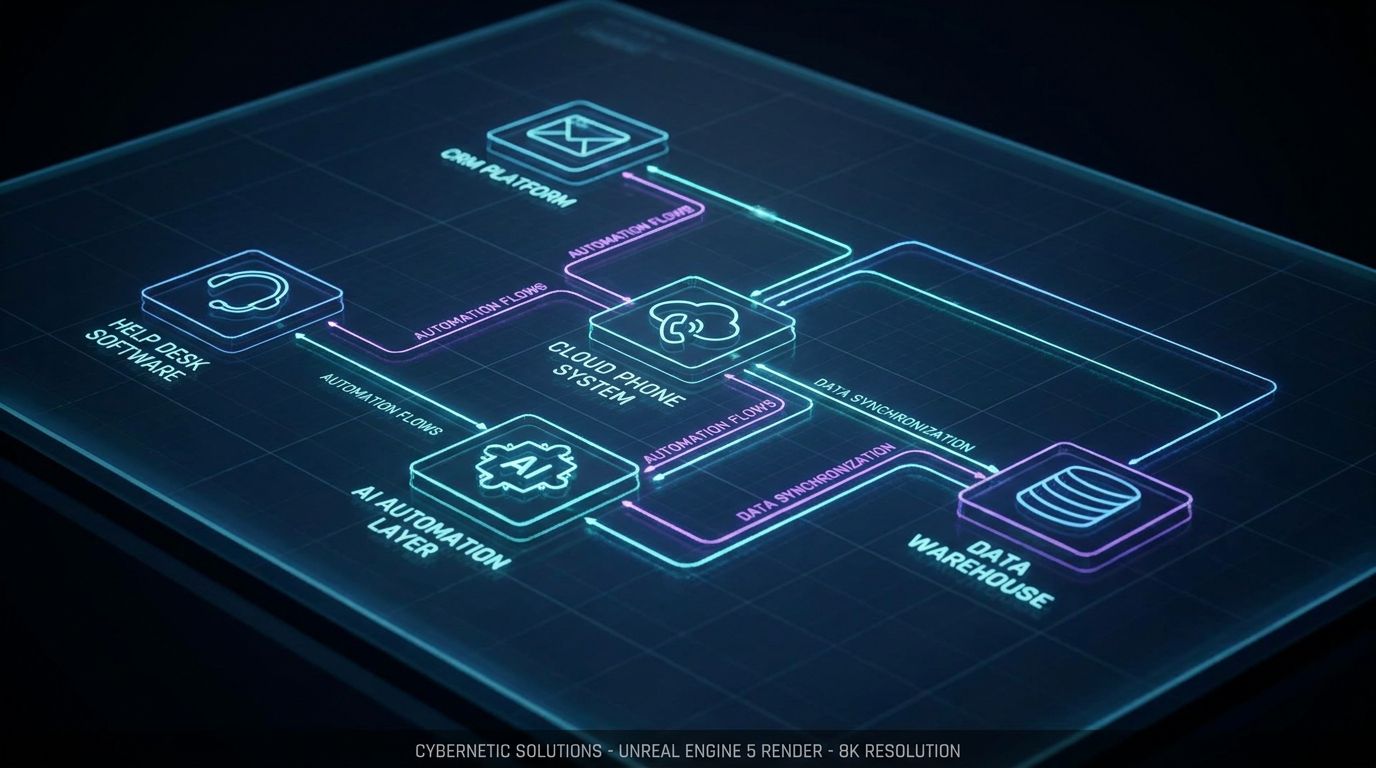
Customer service automation software is any system that can intake customer requests, classify them, take action, and respond with minimal human intervention. It’s broader than a help desk or CRM alone, which primarily store and track interactions rather than orchestrate automated workflows. Think of it as the execution layer that powers automatic customer service across chat, email, and phone while still looping humans in for edge cases.
A modern customer service automation platform usually combines three layers: interaction handling (tickets, calls, chats), automation logic (rules, workflows, AI), and data access (CRM, billing, order systems). The best stacks create a unified brain that powers customer service and support automation across multiple tools, not just a single “all‑in‑one” app. That’s why you’ll see many teams standardize on a primary system of record and then add customer support automation tools around it.
Major categories you’ll evaluate include ticketing‑centric platforms with automation, AI chatbot and virtual agent layers, voice/phone systems with IVR and AI voice, and orchestration or integration layers that tie everything together. Each category solves a different part of the automation puzzle, which is why “one tool to rule them all” rarely works beyond simple environments. Your goal is to assemble them into an automated customer service system that feels seamless to customers and manageable for your team.
Core Capabilities You Actually Need
Ignore vendor buzzwords and evaluate capabilities by the problems they solve and the metrics they move. At minimum, you want omnichannel intake that can capture and unify email, chat, web forms, and phone, with optional social channels where they matter. Without a consolidated intake layer, you’re stuck doing manual reconciliation and losing context between channels.
Next, you need routing and prioritization that go beyond round‑robin: SLA‑aware, skills‑based, and ideally boosted by AI intent classification. This is where customer care automation starts paying off, because you can fast‑track VIPs, urgent issues, and revenue‑impacting tickets automatically. On top of that, invest in a knowledge base and self‑service automation layer where customers can resolve common issues without touching an agent.
AI‑assisted replies, macros, and templates help agents work faster and maintain consistency without sounding robotic. Finally, reporting, QA, and experimentation tools allow you to measure deflection, handle time, CSAT, and iterate on workflows. Without these, your automation stagnates, and you end up flying blind.
How Automation Fits Into Human Support
Good automated customer support augments your team; it doesn’t replace them overnight. The most effective designs use tiers: Tier 0/1 automation for FAQs, status, and simple changes, and humans for complex, emotional, or relationship‑heavy issues. This mirrors how your team already works; automation just takes the repetitive load.
Handoff design is critical: when a bot escalates to a human, the agent should receive full context, conversation history, and metadata like customer value and sentiment. Poorly designed handoffs—where customers repeat themselves or are bounced between channels—tank CSAT even if deflection looks good on paper. Done right, automation makes human support feel more responsive, informed, and personalized, not less.
Top Customer Service Automation Platforms Compared

This section is about landscape and fit, not promoting a single vendor. Most mature teams end up with a primary ticketing or CX system, a voice platform, and an AI or workflow layer that glues it together. The “best” choice depends on your existing stack, in‑house skills, and how far you want to go with automation in the next 12–24 months.
Major Platform Types (Help Desk, CX Suite, AI Layer)
First, you have help desk‑centric platforms (think modern descendants of Zendesk, Freshdesk, Help Scout) that handle email and chat well, with rules, SLAs, and macros baked in. These are often the starting point for customer support automation software in SMB and mid‑market teams. They’re strong on ticket workflows and reporting, weaker on deep telephony and AI unless you bolt on add‑ons.
Next are CX suites that bundle ticketing, chat, basic telephony, and automation in one data model. These can be powerful when you want omnichannel reporting and a single vendor relationship, but they’re usually more complex to implement well. Finally, there are standalone AI support automation platforms that sit on top of your existing tools to provide bots, AI agents, and advanced orchestration without replacing your system of record.
On the voice side, you’ll see telephony‑first or contact center platforms that excel at IVR, call queues, and agent desktops, increasingly with AI Voice Agents layered in. For many teams, these remain separate from the ticketing tool but tightly integrated via APIs or native connectors. The pattern that works repeatedly is one primary record system plus specialized automation layers—not trying to force one monolith to do everything.
Side‑by‑Side Comparison of Leading Approaches
To keep this practical, it’s better to look at archetypes than specific SKUs. Each archetype below exists in multiple brands; what matters is recognizing which pattern matches your needs and constraints. Use this to shortlist categories before you get lost in 20 overlapping demos.
| Tool / Archetype | Best For / Positioning | Channels Covered | Automation Depth | Integrations (CRM, Billing, E‑com) | Typical Complexity |
|---|---|---|---|---|---|
| Legacy Help Desk + AI Add‑Ons | Teams already on a help desk wanting incremental automation without a full replatform. | Strong on email, web, basic chat; voice via add‑ons; limited social. | Rules + macros by default; AI assist / bots as paid extras. | Mature app ecosystems; solid CRM/e‑com connectors; custom via APIs. | Medium – easier if you keep workflows simple. |
| Modern CX Suite with Built‑In Automation | Growing teams wanting one vendor for chat, email, and basic voice with unified reporting. | Email, chat, web, often native voice & SMS; social varies by vendor. | Rules, workflows, journey builders, and increasingly native AI bots. | Good out‑of‑the‑box CRM & e‑com; deeper needs may require custom work. | Medium–High – powerful but easier to over‑configure. |
| Standalone AI Support Automation Platform | Teams wanting strong bots/AI agents on top of existing help desk & CRM. | Chat & web‑first; can extend to email and sometimes voice via APIs. | Full AI agents, intent detection, multi‑step workflows, self‑service flows. | Depends on connectors; best used where good APIs exist. | High – requires careful design and integration. |
| Telephony / Voice‑First Contact Center | Phone‑heavy teams needing IVR, queues, and AI Voice Agents. | Voice & SMS; email/chat typically via integrations or add‑ons. | IVR trees, call routing, and emerging AI voice bots for Tier‑1. | Must be integrated with help desk & CRM for full context. | Medium–High – especially where compliance or call recording matter. |
Use this table to narrow down your primary archetype, then select specific vendors based on integrations with your help desk, CRM, and phone system. Remember that customer support automation platform is usually a combination of these, not just one SKU. AiBizBuild typically designs around whatever system of record you already have, then layers automations where they deliver the fastest ROI.
How to Choose the Best Customer Service Automation Software for Your Stack
Choosing the best customer service automation software is a systems decision, not a shopping decision. The right answer for a five‑agent B2B support team is very different from a 60‑agent eCommerce contact center. This section gives you a decision framework you can walk into vendor calls with.
Map Your Current Channels, Volumes, and Team
Start by mapping your current channels: email addresses, contact forms, in‑app chat, website chat, phone numbers, and any social DMs you actually support. For each, capture monthly volume, peak hours, languages, and how many agents touch that channel today. This quickly clarifies whether your priority is deflection, handle time, or extending coverage hours.
A five‑agent B2B SaaS team getting 600 tickets/month across email and in‑app chat can often start with simpler rules‑based customer service automation software. A 50‑agent consumer or eCommerce team juggling 10,000+ contacts/month across phone, chat, email, and marketplaces needs more robust automatic customer service with AI classification and smarter routing. Use thresholds like **>1,000 tickets/month** or **phone + chat + email + multiple brands** as signs you’ll need deeper automation and integration work.
Also be honest about internal skills: do you have someone who enjoys owning workflows and reporting, or will you rely on vendors/partners for configuration? Tools marketed as “no‑code” still need a process brain behind them. That ownership question matters more to success than whether a UI is slightly prettier.
Integration Considerations (Ticketing, CRM, Phone, Data)
Most automation failures are integration failures wearing a different hat. Your help desk or CX suite should either be your system of record or sync cleanly with your CRM, with clear rules on which fields win on conflicts. If your CRM owns accounts and contracts, and your help desk owns tickets, your customer service automation platform has to see both in one view.
On the phone side, decide whether your contact center platform will be native to your help desk or a separate telephony tool integrated via APIs. For teams exploring AI Voice Agents (Inbound/Outbound), you’ll want tight integration so that calls can create or update tickets, push dispositions into CRM, and trigger follow‑up workflows. Poorly integrated voice means agents are constantly double‑logging and your reports never quite match reality.
Don’t forget billing, order management, logistics, and subscription systems that power self‑service. If your bot can’t see order status, subscription renewal dates, or entitlement levels, your automated customer support services will default to “please contact support” more than customers or leadership will tolerate. Map these data sources explicitly before you pick tools so you know exactly what needs to talk to what.
Governance, Security, and AI Safeguards
Any serious automated customer service system needs clear governance: who can publish new flows, who can edit routing, and how changes are reviewed. For AI features, you also need guardrails around what data can be accessed, how prompts and responses are logged, and how you keep tone on‑brand. This isn’t just risk management; it prevents well‑meaning team members from quietly breaking production flows.
When evaluating AI capabilities, ask how the tool controls knowledge sources: can you restrict bots to your docs, or will they “hallucinate” from generic models? Also push for human‑in‑the‑loop controls for higher‑risk actions like refunds, cancellations, or escalations. Good customer service and support automation is never fully set‑and‑forget; it’s a living system you review monthly or quarterly.
The Hidden Costs of DIY Customer Service Automation (Why DIY Fails)

Most teams underestimate how much work sits between “we bought a tool” and “we have reliable automated customer support running in production.” Vendor demos show polished happy paths, not your messy data, edge cases, and policy nuances. DIY can work, but only if you go in with realistic expectations about time, skills, and ownership.
Implementation Complexity Beyond the Demo
Every serious implementation starts with data mapping, workflow design, and defining the exception paths—none of which show up in the sales deck. For example, “route VIPs faster” sounds simple until you define VIP logic across CRM, billing, and product usage, then make sure it updates correctly every night. The same goes for bots: they’re great on paper, but without curated knowledge and guardrails they’ll happily give wrong answers with high confidence.
We repeatedly see teams launch a bot that handles 10–15% of traffic, then stall because no one owns training and iteration. Tickets end up mis‑routed, or agents work around the system because it doesn’t match how they actually solve issues. This is why the outcome gap between “we turned on features” and “we achieved **30–40% ticket deflection**” is mostly about process and orchestration, not which logo you picked.
Real‑World Cost and Time of Going It Alone
For a modest multi‑channel rollout (email + chat + basic phone integration), expect **80–200 internal hours** spread across a project owner, a systems admin, and sometimes engineering. In calendar time, that’s usually **4–12 weeks** depending on how many competing priorities your team is juggling. If you add AI bots, AI Voice Agents, and deep integrations with CRM and billing, the complexity multiplies.
Beyond build time, there’s the opportunity cost: your ops lead or head of support is spending weeks chasing down edge cases and connector bugs instead of improving product or processes. This is the same pattern we see in marketing teams who try to DIY complex automated content workflows for marketing teams—the tools are “easy,” but turning them into reliable systems is not. That’s the gap AiBizBuild is designed to close.
| Approach | Upfront Cost | Time to First Value | % Tickets Automated (3–6 Months) | Internal Effort (People & Hours) | Illustrative 12‑Month TCO |
|---|---|---|---|---|---|
| DIY Tool‑Only | Platform licenses only; lower cash outlay but no expert build. | 6–12 weeks before first meaningful automation goes live. | Typically **10–25%** for most teams without prior experience. | 1–2 internal owners, **80–200 hours** across scoping, build, and fixes. | Licenses + internal time often equal a mid‑five‑figure commitment. |
| AiBizBuild‑Led System | Licenses + implementation fee for design, build, and integration. | Typically **3–6 weeks** to live Tier‑1 automations in production. | Commonly **30–50%** of Tier‑1 tickets automated by month 6. | Your team provides input & reviews; AiBizBuild handles most of the build. | Higher upfront, but lower cost per resolved ticket over 12 months. |
These are illustrative ranges, but the pattern holds: you’ll either pay with money or with internal time and risk. For teams above a certain scale, an agency‑led system build is usually cheaper over 12 months when you factor in avoided delays, higher automation rates, and less rework. That’s especially true when you’re adding AI Voice Agents, multi‑channel routing, and deeper CRM integrations.
When DIY Still Makes Sense
DIY is perfectly reasonable if you’re an early‑stage team with **<500–1,000 tickets/month**, one or two channels, and a simple product surface area. In that world, basic rules‑based automation—auto‑acknowledgements, priority tags, simple macros—can give you meaningful gains without heavy investment. You can always layer more capabilities later once volumes justify it.
DIY also works if you have a strong internal systems owner who has successfully launched similar stacks before. What doesn’t work is “we’ll figure it out as we go” on top of someone’s day job, especially in multi‑channel or multi‑region environments. Use these thresholds to decide whether to keep it in‑house or treat automation as an infrastructure project deserving specialist help.
Implementation Timelines, TCO, and ROI Benchmarks
Tools are cheap compared to the time your team spends configuring, integrating, and maintaining them. This section breaks down how a typical implementation unfolds, what goes into total cost of ownership, and the ROI patterns you should expect. The same workflow‑first thinking that powers a scalable SEO content generation system applies here as well.
Typical Implementation Phases & Timelines
Phase 1: Audit & Discovery (1–2 weeks) where you map channels, volumes, tools, and key use cases like WISMO, password resets, and basic troubleshooting. Phase 2: Design (1–2 weeks) where you define routing rules, bot intents, AI Voice Agent scripts, and knowledge architecture. Phase 3: Build & Integrate (2–4 weeks) to configure tools, set up connectors, and build flows for your top 3–5 intents.
Phase 4: Pilot & Train (1–3 weeks) where you soft‑launch automations to a subset of traffic, train agents, and tune based on real‑world transcripts. Phase 5: Optimize & Scale is ongoing—adding new intents, channels, and countries once the foundation is stable. With an experienced partner like AiBizBuild, you usually compress this into **4–8 weeks** for a strong initial launch instead of letting it drag for a quarter.
TCO Components (Licenses, Build, Maintenance)
Total cost of ownership has three main buckets: platform licenses/add‑ons, implementation build, and ongoing maintenance/optimization. License costs are relatively easy to budget; the hidden part is the people cost of mapping processes, building flows, and fixing edge cases. Whether that’s internal or via a partner, it’s still real money and should be treated as such.
Maintenance is where many teams quietly lose their ROI. If no one is refining flows, updating AI knowledge with new policies, or closing the loop from QA and CSAT feedback, your automated customer support services age badly. The same lesson shows up when you turn manual approvals into automated workflows: the launch is step one, but ongoing governance is what keeps things fast and safe.
ROI Case Snapshots (Hypothetical but Numbers‑Based)
In B2B SaaS, a typical pattern for well‑implemented customer support automation software is **30% ticket deflection** on Tier‑1 topics, **20–30% faster first response**, and repurposing at least **1 FTE** toward proactive CS or enablement. This usually comes from a mix of knowledge‑based self‑service, smarter routing, and AI‑assisted replies. Because ACVs are higher, even modest time savings around renewals and onboarding issues have outsized revenue impact.
In eCommerce, the gains are often more volume‑driven: **40%+ of WISMO tickets auto‑resolved**, phone queues down **30–35%**, and 24/7 coverage via chatbots and AI Voice Agents for simple order/status queries. Here, automation reduces the marginal cost per order supported and smooths peak periods like holidays. Across both, well‑run stacks often see **20–35% lower handle time** on the tickets that still need humans because agents get better context and tooling.
Customer Service Automation Evaluation Checklist
Use this section as a worksheet while you talk to vendors or partners. The goal is to stress‑test both features and implementation reality, not just get wowed by a slick dashboard. Strong answers here matter more than another “AI‑powered” badge.
Questions About Features and Workflows
- How does your automated customer service system decide when to keep a conversation with automation vs hand off to a human, and can we configure those rules?
- Which customer support automation tools are built‑in (routing, macros, bots) and which require third‑party apps or custom work?
- How do we configure intent‑based routing, SLAs, and priority queues, and what does that look like for a multi‑brand or multi‑region setup?
- How easy is it to A/B test automations, compare bot vs human performance, and roll back changes if something breaks?
- Can we see detailed journey views (across chat, email, phone) for a given customer to understand where automation helps or hurts?
Questions About Integrations and Data
- How does your platform sync with our CRM (direction, frequency, conflict resolution), and can it respect our existing account hierarchies?
- Can we pull data from billing, e‑commerce, and logistics systems into bots and macros for self‑service answers like order status or subscription changes?
- How do you integrate with phone systems, including auto attendants, call recording, and AI Voice Agents that can create or update tickets?
- What happens when an integration fails—do we get alerts, and is there a retry and fallback strategy?
- How does your platform support CRM Integration & Inbox Management if we want unified reporting across shared inboxes and the CRM?
Questions About Implementation, Support, and Ownership
- Who typically owns workflow design—you, us, or a partner—and what’s included in your standard onboarding versus paid services?
- What’s the typical implementation timeline for a stack like ours (channels, volumes, complexity), and what assumptions are you making?
- How are new automations and AI models rolled out to production without disrupting live traffic, and what does your change management process look like?
- What kind of training and documentation do you provide for admins and agents so we’re not dependent on a single expert?
- If we work with an implementation partner like AiBizBuild, what does the three‑way handoff between us, you, and the partner look like?
Use Case: Automating Tier‑1 Support Across Chat, Email, and Phone
—IMAGE_BLOCK: Bioluminescent Data Streams converging from three directions labeled subtly as chat bubbles, email envelopes, and phone icons, merging into a single organized stream of light representing unified Tier-1 automation. Cinematic lighting, Unreal Engine 5 render, futuristic corporate aesthetic, glowing cyan and purple accents, shallow depth of field, 8k resolution—
To make this concrete, let’s walk through a typical mid‑market scenario: 20–40 agents, multiple channels, and a backlog of repetitive Tier‑1 work. This is where a well‑designed customer service automation platform can unlock serious leverage. The same patterns apply whether you’re B2B SaaS, eCommerce, or tech‑enabled services.
The Before State (Manual, Fragmented Support)
Before automation, you likely have separate email inboxes, a website chat widget, and a support phone number, all lightly connected (if at all) to your CRM. Agents spend time triaging manually, copy‑pasting answers, and hunting down order or account data in separate tabs. Response times slip during peaks, answers are inconsistent across agents, and burnout rises as ticket volume grows faster than headcount.
Some customers get stuck in loops—chatbot to email to phone—because there’s no unified view of prior attempts to resolve an issue. Reporting is messy: your phone provider shows one story, help desk another, and CRM a third. Leadership senses that customer service automation software could help but doesn’t see a clear path from “add a bot” to reliable improvements.
The Automated Customer Support Workflow (End‑to‑End)
In the target state, all inbound requests—chat, email, web forms, and phone—flow into a unified intake layer. Phone calls hit an intelligent auto attendant powered by AI Voice Agents that can authenticate the caller, capture intent, and handle simple requests (hours, status, basic troubleshooting) without an agent. Chat and email are classified by AI into intents like WISMO, password issues, billing questions, and product how‑tos.
For common intents, automation responds instantly: pulling order status from e‑commerce, checking subscription info in your billing system, or sharing the right KB article personalized to the customer’s plan or region. When an issue needs a human, the system routes it to the best‑fit queue, attaching full context: intent, sentiment, priority, recent orders, and transcripts from any previous bot or voice interactions. Agents work from a single console with AI‑assisted drafts and macros, so they confirm and personalize rather than write from scratch.
After each interaction, follow‑up automation sends CSAT surveys, triggers internal QA, and creates tickets for content gaps where the bot failed or required escalation. Over time, you expand the intent catalog and train both chat and voice automations to handle more Tier‑1 scenarios safely. What customers experience is fast, consistent, 24/7 service, while internally you see fewer repetitive tickets and cleaner reporting.
Metrics and Outcomes to Expect
On a well‑run Tier‑1 automation project, you can realistically target **30–50% of Tier‑1 inquiries auto‑resolved** within the first 6–9 months. Remaining tickets see a **20–40% reduction** in average handle time because agents aren’t re‑triaging, hunting for data, or rewriting standard replies. This is what “best customer service automation software” looks like in practice, not just on the pricing page.
You also gain effective **24/7 coverage** for simple queries via bots and AI Voice Agents, which improves CSAT in global or high‑traffic businesses. On the cost side, you flatten headcount growth: instead of adding 1 agent for every N new tickets, you grow slower than volume while freeing existing agents for higher‑value work like retention, upsell, and proactive outreach. That’s the compounding effect of treating automation as a system, not a widget.
Done‑For‑You Automation vs Buying Another Tool
By now it should be clear that software alone doesn’t guarantee outcomes. The difference between mediocre and excellent automatic customer service is the quality of workflows, integrations, and ongoing optimization. This is where an implementation partner like AiBizBuild changes the equation.
What an Agency‑Led Automation Build Actually Does
AiBizBuild does not sell another SaaS product; we design and implement the system on top of the tools you already use or choose. That includes mapping and building cross‑channel workflows, configuring your help desk and CX suite, and wiring them into CRM, billing, and data sources. We also implement AI Voice Agents (Inbound/Outbound) where phone support or follow‑ups are a big part of your load.
Beyond the flashy parts, we handle inbox management, routing rules, and escalation paths that reflect your real‑world policies. That means designing how automation and humans share work, how exceptions are handled, and how you monitor performance. You get the outcomes vendors promise—without your team needing to become integration engineers along the way.
Relevant AiBizBuild Services for Customer Service Automation
Three AiBizBuild services are particularly relevant for customer service and support teams. First, AI Voice Agents (Inbound/Outbound) provide automated phone triage, FAQs, and follow‑ups (e.g., payment reminders, appointment confirmations), tightly integrated into your help desk and CRM. This turns your phone line from a pure cost center into a smart, partially automated channel.
Second, 24/7 Appointment Booking Systems are critical if support also handles demos, onboarding sessions, or service visits. Instead of back‑and‑forth emails, bots and AI Voice Agents can offer time slots, write back to your calendar, and update CRM or ticket fields automatically. Third, CRM Integration & Inbox Management ensures that emails, shared inboxes, and support tickets all roll up to accurate customer records and reports.
Where it makes sense, we can connect support automation into adjacent workflows like Cold Outreach Automation or B2B Lead Scraping & Enrichment so high‑value support signals (e.g., expansion interest, feature requests) flow to sales. The result is a coherent customer support automation platform around your existing tools, not another silo. You keep ownership of the stack; we handle the heavy lifting of design and build.
When Partnering with AiBizBuild is Cheaper and Faster
Partnering with AiBizBuild makes the most economic sense once you cross certain thresholds: **>1,000 tickets/month**, multiple channels, or material phone volume. At that point, shaving even **10–15%** off ticket volume or **20–30%** off handle time pays for expert implementation quickly. You also avoid the drag of half‑built projects that quietly consume your best people.
Compared to DIY, an agency‑led build front‑loads cost but delivers higher automation rates and fewer missteps, which means a lower cost per resolved ticket over the first 12 months. That’s the same logic behind bringing in specialists to architect other critical systems rather than trial‑and‑error your way through them. If you’re serious about automation as infrastructure, not a side project, a done‑for‑you build is usually the faster, safer path.
Next Steps: Book a Customer Service Automation Workflow Audit
At this point you should have a clearer view of tool types, integration needs, and where DIY tends to stall. The next step is turning those ideas into a concrete plan tailored to your stack and constraints. That’s exactly what AiBizBuild’s Customer Service Automation Workflow Audit is designed to deliver.
What You Get in a Workflow Audit
In a Workflow Audit, we map your current stack—help desk, CRM, phone, data sources—and your real workflows across chat, email, and voice. You’ll get a visual current‑state map, highlighting bottlenecks, duplicate work, and where automation can safely step in. We then identify **2–3 high‑impact automation opportunities** with rough impact ranges (deflection, handle time, coverage) and risk notes.
Finally, you receive a recommended stack and high‑level implementation plan: which tools to lean on, what to integrate, and an honest **4–12 week** timeline with roles and responsibilities. This includes where AI Voice Agents, 24/7 Appointment Booking Systems, and CRM Integration & Inbox Management fit into your roadmap. You walk away with clarity on investment, phases, and what “good” looks like for your business.
Who This Is For (And Not For)
This is for support leaders, CX owners, and ops/IT partners who have consistent ticket volume, multiple channels, and pressure to scale without linear headcount growth. If you’re already feeling the strain of manual triage, inconsistent responses, or limited coverage hours, you’re in the right zone. It’s also a fit if you’ve bought tools in the past that are underused or misconfigured.
If you’re a very early‑stage team with **<100 tickets/month** and a single shared inbox, a lightweight rules‑based setup is usually enough for now. You can bookmark this guide and come back once growth starts to bite. For everyone else, the next step is straightforward: book your Customer Service Automation Workflow Audit with AiBizBuild and turn “we should automate more” into a concrete, staged implementation plan.
FAQs: Customer Service Automation for Support Leaders
How long does it take to implement a customer service automation platform end‑to‑end?
For most SMB to mid‑market teams, a realistic range is **4–12 weeks** from kickoff to live automations across your primary channels. Simpler setups (email + chat, light integrations) land near the lower end, while multi‑channel, multi‑region builds with AI Voice Agents and deep CRM/billing integrations skew longer. Working with AiBizBuild usually compresses timelines because we reuse proven patterns instead of experimenting from scratch.
Can we start with basic automations and add AI later?
Yes—in fact, that’s often the best approach. Start with routing, SLAs, macros, templates, and simple rules that clean up your queue and standardize responses. Once those foundations are stable, you can safely layer in AI chatbots and AI Voice Agents for Tier‑1 topics without risking chaos.
Do we need a developer or IT team to maintain automated customer support?
Most modern platforms are low‑code, so you don’t need a full‑time developer, but you do need someone to own workflows, reporting, and integration hygiene. Without an owner, automations drift out of sync with your policies and product. AiBizBuild can handle the heavier integration and design work, leaving your team to focus on approvals and strategic decisions.
How do we measure ROI on customer service and support automation?
Core metrics include ticket deflection rate, time to first response, average handle time, cost per ticket, CSAT, and first contact resolution (FCR). You should baseline these before implementation, then track changes by channel and intent post‑launch. Indirect benefits—like reduced agent burnout and the ability to redeploy FTEs to higher‑value work—are also meaningful and should be part of your ROI narrative.
Will automation hurt our customer experience or make support feel less human?
Badly implemented bots absolutely can hurt CX—that’s what most people have experienced. Well‑designed customer service and support automation, however, uses empathy in copy, clear options, and smart handoffs to humans with full context, which usually improves CSAT. The goal is not to avoid humans; it’s to reserve human attention for problems where it matters most.
Ready to move from tool shopping to a working automated system? Book your Customer Service Automation Workflow Audit with AiBizBuild and get a concrete, low‑risk plan to implement the right automations on top of the stack you already have.