

Amazon Chatbot for Customer Service: Integrating Amazon Connect & Conversational Tools
Key Takeaways
– An amazon chatbot customer service setup is not a single bot; it’s Amazon Connect for routing, Amazon Lex for conversational intelligence, plus deep integrations into your order, CRM, and ticketing systems to resolve real issues end-to-end.
– Compared to manual contact-center flows, Amazon-driven conversational automation can deflect 20–40% of simple tickets, cut handle time, and give customers 24/7 self-service without burning out agents.
– DIY chatbot builds look cheap but usually drag on with integration gaps and poor CX; for most teams, a done-for-you automation partner like AiBizBuild gets you to production-grade results faster and with less risk.
In This Guide:
🤖 What an Amazon Chatbot for Customer Service Actually Is – Connect, Lex, and your contact-center stack
📞 Manual Contact-Center Flow vs Amazon Automation – How the experience changes for customers and agents
⚙️ Implementation Steps: From Requirements to Live Chatbot – A realistic rollout plan, not fantasy timelines
🧾 Use Cases, ROI, and Cost Scenarios – Order status, returns, and the business case
⚠️ Why DIY Chatbot Projects Fail – The hidden complexity you won’t see in Amazon’s marketing
🛠️ When to Bring in a Done-For-You Automation Partner – How AiBizBuild plugs into your stack
If you lead a contact center today, you’re under pressure to cut costs, lower handle time, and still keep CSAT intact. Adding an amazon chatbot customer service layer looks like an easy win, especially if you already use Amazon Connect or are evaluating it. Amazon’s marketing makes it feel like you can just turn on Lex, point it at your FAQs, and watch your queue evaporate.
In reality, the value doesn’t come from dropping a chatbot widget in front of the same old flows. It comes from rethinking your entire contact flow—voice and chat—so that Amazon Connect, Lex, and your back-end systems work together as a single automation fabric. That’s where teams see 25–40% deflection of tier-1 contacts and stop adding headcount every time volume spikes.
In this guide, I’ll walk through what an Amazon chatbot for customer service actually is, how it changes the daily reality for your agents and customers, and why most DIY projects stall without a systems-first approach.
What an Amazon Chatbot for Customer Service Actually Is
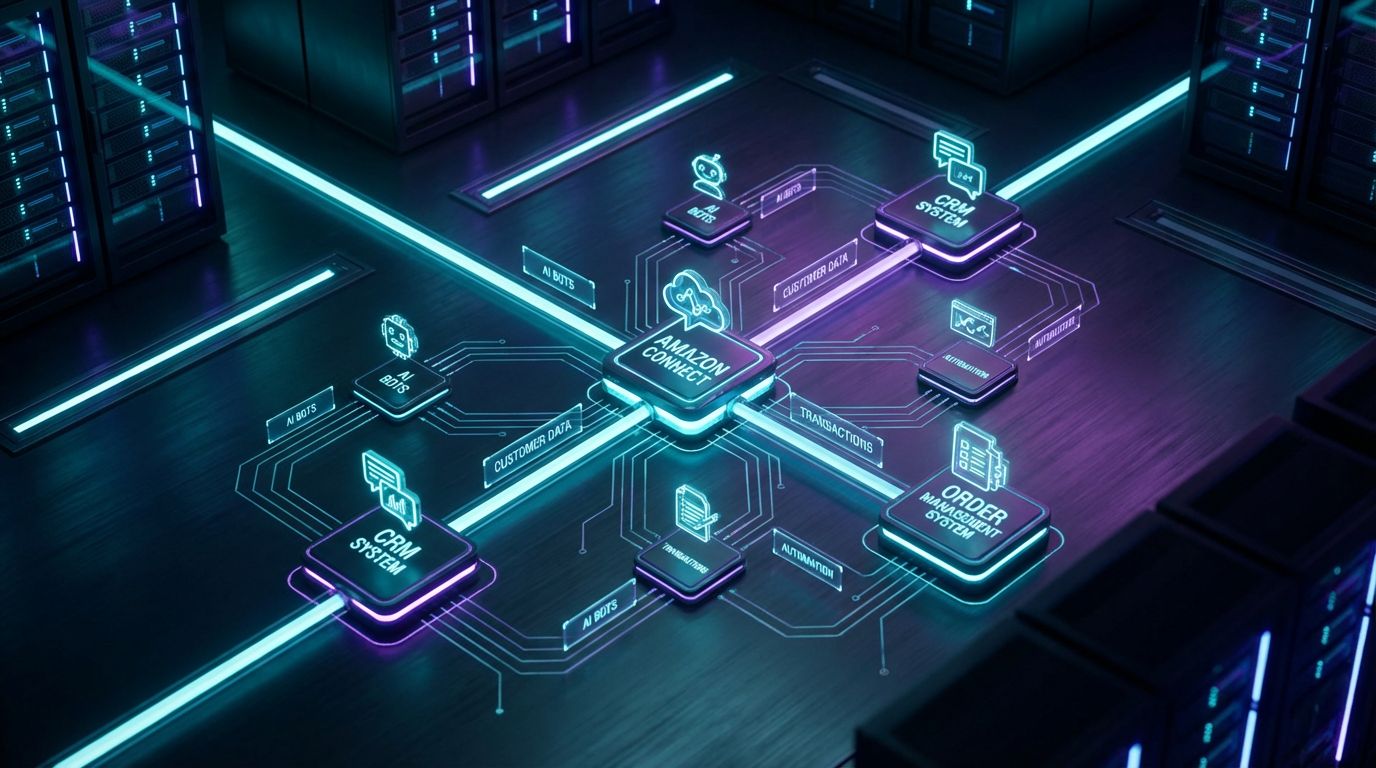
Let’s start by demystifying what you’re actually buying when you invest in an Amazon Connect chatbot stack. It’s not a magic AI that “just knows” how to handle your order status and returns calls. It’s a set of cloud primitives that you architect into a customer service system.
From IVR Trees to Intent-Based Conversations
Traditional IVR thinks in terms of menus: “Press 1 for billing, press 2 for orders, press 3 for support.” The system forces customers to guess which branch of the tree holds their answer, and agents end up handling the bulk of work anyway. It’s linear, rigid, and expensive when 60–80% of your volume is repetitive tier-1 inquiries.
Amazon Lex flips that model to intent-based conversations. Instead of pressing keys, customers simply say or type what they want: “Where is my order?” or “I need to return a pair of shoes.” Lex’s NLU (natural language understanding) maps that utterance to an intent like CheckOrderStatus or StartReturn, then routes the flow inside Amazon Connect based on what the customer is actually trying to do.
Amazon Connect sits underneath as your cloud contact center: managing voice and chat channels, queues, routing, and metrics. Lex plugs into Connect so you can drive both voice bots and chatbots using the same intent models and business logic.
Core Building Blocks of an Amazon-Driven CX Stack
An effective Amazon chatbot for customer service is built from a few core building blocks:
- Amazon Connect flows – Visual flows that define what happens when a customer calls or starts a chat: prompts, Lex handoff, routing to queues, transfers, and end-of-call logic.
- Amazon Lex intents and utterances – Definitions of what customers want (intents) and the many ways they might say it (utterances), plus slots for structured data like order numbers or email addresses.
- AWS Lambda functions and APIs – Serverless logic that calls your order system, CRM, or ticketing tool to fetch data, validate identity, and perform actions like creating a return or logging a case.
- Integrations with CRM/order systems – Secure connectors to Shopify, Amazon Seller Central, your OMS, or your CRM so the bot can actually do things, not just answer FAQs.
All of this is orchestrated as a system, not a toy demo. Without those integrations, your “Amazon Connect chatbot” is just a slightly smarter IVR—fine for basic FAQs, but it won’t meaningfully reduce cost per contact or agent workload.
Manual Contact-Center Flow vs Amazon Automation
This is where the gap between how you work today and what’s possible with Amazon-driven automation becomes tangible. Most teams are sitting on a goldmine of automatable volume, but the current flow keeps everything locked behind an agent.
The Old Way – Agent-Heavy, Linear, Expensive
In a typical manual contact center, the flow looks like this: Customer dials in → IVR menu → queue → agent. Maybe there’s a basic web chat widget, but it usually just routes to a human or collects a name and email before handing off.
Your agents then handle the same themes over and over: “Where is my order?”, “How do I start a return?”, “What’s your shipping policy?”, “Can you update my address?” In many B2C and e-commerce environments, 60–80% of inbound volume falls into these tier-1 categories that follow predictable rules.
The result is high cost per contact, long hold times during peaks, and burned-out agents repeating answers they could recite in their sleep. Customers don’t care how your queues work; they care about time-to-resolution.
The New Way – Intent Detection, Smart Routing, and Self-Service
With an Amazon Lex-powered front end, the flow changes fundamentally: Customer dials in or starts chat → Lex detects intent → self-service if possible → smart escalation only when needed. Instead of forcing a menu, you let the customer describe their problem in their own words.
For an order-status question, Lex captures identifiers (email, order number, phone) and passes them through Lambda to your order system. The bot then reads back the shipping status, expected delivery date, and even offers options like SMS updates—without an agent ever joining.
If the customer’s issue is complex or the bot hits a confidence threshold it can’t meet, the call or chat escalates to an agent in Amazon Connect with full context: intent, transcript, and any retrieved data. Agents handle fewer, more valuable contacts instead of triaging everything.
Side-by-Side: A Single Customer Journey, Two Paths
Take a simple “Where is my order?” scenario from a phone call.
Manual flow: Customer calls → IVR: “Press 1 for orders” → long queue → agent asks for order number and email → agent looks up order in OMS → reads status → offers tracking link via email or SMS → ends call. Total handle time: easily 5–8 minutes including wait.
Amazon-powered flow: Customer calls → greeted by Lex: “How can I help today?” → customer says “I’m checking on an order” → Lex detects CheckOrderStatus intent → collects order number and verifies via phone or email → Lambda fetches status → bot reads out status and offers to text tracking link → call ends. Handle time: 60–120 seconds, fully automated for most cases.
| Aspect | Manual Contact Center | Amazon-Driven Automation |
|---|---|---|
| First-response time | Dependent on queue; often several minutes during peaks | Immediate bot response, even at peak volume |
| Average handle time (simple inquiries) | 5–8 minutes including hold and wrap-up | 1–3 minutes, often fully automated |
| Agent involvement | Required for nearly every contact | Reserved for complex or high-value cases only |
| Customer effort | Navigating menus, repeating details to agents | Describe issue in natural language, minimal repetition |
| Scalability | Scale = more agents and more cost | Scale primarily via AWS capacity; agents scale slowly |
| 24/7 coverage | Requires night shifts or outsourcers | Native 24/7 self-service for simple use cases |
When you look at it this way, the question isn’t whether you should automate. It’s whether you want your agents to keep doing work a well-architected system can do faster, cheaper, and more consistently.
Implementation Steps: From Requirements to Live Chatbot
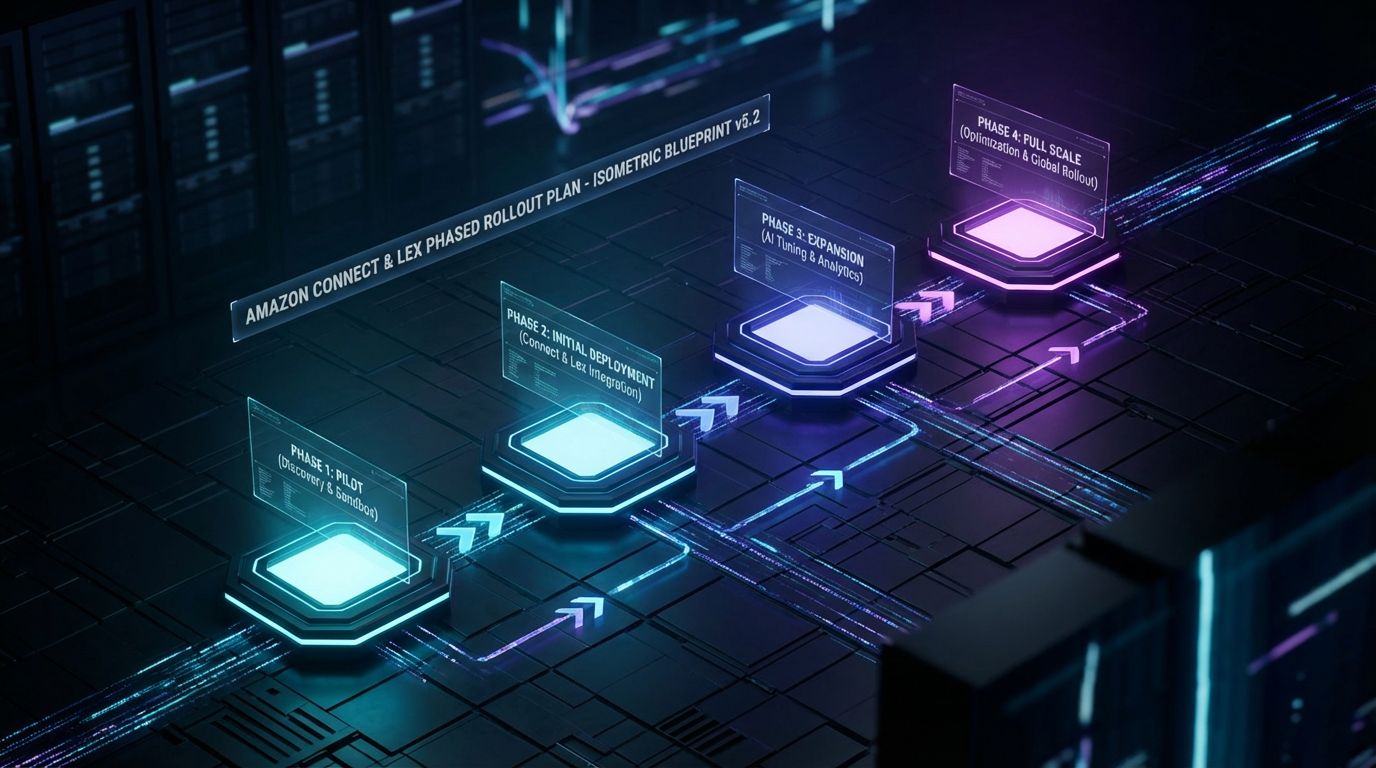
Amazon Connect and Lex give you powerful building blocks, but they don’t give you a project plan. If you try to “just build a bot” without a structure, you end up with a demo that never makes it to production. Here’s what a realistic 3–8 week implementation actually looks like.
Step 1 – Define Use Cases and Success Metrics
Start by identifying the high-volume, rule-based inquiries that are ideal for phase one. In most contact centers, that means order status, returns/exchanges, account FAQs, simple billing questions, and appointment scheduling where applicable.
Then define how you’ll measure success. Typical metrics include containment rate (percentage of contacts resolved without an agent), CSAT for bot-handled vs agent-handled contacts, average handle time, and cost per contact.
If you can’t quantify what “good” looks like up front, every conversation with stakeholders later becomes subjective. That’s how automation projects lose momentum.
Step 2 – Map Existing Flows and Data Sources
Next, map your current reality. Document today’s call and chat flows, the IVR trees, the agent scripts, and the macros they use to resolve common issues.
In parallel, inventory your data sources: CRM, order management, ticketing, payment systems, and any third-party tools that hold key customer information. You need to know where data lives, who owns it, and how it can be accessed (APIs, webhooks, database views) before you can automate anything.
This is the same kind of systems thinking required to build automated approval workflows in other domains: you’re designing flows around real data and governance, not a whiteboard fantasy.
Step 3 – Design Conversation Flows and Intents in Lex
Designing Lex isn’t just naming a few intents and clicking publish. You’re engineering conversations that have to work for thousands of real people under messy conditions.
For each use case, define intents, sample utterances, required slots (like order number or email), prompts, and error handling. Plan for misheard audio, customers who skip steps, and edge cases like missing orders or mismatched addresses.
If you operate in multiple regions, consider multilingual support and compliance constraints around what can be read back or changed automatically. Build fallbacks that gracefully route to agents when the bot can’t confidently resolve an issue.
Step 4 – Integrate Amazon Connect, Lex, and Back-End Systems
This is where most “drag-and-drop” demos fall apart. It’s easy to build a chatbot that says “Your order has shipped” in a scripted demo; it’s much harder to securely connect to your live systems and handle real-world data quality issues.
Using AWS Lambda and your existing APIs, you’ll wire Lex and Connect into your CRM, order system (e.g., Shopify, Amazon Seller Central, custom OMS), and ticketing tools. The goal is to let the bot perform actions: look up orders, initiate returns, schedule appointments, and create cases—just like an agent would.
This is also where AiBizBuild’s AI Voice Agents (Inbound/Outbound), E-commerce Operations (Shopify/Amazon), and CRM Integration & Inbox Management services come into play, because they’re designed to sit around the Amazon tools and make this integration work reliable and maintainable.
Step 5 – Test, Train, and Roll Out in Phases
Finally, you test. That means structured UAT with internal users, plus a limited rollout to a subset of real customers while you monitor intent recognition, drop-off points, and escalation rates.
A realistic timeline to take 1–3 core use cases from design to production is 3–8 weeks, depending on integration complexity and how quickly you can make decisions. You don’t need a big bang launch; you can start with order status on chat, then add voice, then layer in returns and FAQs.
The key is to treat the bot as a living system. You’ll keep tuning intents, refining prompts, and adding branches based on real transcript data—not assumptions.
Use Cases, ROI, and Cost Scenarios
Once you see the system architecture, the next question is simple: where does this actually pay off? For most teams, the answer is “much faster than we expected,” provided you start with the right use cases and model ROI correctly.
High-Value Use Cases for Amazon Chatbots in Customer Service
Across B2C, e-commerce, and services, a few patterns show up over and over as ideal automation targets:
- Order status & shipping updates – Check order state, shipment progress, expected delivery, and resend tracking links across voice and chat.
- Returns & exchanges – Validate eligibility, apply your policy rules, generate return labels, and set expectations on refunds or credits.
- Account FAQs – Password resets, subscription changes, address updates, and basic profile questions.
- Simple billing or appointment flows – Clarifying recent charges, sending invoices, or using a 24/7 Appointment Booking System for service slots or callbacks.
These are the kinds of workflows AiBizBuild automates every day for E-commerce Operations (Shopify/Amazon) clients. The Amazon stack simply becomes the conversational front door to those existing processes.
Modeling ROI for Contact-Center Teams
Let’s do some back-of-the-envelope math for a mid-sized contact center.
Say you handle 50,000 contacts per month across voice and chat. Your average handle time is 6 minutes and your fully loaded agent cost is $30/hour. That means you’re spending roughly 5,000 hours and $150,000 per month on front-line handling.
If a well-designed Amazon Connect + Lex solution automates or deflects 25–40% of tier-1 contacts, you’re saving 1,250–2,000 hours per month. That’s $37,500–$60,000 in monthly labor value, or roughly $450,000–$720,000 per year, plus the avoided need to hire more FTEs as volume grows.
Cost Components: Tools vs Implementation
Amazon’s pricing is usage-based: you pay for minutes of Connect usage, Lex requests, and Lambda invocations. For most teams, the tool spend is material but not the dominant cost driver.
The real investment is in implementation and ongoing operations. That includes solution design, integration work, NLU training, security reviews, and continuous optimization based on analytics.
This is the same pattern you see when teams invest in SEO Content & Blog Automation: the software is powerful, but the ROI only materializes when you build the right workflows around it. In contact centers, that’s where a done-for-you partner often ends up cheaper and faster than hiring a full internal team.
Why DIY Chatbot Projects Fail

If Amazon Connect and Lex are so capable, why do so many internal chatbot projects stall or quietly die after an initial pilot? It’s rarely because the tech can’t do the job. It’s almost always because the organization underestimated the system design required.
The Hidden Complexity Behind “Drag-and-Drop” Demos
Amazon’s console and sample blueprints make it easy to build a quick demo. You can wire up a basic Lex bot, route it through a Connect flow, and show your leadership a slick two-minute interaction.
The gap appears when you move from demo scripts to production realities: hundreds of utterance variations, accents, background noise, ambiguous intents, and edge cases that agents handle instinctively. If you don’t train Lex with substantial, domain-specific data and build robust fallbacks, your containment rates will be poor and CSAT will drop.
Teams also underestimate the work of dialog design. Short, crisp, low-friction conversations are hard to design; long-winded, robotic ones are easy.
Integration, Compliance, and Governance Pitfalls
On paper, “connect to the order system” sounds trivial. In practice, you’re dealing with legacy platforms, inconsistent data models, and security requirements that limit what can be exposed via APIs.
You also need to handle PII correctly: encrypt in transit and at rest, lock down IAM roles, and maintain audit trails of who (or what) accessed what data and when. That’s non-negotiable if your bot is going to touch orders, billing, or account changes.
Governance is its own challenge. You need a change-management process for bot scripts and flows that looks a lot like what content teams use for content approval workflows: drafts, reviews, approvals, and controlled rollouts—not ad-hoc edits in production.
Operational Debt: Who Owns the Bot After Launch?
The biggest failure mode I see is operational debt. The team that built the first version of the bot “moves on,” and no one is clearly accountable for training, tuning, and expanding it.
In practice, a production-grade Amazon chatbot for customer service needs ongoing care: reviewing transcripts, adding new intents for emerging topics, refining prompts, updating policies, and coordinating with marketing, CX, and legal. If this work isn’t budgeted and assigned, performance degrades over time.
This is why many DIY bot projects quietly plateau at 10–15% deflection instead of the 25–40%+ they could achieve. The technology is fine; the operating model is missing.
| Dimension | DIY Internal Team | Done-For-You with AiBizBuild |
|---|---|---|
| Time-to-value | 6–18 months including hiring, learning curve, and iteration | 3–8 weeks for core use cases with proven blueprints |
| Required in-house skills | AWS architecture, Lex NLU, Lambda, APIs, CX design, analytics | Light technical sponsorship; AiBizBuild provides specialized skills |
| Project risk | High risk of stalled pilots and partial integrations | Lower risk with standardized patterns and prior implementations |
| Quality of integration | Often shallow; FAQs only or limited data actions | Deep integrations into e-commerce, CRM, and ticketing systems |
| Optimization cadence | Ad-hoc tuning when someone has time | Structured reviews, analytics-driven tuning, and roadmap updates |
| Predictability of outcomes | Uncertain; hard to forecast ROI and timelines | Modeled upfront based on prior benchmarks and clear SLAs |
When you factor in time-to-value and opportunity cost, “saving money” by keeping everything in-house can easily become the most expensive option.
When to Bring in a Done-For-You Automation Partner
At some point, the question stops being “Can we do this ourselves?” and becomes “Is this the best use of our internal team’s time?” For many contact-center leaders, that inflection point arrives sooner than they expect.
Signs You’ve Outgrown DIY Amazon Chatbots
There are a few clear signals that it’s time to bring in a partner for your Amazon chatbot customer service program. One is stalled pilots: you have a proof-of-concept bot running in a sandbox, but legal, security, or integration issues keep blocking production.
Another is bandwidth. Your IT team is already overcommitted, your data team is chasing other priorities, and your CX team doesn’t have the technical depth to own Lex and Connect. Meanwhile, leadership is asking for visible results in under 90 days.
If you’re already on Amazon Connect but still running primarily manual flows, you’re leaving obvious savings on the table. You’ve already chosen the right platform; you just haven’t fully automated around it.
What a Workflow Audit Looks Like with AiBizBuild
AiBizBuild engages through a workflow audit, not a generic chatbot pitch. We start by inventorying your top contact reasons, analyzing transcripts and reports, and mapping your existing Connect flows end-to-end.
Then we assess your data and integration landscape: where orders live, how returns are processed, what your CRM captures, and what ticketing system you use. From there, we design a phased automation roadmap that prioritizes high-ROI use cases like order status, returns, and account changes.
The outcome is a concrete plan: which intents to build first, what integrations are required, expected deflection and savings ranges, and a realistic 3–8 week rollout sequence. It’s the same systems-first mindset we apply when building ChatGPT for lead generation automation and other conversational workflows.
Relevant AiBizBuild Services for Amazon CX Automation
Within that roadmap, AiBizBuild brings specific done-for-you services that wrap around your Amazon tools:
- AI Voice Agents (Inbound/Outbound) – Amazon Connect + Lex-powered voice bots that answer calls, handle tier-1 intents like order status and returns, and escalate smartly to human agents with full context.
- 24/7 Appointment Booking Systems – Conversational flows that schedule service appointments or callbacks, integrated with your calendar or scheduling platform so customers don’t wait for business hours.
- E-commerce Operations (Shopify/Amazon) – Deep integrations into your e-commerce stack so the bot can track orders, initiate returns, apply policies, and handle common account tasks across channels.
- CRM Integration & Inbox Management – Logging bot interactions into your CRM, enriching customer profiles, and routing complex issues into shared inboxes or ticketing queues with all necessary context.
The goal isn’t to sell you another SaaS subscription. It’s to design and implement custom workflows that use Amazon Connect and Lex as infrastructure, not as the whole solution.
CTA – Book Your Amazon CX Workflow Audit
If you’re serious about cutting tier-1 call volume by 25–40%, lowering cost per contact by 10–30%, and delivering consistent 24/7 coverage, the next step isn’t another internal brainstorming session. It’s a focused review of where automation will actually move the needle.
Book a 30-minute Amazon Connect & chatbot workflow audit with AiBizBuild. We’ll walk your team through what an Amazon chatbot for customer service could look like for your specific order-status, returns, and account flows—and how to get it live in the next 3–6 weeks.
Alternatively, request a demo of an Amazon-style automated customer service flow using your own scenarios, so stakeholders can see the before-and-after experience side by side.
FAQ: Building an Amazon Chatbot for Customer Service
How long does it typically take to implement an Amazon chatbot for customer service?
For 1–3 core use cases like order status, returns, and basic FAQs, a realistic timeline is 3–8 weeks from requirements to production. The exact duration depends on integration complexity, security reviews, and how quickly your team can make decisions on flows and policies.
Do we need in-house developers to maintain an Amazon Connect and Lex chatbot?
You’ll eventually want access to skills in AWS (Connect, Lex, Lambda), APIs/integrations, and NLU tuning to maintain and evolve your bot. However, a done-for-you partner like AiBizBuild can own the heavy lifting—design, build, integration, and ongoing optimization—while your internal team focuses on strategy and governance.
Can an Amazon chatbot securely access customer data like orders and billing?
Yes, when designed properly, an Amazon chatbot can access orders, billing details, and account data with the same (or stronger) security controls as your human agents. That means strict IAM roles, encryption in transit and at rest, tokenized access to external systems, and full audit logging of what the bot accessed and when.
What kind of deflection or savings can we realistically expect from automation?
For organizations with a high volume of repetitive tier-1 contacts, it’s common to see 25–40% deflection of those inquiries within the first phases of automation. That typically translates into a 10–30% reduction in cost per contact, plus the ability to absorb growth without adding proportional headcount—assuming you invest in proper design, integration, and ongoing tuning.
We already use Amazon Connect. Can we add a chatbot without rebuilding everything?
In most cases, yes—you can layer Amazon Lex-powered flows on top of your existing Connect infrastructure and phase them in alongside current queues and IVRs. That said, you’ll get the best results by revisiting and simplifying some of your existing flows so they’re optimized for intent-based routing rather than menu trees.
When you’re ready to move beyond theory and into a concrete plan, AiBizBuild is set up to help you design and deploy an Amazon chatbot customer service system that actually delivers measurable results.