

AI Voice Agents for Customer Service: 24/7 Virtual Receptionists vs Traditional Call Centers
Key Takeaways
– AI voice agents and 24/7 virtual receptionists can reliably handle 60–80% of frontline calls (routing, FAQs, simple appointments, basic changes) when workflows and integrations are designed correctly.
– The real gap between traditional receptionists and AI isn’t just cost per call; it’s routing logic, compliance, failure modes, and human handoff—the unglamorous pieces most platforms never talk about.
– You don’t need to become a voice AI engineer; AiBizBuild designs, implements, and maintains production-grade AI voice workflows on top of your existing telephony and CRM stack.
In This Guide:
💬 What AI Voice Agents Actually Do – Clear definition vs legacy IVR and human receptionists
🏢 Traditional Receptionists vs AI Voice Agents – Cost, SLAs, CX, and deployment compared
⚠️ Why DIY AI Implementations Fail – Hidden risks, tech debt, and missed ROI
🧩 How a 24/7 Virtual Receptionist Deployment Works – Step-by-step implementation playbook
📈 Use Case: Automated Call Answering for a B2B Services Firm – Concrete flows, metrics, and handoff to humans
🛠️ Tools vs Systems: Where Agencies Like AiBizBuild Fit – Why picking software isn’t enough
✅ Is This Right for Your Team? Next Steps – When to engage AiBizBuild for AI voice agents
If you run a phone-heavy customer service function, you don’t care about AI buzzwords; you care about missed calls, handle times, SLAs, and customer churn. You’ve probably looked at a few “AI receptionist” tools and walked away thinking, “This looks powerful, but who’s actually going to wire all this into our real-world contact flows?” This guide is written from the perspective of deploying ai voice agents for customer service in production—where telephony, compliance, and human teams all collide.
What AI Voice Agents Actually Do
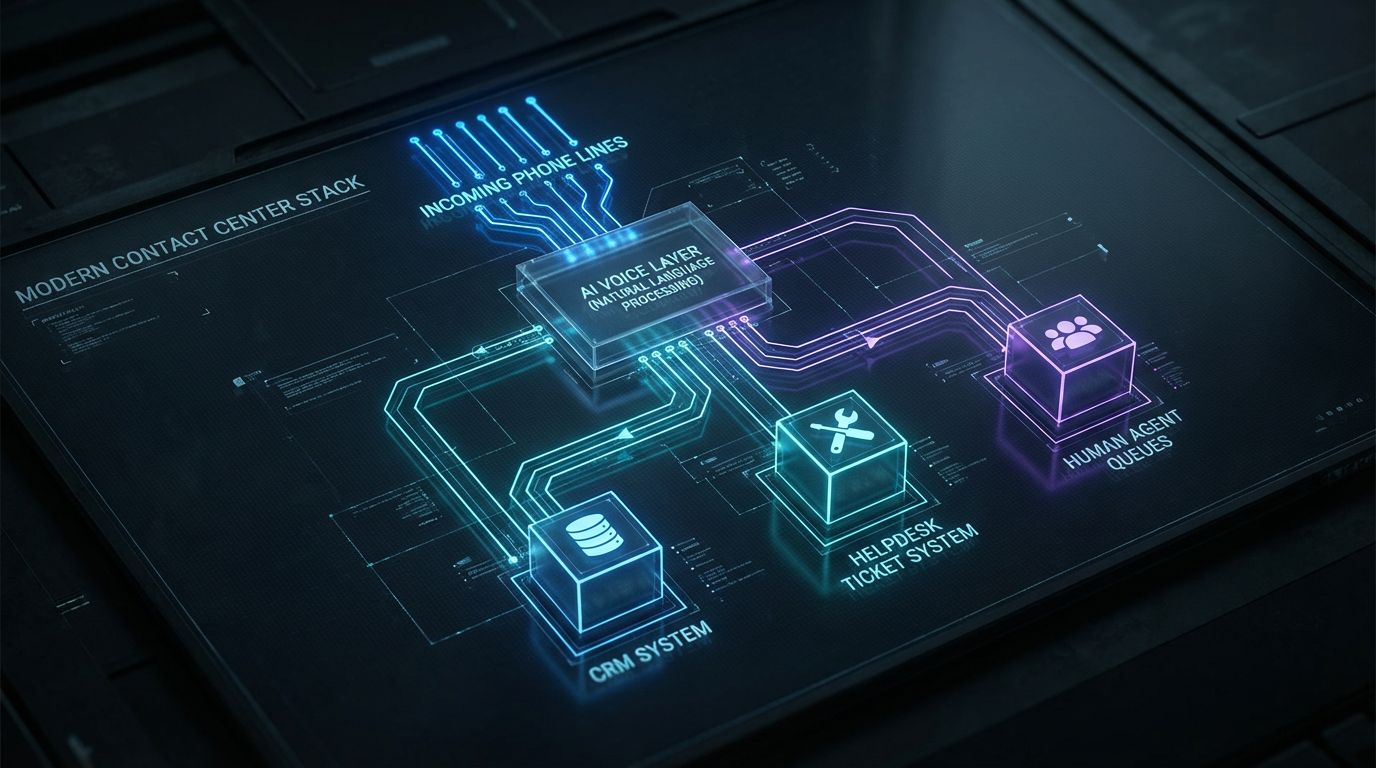
Let’s strip the hype away and define what modern AI voice agents and a 24/7 virtual receptionist actually do. At their core, they are real-time, speech-enabled interfaces sitting on top of your phone numbers, your business logic, and your data. They listen, understand intent, follow workflow rules, and either resolve the issue or hand it off with structured context.
Legacy IVR vs Script Bots vs LLM-Powered AI Voice Agents
Most of what’s in production today still falls into one of these older buckets. First, you have legacy IVR / automated telephone answering systems—the classic “Press 1 for Sales, Press 2 for Support” trees that customers hate but many enterprises still rely on. These are rigid, menu-based, and expensive to change.
Next are script-based bots tied to a narrow intent list, often marketed as an “automated phone answering service.” They can handle a few known paths well, but they break as soon as the caller speaks naturally, goes off-script, or brings up multiple topics in one call. They reduce load, but they don’t feel like a real conversation.
Today’s LLM-powered ai voice agents are different. They support multi-turn, free-form conversations, can clarify ambiguous requests, and can drive a full automated call answering system that adapts to context rather than forcing rigid menu choices.
What a 24/7 Virtual Receptionist Typically Covers
A well-designed 24/7 virtual receptionist (or 24 7 receptionist) usually owns the top of your call funnel. That includes inbound triage, FAQs, basic status checks, appointment scheduling, and message taking or call routing when a human is required. Think of it as your front desk—just reachable from anywhere, at any time.
Typical responsibilities for an AI-powered automated phone receptionist include:
- Call triage: Understanding if the caller is a new prospect, existing customer, partner, or vendor.
- FAQ handling: Hours, location, simple policy answers, basic troubleshooting steps.
- 24/7 appointment booking systems: Creating, rescheduling, or canceling appointments directly into calendars or CRMs.
- Basic account updates and status lookups: Address changes, order status, ticket status where data access is allowed.
- Message taking and routing: Capturing intent, notes, and urgency, then routing to the right queue or inbox.
In smaller environments, this may look like an automated answering service for small business fronting a single main line. In enterprise settings, you’re closer to a business automated phone answering system, routing across departments, regions, and multiple helpdesks.
Traditional Receptionists vs AI Voice Agents
Before you evaluate tech, you need to be clear about what you’re replacing or augmenting. A 24/7 virtual receptionist is not a like-for-like swap for your best senior agent, and it shouldn’t be positioned that way. Instead, treat it as a way to handle the repetitive 60–80% of traffic so your humans can focus on high-value work.
The Old Model: Human Receptionists & Contact Centers
In the traditional model, humans handle almost every call directly. You staff receptionists or front-line contact center agents across shifts, manage breaks and vacations, and pray that seasonal spikes don’t crush your SLAs. Training, QA, and attrition management become never-ending overhead.
The cost structure goes far beyond hourly wages or salaries. You’re also paying for benefits, supervision, workforce management software, physical space (if on-prem), and the time of QA and operations leaders. The strengths are real: humans bring empathy, nuanced judgment, and the ability to interpret messy, cross-topic calls.
But the weaknesses are structural. Coverage is inconsistent after hours and on weekends, queues build during spikes, and manual data entry into CRMs or helpdesks is error-prone. Every time you spin up a new line of business, you have to hire and train more people just to keep pace.
The New Model: Automated Call Answering and Virtual Receptionists
In the new model, an automated call answering service sits in front of or alongside your human team. This is usually an automated phone answering service or automated telephone answering service powered by AI voice agents that can answer, understand, and act in real time. Instead of hard-coded menus, you get conversational flows.
These ai voice agents can handle common intent types end-to-end—like appointment booking, simple order checks, or routing to the correct department—while escalating complex, emotional, or high-risk calls to humans. The benefit is instant pickup, 24/7 coverage, and consistent scripting on every interaction.
Because the AI sits on top of a proper automated phone answering system, it can automatically log call outcomes, update CRM records, and generate structured data for reporting. This is where the gap appears between “AI-like IVR” and a genuinely intelligent automated call answering workflow.
Cost, SLA, and CX Comparison
From a metrics perspective, the biggest differences show up in Average Speed of Answer (ASA), abandonment rate, and after-hours coverage. A virtual receptionist can bring ASA to near-zero for the bulk of calls, even during spikes. It also deflects simple calls before they ever hit an agent, preserving capacity for complex cases.
The tradeoff is that you shift cost from variable labor to up-front design and implementation. If you simply buy a tool without designing workflows, you’ll get mediocre CX and low containment. If you treat it as a proper automated call answering system project, you can reduce cost per call while improving consistency.
| Dimension | Traditional Receptionist / Human-Only Contact Center | AI Voice Agent & 24/7 Virtual Receptionist | Hybrid Model (AI Frontline + Humans) |
|---|---|---|---|
| Cost per call | High and linear with volume; driven by labor and overhead. | Low and scalable; fixed platform + usage costs. | Medium; AI absorbs repetitive calls, humans handle complex cases. |
| Hours of coverage | Business hours plus limited on-call coverage. | 24/7/365 by default. | AI 24/7, humans during staffed hours or via on-call escalation. |
| Consistency of experience | Varies by agent, shift, and training quality. | Highly consistent; same opening, questions, and workflows every time. | Consistent triage by AI; human variance only on escalations. |
| Time-to-scale capacity | Slow; hire, train, and schedule new agents. | Fast; increase concurrent sessions within platform limits. | Fast for common calls; targeted hiring for complex work only. |
| Data capture quality | Inconsistent; manual notes and ticket fields often incomplete. | Structured and automatic; every call logged with standardized fields. | AI captures structured data; humans add nuance on escalated cases. |
| Implementation complexity | Low technical complexity; high ongoing HR and ops overhead. | High initial design and integration effort; lower ongoing ops. | Moderate; AI must be tightly integrated with human routing. |
| SLA flexibility | Limited by staffing and budgets. | High; near-instant pickup and dynamic routing rules. | High; AI buffers volume, humans focus on SLA-critical queues. |
Why DIY AI Implementations Fail

Most teams that “try AI” in their contact center start by signing up for a shiny platform and pointing a test number at it. Six months later, they have a few semi-working flows, inconsistent CX, and no clear ROI. The issue isn’t the engine; it’s that a platform is not a system.
The Tool Trap: Platforms Without a Workflow Strategy
Infrastructure providers like Retell- or Bland-style engines, or Assembled-like voice products, are powerful. They give you low-latency streaming, speech-to-text, LLM hooks, and telephony APIs. But what they don’t provide out of the box is a functioning business automated phone answering system tailored to your SLAs, compliance needs, and call types.
When you go DIY, your team suddenly owns a long list of responsibilities. You must handle conversation design and copy so the AI sounds on-brand but still structured enough to be reliable. You must handle intent mapping, edge-case coverage, and safe fallbacks when the model is unsure.
Then there’s telephony and routing: SIP trunk configuration, IVR trees, failover routes, and connecting numbers to your automated phone answering system. On top of that, you have to build CRM/helpdesk integration logic so calls create tickets, update contacts, trigger workflows, and sync with the rest of your stack.
Hidden Risks: Compliance, Escalations, and Brand Damage
A naive implementation of an automated phone answering service can create more risk than benefit. Without guardrails, an LLM can hallucinate policies, mishandle sensitive data, or give inconsistent answers to the same question. That is how brand damage happens quietly over hundreds of calls.
Compliance is another failure point. If your AI voice agent asks for or hears card numbers or health information, your automated call answering service must know when to stop recording, when to mask transcripts, and when to route to compliant systems or human agents. The same goes for consent recording and regional data laws.
Finally, escalation logic is often an afterthought. A robust automated call answering system needs explicit rules for when to hand off to a human—based on keywords, sentiment, call duration, or failed attempts. If you don’t design this, you end up with callers trapped in loops, hammering “representative” and destroying CSAT.
Time-to-Value vs Internal Capacity
Most platforms claim you can be “live in 30 days,” which is technically true if you accept a minimal, brittle setup. In practice, your internal team has limited bandwidth and expertise in both telephony and AI. Every hour they spend tinkering with prompts is an hour not spent on core projects.
This is where the real cost of DIY lives: opportunity cost and implementation drag. Leaders, engineers, and ops staff get pulled into ad hoc experimentation instead of shipping a reliable automated answering service. You don’t just risk subpar CX; you risk the initiative stalling out entirely.
| Area | DIY with AI Voice Platform | Done-For-You with AiBizBuild |
|---|---|---|
| Conversation design & flows | Owned by your CX/ops team; built from scratch, trial-and-error. | Owned by AiBizBuild using proven patterns from past deployments. |
| Telephony & routing configuration | Your IT/telephony team must learn platform nuances and maintain routing rules. | AiBizBuild designs and configures call flows, failover, and number routing. |
| CRM & helpdesk integrations | Built piecemeal by internal devs or admins; prone to gaps and inconsistency. | Designed, implemented, and tested by AiBizBuild as part of a full system. |
| Compliance review & guardrails | Your team must interpret policies and implement redaction, consent, and routing rules. | AiBizBuild co-designs flows with your compliance stakeholders and bakes in safeguards. |
| Testing & QA | Informal, ad hoc test calls; limited transcript review capacity. | Structured pilots, call sampling, and defect tracking run by AiBizBuild. |
| Monitoring & optimization | Relies on internal champions to watch dashboards and iterate flows. | Ongoing tuning, reporting, and optimization as a managed service. |
| Go-live timeline for first use case | Highly variable; often 3–6+ months to reach stable production. | Typically 3–6 weeks for an initial, production-grade workflow. |
| Risk profile | Higher risk of CX issues, compliance gaps, and abandoned initiative. | Lower risk; designed around known failure modes and safeguards. |
How a 24/7 Virtual Receptionist Deployment Works
Vendors love to say you can be live “in a few clicks.” In reality, a reliable 24/7 virtual receptionist deployment follows a structured playbook. Below is the framework AiBizBuild uses across engagements so you know exactly who does what, and when.
Phase 1 – Discovery & Call Mapping
We start by mapping your current call reality, not an idealized future state. That means analyzing your call reports to identify top call types: new inquiries, existing customer support, appointment booking, billing questions, and FAQs. We also map volumes by hour and day to understand peaks and after-hours demand.
Each call type is assigned a risk tier. Low-risk flows (hours, directions, password reset instructions) are candidates for full automation in your automated call answering service. Medium- and high-risk flows (billing disputes, cancellations, health or financial data) are routed through AI triage with clearly defined human handoff.
The output of this phase is a set of prioritized, automatable workflows and a first-pass design for your automated phone answering system. This is also where we align with stakeholders on SLAs, compliance constraints, and success metrics for the pilot.
Phase 2 – Conversation Design & Guardrails
Next, we design the actual conversations your automated phone receptionist will have. This isn’t about clever copy; it’s about predictable, structured dialogs that still feel natural. We define openings, clarification strategies, and closing behaviors for each call type.
We also design fallback and escalation patterns: how the AI responds when it’s unsure, when the caller is frustrated, or when multiple intents appear in one sentence. Guardrails are added to control what the AI can and cannot say, and how it references policies or account data.
Multilingual and accent considerations are handled here as well. For many organizations, that means deploying an English-first ai voice agents for customer service setup first, then adding other languages once the core routing and logic are stable.
Phase 3 – Integration with Telephony and CRM
In Phase 3, we wire the design into your actual stack. On the telephony side, we connect the automated telephone answering system to your existing PBX, SIP trunks, or cloud telephony like Twilio, Five9, or similar. We define which numbers or IVR entries should route into the AI voice agent and under what conditions.
Routing rules define the relationship between AI and humans: when to keep the caller in the AI, when to transfer to a live queue, and when to drop to voicemail or on-call escalation. For hybrid models, the AI works as an automated answering service that gathers context before passing the call on.
On the CRM/helpdesk side, we connect to systems like HubSpot, Salesforce, or Zendesk. The goal is that your automated call answering system can log calls, create tickets, update contacts, and tag outcomes automatically. This ties your phone channel into broader workflows such as lead generation automation or case management.
Phase 4 – Pilot, QA, and SLA Tuning
We never recommend flipping everything at once. Instead, we run a contained pilot: for example, routing only after-hours calls, or only certain low-risk call reasons, through the AI. This keeps risk low while generating real-world traffic for tuning.
During the pilot, AiBizBuild runs structured QA: sampling call recordings, reviewing transcripts, and tracking deflection rates, misroutes, and escalation quality. We refine prompts, routing logic, and guardrails based on actual interactions, not guesses in a conference room.
We also tune SLA parameters: maximum hold time before a human must pick up, maximum number of AI clarification turns, sentiment thresholds for escalation, and callback vs live transfer strategies. This is where the system shifts from “it works” to “it works reliably under real load.”
Phase 5 – Scale, Reporting, and Optimization
Once the pilot is stable and metrics are trending in the right direction, we scale. That can mean expanding coverage to all hours, adding more call types into the automated phone answering service, or rolling out across multiple regions or brands. For an automated answering service for small business, this may be as simple as routing all main lines into the AI.
We set up dashboards tracking volumes, AI containment percentage, transfer rates, average handle time, and CSAT proxies (like re-contact rates and complaint tags). This gives leaders an objective view into how the business automated phone answering system is performing.
Finally, AiBizBuild runs ongoing optimization cycles—often weekly during early rollout, then monthly. This mirrors how we approach other complex automation programs, such as automated content approval workflows, where governance and iteration are built into the system from day one.
Use Case: Automated Call Answering for a B2B Services Firm

To make this concrete, let’s walk through a typical deployment of ai voice agents for customer service in a B2B context. Imagine a professional services or B2B SaaS company with 30–100 agents and heavy inbound phone volume from prospects and customers.
Scenario Overview
Today, every call hits a small receptionist team or a basic IVR before landing on agents. During business hours, hold times spike whenever a campaign lands or an incident occurs. After hours, calls go to voicemail, and someone triages them manually the next morning.
Missed calls, especially from new prospects, translate directly into lost pipeline. Agents spend a significant portion of their day on repetitive calls: password resets, “what’s the status of my ticket,” and “how do I book a demo.” Data capture is inconsistent; many calls never get logged with structured outcomes.
The leadership team wants a 24/7 virtual receptionist that can answer every call, triage intelligently, and plug into their CRM and ticketing stack. They see the appeal of an automated call answering model but don’t want to gamble with customer experience.
Designing the Automated Call Answering Flow
In the new design, an AI-powered automated phone answering service answers 100% of calls within a few seconds. The opening flow is simple, natural, and consistent: identify the caller’s intent in their own words, then follow the correct workflow.
Example Flow 1 – New Lead Call:
- Caller selects or says they are a new customer or prospect.
- AI confirms basics: company name, role, high-level need.
- AI runs a short qualification script: budget range, timeline, and fit indicators, reusing logic from existing lead generation automation workflows.
- For qualified leads, the AI uses integrated 24/7 appointment booking systems to schedule a meeting directly on the correct rep’s calendar.
- The automated call answering system creates a contact and opportunity in the CRM, attaches the call transcript, and tags qualification fields.
Example Flow 2 – Existing Customer Support Call:
- Caller identifies as an existing customer by company and name, with optional verification via account number or email.
- The automated telephone answering service looks up the account in the CRM or helpdesk.
- For simple issues (hours, plan details, ticket status), the AI answers directly using approved knowledge sources.
- For more complex topics, the AI opens or updates a ticket, summarizes the problem, and performs a warm transfer to the right queue.
- Agents receive the call along with a concise summary: caller identity, issue description, steps already taken by the AI, and any urgency tags.
In both flows, the AI is not pretending to be human. It is transparently acting as an intelligent automated phone receptionist that reduces friction for the caller and for your team.
Human Handoff and Hybrid Model
A successful deployment assumes that humans stay in the loop. The 24 7 virtual receptionist handles the front line; humans handle nuance, exceptions, and relationships. The key is having clear, enforced handoff rules.
Escalation can be triggered by keywords (“cancel,” “legal,” “complaint”), by sentiment (frustration detected in voice), or by complexity (multiple unresolved clarification attempts). When triggered, the automated call answering service performs a warm transfer rather than dropping the caller into a generic queue.
The human agent receives structured context in their desktop: who is calling, why they called, what the AI already did, and any relevant account data. This shortens average handle time and avoids the dreaded “so, tell me again why you’re calling?” experience.
Measurable Outcomes & ROI
With a well-designed system, you can expect meaningful improvements without promising magic. In similar deployments, we’ve seen 30–60% reductions in missed calls, especially after hours and during spikes. AI voice agents often handle 40–70% of inbound calls end-to-end, depending on your call mix and risk profile.
Human agents see reduced average handle time because they start interactions with context already captured and simple work already done. This effectively increases capacity without increasing headcount. At the same time, leaders gain visibility into call reasons and outcomes that were previously buried in voicemails or unstructured notes.
ROI for an automated call answering system typically shows up in four areas: lower cost per interaction, fewer missed revenue opportunities, improved SLA compliance, and better customer satisfaction. All of that depends on workflow design and integration quality, not on which AI engine happens to be under the hood.
Tools vs Systems: Where Agencies Like AiBizBuild Fit
At this point, the pattern should be clear: the challenge isn’t finding an AI voice tool. It’s turning that tool into a reliable, measurable automated answering service that your operations and compliance teams trust.
The AI Voice Tech Stack (Examples)
Under the hood, an AI-driven automated telephone answering system uses several components. There’s telephony (SIP, PBX, or cloud platforms), real-time speech recognition, an LLM or similar model, business logic, and integrations into CRM/helpdesk systems. Many vendors offer one or more of these layers.
AiBizBuild is not selling a $10/month widget or one-size-fits-all app. We work with the stack you already have—within reason—and fill in missing pieces. The same way we build scalable SEO content generation systems rather than just “AI writers,” we design full ai voice agents for customer service systems rather than pushing a specific platform.
Whether your phones live in Twilio, Five9, RingCentral, or on-premise SIP, the pattern is similar: calls route into an AI layer, which then uses APIs to read and write data, trigger workflows, and hand off to humans as needed.
What AiBizBuild Actually Delivers
AiBizBuild’s role is to ship the working system, not just hand you access to a model. Our core offerings in this context are:
- AI Voice Agents (Inbound/Outbound): Design, scripting, routing logic, and deployment of production-grade voice flows.
- 24/7 Appointment Booking Systems: Flows where the automated phone answering service books, reschedules, or cancels meetings directly into calendars and CRMs.
- CRM Integration & Inbox Management: Ensuring calls turn into structured records, tickets, and follow-up tasks so phone conversations feed your broader customer operations.
We own the heavy lifting: use-case scoping, conversation design, telephony configuration, automation logic, QA, reporting, and continuous improvement. Your team owns the vision, guardrails, and final decisions; you don’t need to become AI or telephony experts to get the benefits.
Why a Done-For-You Partner Is Cheaper and Faster Than DIY
When you factor in internal time, a DIY approach to a business automated phone answering system is rarely cheaper. Engineering and ops leaders burn cycles experimenting with flows and firefighting issues. CX risk increases during that learning curve.
With a specialized implementation partner, you shorten the path from idea to stable production. AiBizBuild reuses proven patterns, libraries, and governance models from prior automated call answering and workflow automation projects. That means weeks, not quarters, to reach meaningful automation.
Most importantly, you end up with a production-ready automated phone answering system, not just another tool your team has to manage. That distinction is what drives sustainable ROI rather than a short-lived pilot.
Is This Right for Your Team? Next Steps
AI voice agents are not a fit for every organization, and they’re not a magic bullet. But for many phone-heavy teams, they’re now a practical way to reduce pressure on staff while improving coverage and consistency.
Signs You’re Ready for AI Voice Agents & Virtual Receptionists
You’re likely ready to explore a 24/7 virtual receptionist and automated phone answering system if several of these are true:
- Call volume has grown faster than your ability to hire, leading to rising hold times or missed calls.
- After-hours and weekend demand is significant, but you can’t justify full staffing.
- Your agents spend a large share of time answering repetitive, low-risk questions or doing basic triage.
- You already use a modern CRM/helpdesk and telephony platform but rely on manual processes between them.
- You operate in a regulated or sensitive environment and need designed guardrails, not ad hoc experiments.
This applies from automated answering service for small business setups all the way to multi-site enterprises. The playbook scales; only the scope and integration depth change.
What to Bring to a Workflow Audit with AiBizBuild
To make a workflow audit productive, it helps to come prepared with a few essentials. First, recent call volume data, broken down by time of day and basic reason codes if you have them. This anchors the conversation in your actual demand, not averages.
Second, a simple inventory of your current stack: telephony provider, CRM, helpdesk, and any key internal tools. Third, your compliance requirements and non-negotiables: PCI, HIPAA, GDPR, or internal data retention rules. Finally, your SLA targets and pain points: where you’re consistently missing, and which customer segments matter most.
In return, AiBizBuild will outline a prioritized list of automatable call flows, a high-level architecture for your automated phone answering system, and a phased rollout plan with milestones. This becomes your roadmap, whether you move forward immediately or stage the implementation over multiple quarters.
FAQ for B2B Decision Makers
Below are concise answers to the questions that usually come up once leaders start evaluating AI voice agents seriously.
1. How long does it take to deploy an AI voice agent and 24/7 virtual receptionist for our contact center?
For a first, well-defined use case, a realistic range is 3–6 weeks from kickoff to production. That includes discovery, design, integration, pilot, and tuning, not just turning the tool on. More complex, multi-queue deployments can extend beyond that, but you should expect to see value on a narrow scope within the first month or two.
2. Will AI voice agents replace my human agents, or just handle simpler calls?
In practice, AI voice agents handle simpler, repetitive, and low-risk calls plus triage, while humans focus on complex, high-value, or emotionally sensitive interactions. Most teams repurpose capacity rather than cut headcount: agents move into higher-value work, specialist queues, or outbound follow-up while the AI handles routine front-line tasks.
3. How do you ensure compliance and data security with an automated phone answering service?
We design call flows with compliance as a first-class constraint. That includes controlling what the AI can ask, where recordings and transcripts are stored, how consent is captured, and how PCI/PHI is handled or avoided. We configure the automated telephone answering service to mask sensitive data, pause recording where needed, and route certain interactions directly to compliant human workflows.
4. Do we need in-house developers or telephony experts to work with AiBizBuild?
No. AiBizBuild is a done-for-you implementation partner. We handle telephony configuration, integrations, and conversational workflow design. You’ll need an engaged CX/ops lead, IT for approvals and access, and compliance stakeholders for sign-off—but not a dedicated internal AI engineering team to keep things running.
5. What kind of ROI can we expect from an automated call answering system?
ROI varies by industry and call mix, but typical outcomes include fewer missed calls, higher after-hours coverage, and a meaningful share of calls fully resolved by AI. That translates into lower cost per interaction and better utilization of your human agents. We treat ROI as a function of your baseline metrics and targeted workflows, not a generic promise.
Call to Action
If you’re feeling the strain of staffing, scheduling, and scaling your frontline phones, you don’t need another platform login. You need a working automated call answering system that respects your SLAs, your customers, and your compliance constraints.
The fastest path there is a focused Workflow Audit with a team that has already shipped multiple ai voice agents for customer service into production. AiBizBuild will help you identify where AI voice fits, what to automate first, and how to phase toward a robust 24/7 virtual receptionist model.
Next step: Book a Workflow Audit with AiBizBuild to review your current call flows and design a practical roadmap for AI voice agents and virtual receptionist workflows. You don’t need to choose a platform first—we’ll help you architect the right system and then select or work with the tools that fit.