

Email + CRM Integrations for SMBs: How to Build a Reliable HubSpot CRM–Mailchimp Workflow
Key Takeaways
– How to move from manual CSV exports and list uploads to a clean, automated HubSpot CRM–Mailchimp workflow that marketing and sales can actually trust.
– A practical implementation checklist to connect tools, map fields, build workflows, and properly QA your data sync before going live.
– Why most DIY integrations fail, how SMB teams lose 10–20 hours/month on rework, and when to bring in AiBizBuild’s CRM Integration & Inbox Management for a done-for-you setup.
– How other email CRM platforms like Flodesk, Gmail integrated CRMs, and free CRM for Gmail tools fit around a HubSpot-centric architecture.
In This Guide:
📧 The Old Way: Manual HubSpot–Mailchimp List Management – Why exports, imports, and spreadsheets are killing your campaigns
🔗 The New Way: Integrated HubSpot CRM–Mailchimp Workflow – What a clean, automated setup actually looks like
✅ HubSpot CRM–Mailchimp Implementation Checklist – Connect, map, automate, and QA your integration
⚠️ Why DIY HubSpot–Mailchimp Integrations Fail – Hidden edge cases, data loss, and compliance risks
📈 ROI: Hours Saved and Fewer Mismatched Lists & Opt-Outs – Estimating impact for SMB teams
🧩 Choosing the Right Email CRM Platform Stack (HubSpot, Mailchimp, Flodesk, Gmail CRMs) – When to add or replace tools
🛠️ SMB Use Case: From CSV Chaos to a Stable HubSpot–Mailchimp Engine – A concrete before-and-after blueprint
🤖 How AiBizBuild Implements and Maintains Your Stack – Our done-for-you CRM Integration & Inbox Management service
❓ FAQs – Common questions from SMB marketing and RevOps leaders
Your team did not buy HubSpot and Mailchimp so you could babysit spreadsheets. Yet most SMBs still manage campaigns with manual exports, list uploads, and guesswork instead of a reliable hubspot crm mailchimp workflow. The result is hours of repetitive work, mismatched lists, and no clean way to see who actually engaged inside your CRM.
This guide shows you what a proper system looks like, why DIY attempts usually break at scale, and how AiBizBuild’s CRM Integration & Inbox Management service takes the entire integration off your plate. The goal is simple: one source of truth, predictable automations, and email data your sales team can trust.
The Old Way: Manual HubSpot–Mailchimp List Management
Most small teams follow the same pattern, even if they use different tools. A new form submission or event list comes in, someone exports a CSV, cleans it in Excel or Google Sheets, then uploads the latest slice into Mailchimp before a send. After the campaign, they may or may not update HubSpot with notes or deal activity.
Every step invites tiny but expensive mistakes. Columns don’t quite line up, duplicates sneak in, and unsubscribed contacts accidentally get re-imported because the spreadsheet wasn’t filtered correctly. Over time, your CRM and Mailchimp audiences drift further apart, and nobody can say which list is right.
What Manual Exports and List Uploads Look Like Day-to-Day
On a typical Monday, someone on your team downloads contacts from website forms, landing pages, or your ecommerce platform. They open a spreadsheet, copy-paste columns, normalize names, and try to match fields to what Mailchimp expects. If you also touch tools like Flodesk or a Gmail plugin, they may run separate exports just to keep those in sync.
Once the file “looks clean enough,” they upload it into Mailchimp, map columns by hand, and hope they didn’t miss a key field like consent or lifecycle stage. Then they jump into HubSpot and manually update contact properties or deals so sales isn’t flying blind. Multiply that by every campaign, every webinar, and every new lead source.
The Hidden Costs: Time, Errors, and Compliance Risk
Even in a lean SMB, this manual dance easily consumes 1–3 hours per campaign or list refresh. With just a few campaigns per month and multiple segments, you’re looking at 10–20 hours/month of non-strategic work for someone on your team. That’s time they could spend optimizing messaging, building sequences, or aligning with sales.
The bigger threat is invisible until it hurts. List mismatches between HubSpot, Mailchimp, and tools like Flodesk mean some contacts never get nurtured while others get double-sent or emailed after they unsubscribed. Besides complaints and spam flags, you’re carrying unnecessary compliance risk if consent and unsubscribe data aren’t consistent across systems.
Manual vs Integrated Workflow
Here’s how the old way compares to a designed, integrated HubSpot CRM–Mailchimp workflow.
| Dimension | Manual Exports & Uploads | Integrated HubSpot CRM–Mailchimp Workflow |
|---|---|---|
| Setup Time | None upfront, but every campaign requires rebuilding lists from scratch. | Initial design and setup over 10–21 business days, then reusable for every future campaign. |
| Ongoing Effort | 10–20 hours/month spent on exports, cleaning, imports, and fixes. | 1–3 hours/month to review dashboards and adjust workflows. |
| Error & Compliance Risk | High risk of duplicates, wrong segments, and emailing unsubscribed contacts. | Consent and unsubscribes synced from a single source of truth in HubSpot. |
| Visibility into Engagement | Email opens/clicks live in Mailchimp only, disconnected from CRM and deals. | Engagement data pushed into HubSpot for lifecycle and revenue reporting. |
| Scalability | Breaks down with more brands, regions, lists, or tools like Flodesk CRM. | Designed to handle multiple audiences, brands, and new lead sources. |
The New Way: Integrated HubSpot CRM–Mailchimp Workflow
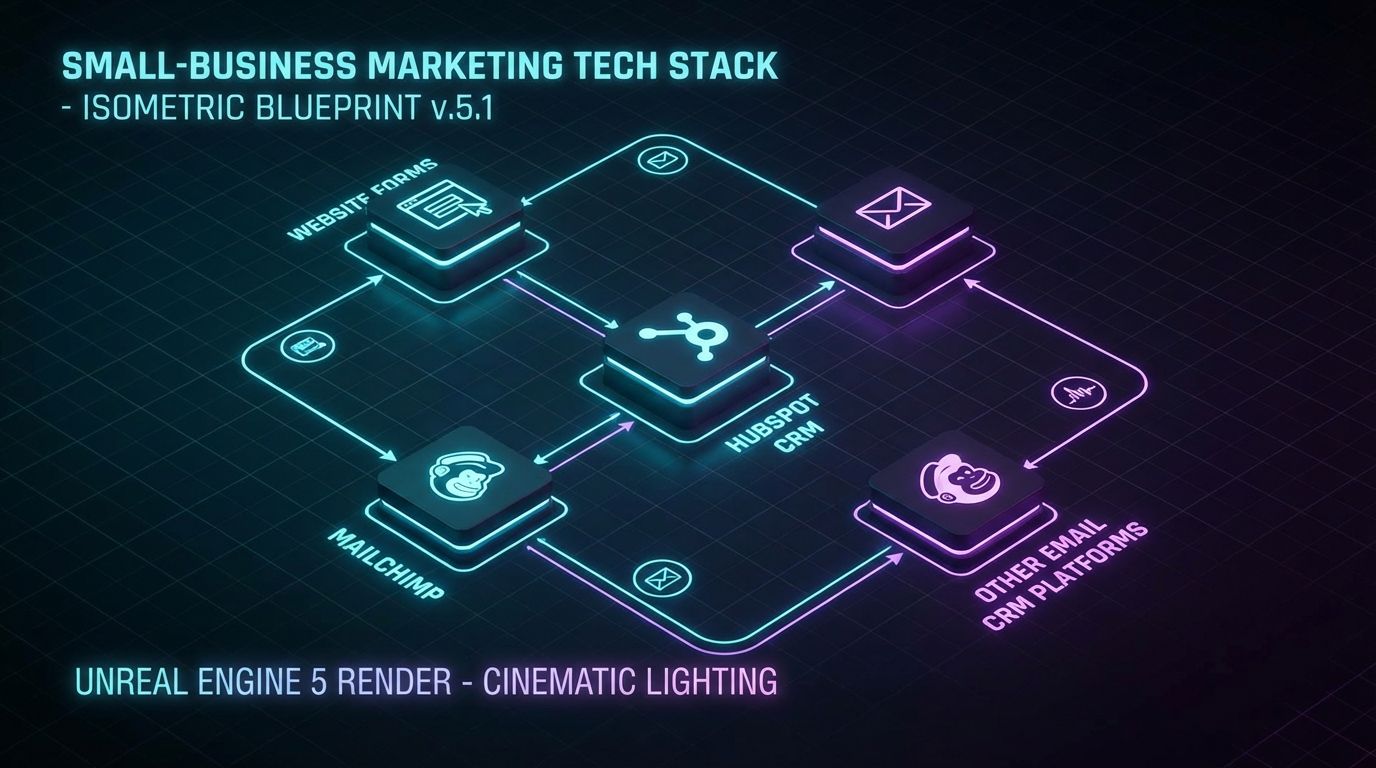
A reliable HubSpot CRM–Mailchimp workflow treats HubSpot as the brain and Mailchimp as an execution layer. Contacts from every lead source flow automatically into HubSpot, get enriched and segmented, then sync to Mailchimp audiences or tags based on clear rules. Email engagement flows back into HubSpot, closing the loop for sales and reporting.
In a one-way sync, HubSpot feeds Mailchimp but not vice versa, which can work for simple setups. In a two-way or bi-directional pattern, you decide which fields are mastered in HubSpot and which are safe to update from Mailchimp, avoiding data ping-pong and overwrites.
What a Clean HubSpot CRM–Mailchimp Integration Actually Does
Imagine this architecture in plain language. Website forms, landing pages, and other sources create or update contacts in HubSpot with key fields like lifecycle stage, source, and consent. A set of rules then determines who should be eligible for Mailchimp campaigns and pushes those contacts to the right audience or segment automatically.
When you send a campaign, opens, clicks, and unsubscribes sync back into HubSpot as activities and updated properties. Workflows in HubSpot can then trigger tasks or deal stage changes when someone engages, giving sales context without logging into Mailchimp.
How Non-HubSpot Forms, Flodesk, and Gmail-Based CRMs Fit In
Most SMBs don’t live in a HubSpot-only world. You may have a beautifully designed newsletter running through Flodesk CRM, a gmail integrated crm plugin your sales team loves, or a free crm for gmail that felt like a quick win early on. Each of these tools can either feed into or pull from HubSpot, but they should not replace it as your system of record.
The cleanest pattern is to treat HubSpot as the central data layer and source of truth for contacts, consent, and lifecycle. Other email CRM platforms like Flodesk or Gmail-based CRMs either push leads into HubSpot or receive targeted lists from it, with clear rules about which tool is allowed to write which fields.
Core Building Blocks of an Integrated Email CRM Platform
Every integrated stack rests on three pillars. First is your data model: which fields exist, what they mean, and which system owns them. Second are your sync rules: how and when contacts move between HubSpot, Mailchimp, and other tools, plus conflict resolution rules.
Third are your automations and workflows: welcome series, re-engagement, lead scoring, and lifecycle changes that respond to real behavior. Email CRM platforms like Mailchimp and Flodesk excel at sending messages, but HubSpot is where cross-channel logic, reporting, and governance live when the system is designed correctly.
HubSpot CRM–Mailchimp Implementation Checklist
Here’s a practical playbook you can follow or hand to a partner like AiBizBuild. The objective is to move from ad hoc integrations and spreadsheets to a designed, testable workflow. Treat this as a project, not a side task someone squeezes in between campaigns.
Step 1 – Audit Your Current Lists, Forms, and Email Tools
Start by inventorying every place a contact can enter your world. That usually includes website forms, landing pages, event sign-ups, ecommerce checkouts, lead gen tools, Flodesk lists, and anything powered by a Gmail integrated CRM or free CRM for Gmail.
For each source, capture where the data goes today, which fields are stored, and which system is treated as the “truth.” You’ll almost always find duplicates, conflicting consent information, and at least one list that nobody fully trusts.
Step 2 – Design Your Contact & Field Mapping
Next, define the standard fields that must exist in HubSpot and which ones Mailchimp actually needs. Core properties usually include email, name, company, lifecycle stage, lead source, subscription type, consent flags, and any key segmentation attributes you care about.
Then design a mapping: for each HubSpot property, specify the corresponding Mailchimp field, data type, and direction of sync. This is where many DIY hubspot crm mailchimp integrations fail because default mappings are left as-is instead of being aligned with your actual segmentation and reporting needs.
Step 3 – Connect HubSpot CRM and Mailchimp
With the data model defined, you can safely install and configure the HubSpot–Mailchimp integration or a trusted connector. Authenticate both tools, choose which HubSpot lists or segments map to which Mailchimp audiences, and apply your field mappings rather than accepting defaults.
Be aware of limitations such as which fields can sync, how often updates run, and whether certain changes are one-way only. Document these decisions so your future campaigns don’t rely on assumptions that were never true.
Step 4 – Build and Test Automated Workflows
Now design workflows around real business moments instead of static lists. For example, a new lead in HubSpot with marketing consent can automatically flow into a Mailchimp welcome series, while a contact who hasn’t opened in 90 days can be moved into a re-engagement sequence.
In HubSpot, set up workflows that update lifecycle stage or create tasks for sales when someone clicks a key link or reaches a certain engagement threshold. Always test with internal or test contacts first, using a sandbox or dedicated test audience where possible, before touching your main lists.
Step 5 – QA, Monitoring, and Ongoing Maintenance
Before you declare victory, run a structured QA pass. Create a set of test contacts with different consent statuses and segments, push them through your workflows, and verify that HubSpot and Mailchimp reflect the same data for each scenario.
Then set up basic dashboards in HubSpot to monitor sync volume, new contacts by source, and any integration errors. Plan a lightweight quarterly review to adjust mappings when new forms, fields, or tools are added so your integration doesn’t silently decay.
Why DIY HubSpot–Mailchimp Integrations Fail

If you’ve already tried to connect HubSpot and Mailchimp yourself, you’ve probably realized the problem isn’t finding the “Connect” button. The real challenge is handling edge cases, historical data, consent, and ongoing changes without breaking something quietly. That’s where most DIY builds start to leak.
Edge Cases That Break DIY Setups
Things are manageable when you have one brand, one region, and a single newsletter. As soon as you add a second brand, different regional compliance rules, or multiple Mailchimp audiences, simple mappings stop working. Contacts end up in the wrong audience or miss critical communications because your rules weren’t designed for complexity.
Historical imports can also create sync gaps if they’re not handled carefully. Merge tag requirements in Mailchimp, legacy custom fields, and partially migrated data from tools like Flodesk CRM or Gmail CRMs all introduce landmines that a checkbox-style integration wizard won’t address for you.
Data Quality, Consent, and Reporting Gaps
Without a clear data model, you end up with inconsistent fields and missing consent tracking across systems. One list may treat “Subscribed” as a status, another uses tags, and a third tracks consent dates but never syncs them to HubSpot.
When email engagement isn’t reliably stored in HubSpot, your reports can’t show which campaigns actually influenced pipeline or revenue. Sales loses context, marketing loses credibility, and leadership sees channels in isolation instead of as a connected system.
The Time Suck of Learning by Trial and Error
For a non-specialist marketer, learning the nuances of HubSpot, Mailchimp, and their integration typically means 10–30 hours lost to documentation, trial-and-error testing, and rework. That number spikes every time you add a new form tool, experiment with Flodesk, or swap in a new Gmail integrated CRM.
The deeper cost is the cognitive load of constantly wondering “Is this list right?” or “Did we just email someone who unsubscribed?” instead of focusing on strategy. That’s not what you hired your team for.
If you’d rather not gamble your list health, reporting, and compliance on trial-and-error, Book a Workflow Audit with AiBizBuild. Our CRM Integration & Inbox Management service designs, implements, and maintains a stable HubSpot–Mailchimp system so your team can focus on campaigns, not connectors.
ROI: Hours Saved and Fewer Mismatched Lists & Opt-Outs
Integrations are not a vanity project; they’re an operations lever. When you remove manual exports and fix list drift between HubSpot, Mailchimp, and other email CRM platforms, you buy back real time and reduce real risk. Let’s quantify that at a practical level.
Estimating Time Savings for a Typical SMB
Take a simple model: you run four campaigns per month, with two main segments and an occasional ad hoc list. Each cycle currently takes 2–3 hours of exports, cleaning, and uploads for a marketing generalist and sometimes help from ops.
That’s easily 10–15 hours/month of manual work that an integrated HubSpot CRM–Mailchimp workflow can compress to 1–3 hours of oversight and optimization. Over a year, you reclaim well over one full workweek of focused time for higher-value projects.
Quantifying the Cost of List Errors and Compliance Issues
The harder-to-see ROI comes from avoiding list errors and compliance problems. Sending campaigns to stale contacts drags down open rates and can damage sender reputation, reducing deliverability across the board. Accidentally emailing unsubscribed users creates complaints, distrust, and potential regulatory exposure.
By standardizing consent and unsubscribe logic in HubSpot and ensuring Mailchimp and tools like Flodesk respect that logic, you dramatically reduce the likelihood of embarrassing or costly mistakes. Over time, cleaner data feeds better segmentation, which usually lifts engagement and conversion even without changing your creative.
DIY vs Done-For-You Cost & ROI
Here’s how a DIY integration effort compares with AiBizBuild’s done-for-you model from a cost and risk perspective.
| Category | DIY Integration | AiBizBuild Done-For-You Implementation |
|---|---|---|
| Time to Launch | Often 4–8 weeks of on-and-off internal effort. | 10–15 business days for most SMB stacks, depending on complexity. |
| Internal Hours Required | 20–40+ hours from marketing/RevOps to design, test, and troubleshoot. | A few structured workshops and reviews; most heavy lifting handled by AiBizBuild. |
| Error Risk in First 90 Days | High: frequent list mismatches, duplicate sends, and missing engagement data. | Low: designed data model, documented mappings, and structured QA processes. |
| Ongoing Maintenance | Ad hoc fixes whenever something breaks or a new tool is added. | Planned reviews and updates as part of CRM Integration & Inbox Management. |
| Predictability of Outcomes | Uncertain: depends on internal bandwidth and expertise. | High: defined architecture, documented workflows, and measurable success criteria. |
Choosing the Right Email CRM Platform Stack (HubSpot, Mailchimp, Flodesk, Gmail CRMs)

There is no shortage of email crm platforms promising simplicity and automation. The question for SMBs is not “Which tool has the nicest UI?” but “Which stack supports our pipeline, reporting, and growth without turning into a Franken-system?” HubSpot plus Mailchimp is often the right backbone when implemented intentionally.
Where HubSpot CRM + Mailchimp Make the Most Sense
HubSpot CRM shines when you need a central place for contacts, deals, and lifecycle management, especially in B2B or high-consideration B2C. Mailchimp remains a strong choice for newsletters, broadcast campaigns, and straightforward automations your team already knows how to use.
Together, an integrated HubSpot CRM–Mailchimp setup gives you a clean CRM brain with a flexible email engine on top. It’s particularly effective when you’re also investing in channels like SEO Content & Blog Automation, since those top-of-funnel leads can flow directly into HubSpot and then into targeted Mailchimp journeys.
When Tools Like Flodesk CRM or Gmail-Integrated CRMs Come Into Play
Tools such as Flodesk CRM appeal when design and brand aesthetics are paramount, especially for creative or visually driven businesses. A gmail integrated crm or free crm for gmail can be a great starter option for small sales teams living in their inboxes.
The risk is letting these tools become your de facto system of record as you scale. They work best as adjacent tools that plug into a central CRM like HubSpot, where full history, consent, and reporting live, rather than as replacements for a proper data layer.
Avoiding the Tool Trap: Strategy Before Software
Buying more tools will not fix a broken process. The same problems that plague your current lists—manual exports, unclear ownership of fields, inconsistent consent—will simply move into whatever new platform you choose.
AiBizBuild’s role is to architect the system: which email CRM platforms you actually need, how they connect, and what workflows they support. Once the architecture is in place, tools like HubSpot, Mailchimp, Flodesk, and social schedulers can work together instead of against each other.
SMB Use Case: From CSV Chaos to a Stable HubSpot–Mailchimp Engine
To make this concrete, here’s a composite scenario based on real SMB implementations. Names and details are generalized, but the patterns will feel familiar if your team lives in CSVs. The goal is to show the before-and-after of moving to a designed HubSpot CRM–Mailchimp workflow.
Starting Point: Disconnected Tools and Manual Work
Our client was a 12-person B2B services firm running WordPress forms, Mailchimp campaigns, an occasional Flodesk newsletter, and a lightweight Gmail CRM plugin. Contacts existed in five different places, with no reliable way to tell who had consented to what.
Every webinar or campaign required exporting from WordPress, cleaning in spreadsheets, deduplicating against legacy Mailchimp lists, and manually updating a Gmail-based CRM. Marketing spent multiple afternoons each month just trying to build “good enough” lists, while sales complained that email engagement never showed up next to deals.
The Integration Blueprint We Implemented
First, we centralized contacts in HubSpot and defined a data model for lifecycle stage, lead source, subscription types, and compliance fields. WordPress forms, Flodesk forms, and other lead sources were reconfigured to write directly into HubSpot with the right field values.
Next, we connected HubSpot to Mailchimp with explicit mappings and rules, creating audiences aligned with real segments instead of legacy list sprawl. We then built automations including a multi-step welcome series, a reactivation campaign for cold leads, and MQL alerts to sales based on Mailchimp engagement data flowing back into HubSpot.
Results: Time Saved, Cleaner Lists, and Better Reporting
Within the first quarter, manual list work dropped by roughly 70%, freeing the marketing lead to focus on messaging and experiments instead of exports. Bounced and invalid addresses decreased by about 30% as bad data was cleaned once in HubSpot instead of being copied forward in spreadsheets.
Most importantly, leadership could finally see which campaigns contributed to pipeline because email engagement and deal data lived in one place. If you want the same shift from CSV chaos to a reliable engine, Book a Workflow Audit and we’ll map out what a tailored HubSpot CRM–Mailchimp architecture would look like for your stack.
How AiBizBuild Implements and Maintains Your Stack
AiBizBuild’s CRM Integration & Inbox Management service is built for exactly these scenarios. We take responsibility for the architecture, field mapping, integration configuration, QA, and ongoing adjustments as your tools and campaigns evolve. You get a stable system instead of a one-time “connection.”
Our 4-Step Implementation Framework
We follow a structured 4-step framework. 1) Audit & Architecture: we inventory your forms, lists, tools, and reporting needs, then design your target data model and flows. 2) Data Model & Field Mapping: we standardize properties in HubSpot and define mappings to Mailchimp and any other email CRM platforms you rely on.
3) Integration & Workflow Build: we configure the HubSpot–Mailchimp connection, implement workflows, and handle historical imports or clean-ups. 4) QA & Monitoring: we run structured testing, deploy dashboards, and define an ongoing monitoring plan. Most SMBs go from manual to automated in about 10–21 business days, depending on complexity.
What You Get: Deliverables and Outcomes
Deliverables typically include a documented data model, field mapping blueprint, live HubSpot CRM–Mailchimp sync, and a set of core workflows such as welcome, re-engagement, and lifecycle alerts. We also provide a QA checklist and basic reporting views in HubSpot so your team can see what’s happening without digging.
The outcomes are what matter: hours back each month, consistent lists across tools, and reliable engagement data available directly inside your CRM. Your team can then layer on initiatives like automated social media workflows or sales sequences knowing the underlying data is sound.
How This Fits With Our Other Automation Services
A stable CRM and inbox layer is the foundation for more advanced automation. Once HubSpot and Mailchimp are properly integrated, it becomes far easier to plug in Cold Outreach Automation, since your prospect and customer lists are finally trustworthy.
The same is true for top-of-funnel engines like SEO Content & Blog Automation and Social Media Workflow Automation. All those leads and engagements can flow into a clean CRM instead of yet another spreadsheet or siloed tool.
Call to Action
If your team is tired of living in CSVs and guessing which list is right before every send, it’s time to treat this as an infrastructure project, not a side task. AiBizBuild’s CRM Integration & Inbox Management service is designed to give SMBs an enterprise-grade HubSpot CRM–Mailchimp workflow without hiring a full-time architect.
Book a Workflow Audit to review your current setup, identify the biggest risks and time sinks, and see a clear plan for getting from manual patchwork to a reliable, automated system. No coding required on your side—our team handles the tech and the strategy so yours can focus on growth.
FAQs
Do I need to already be on both HubSpot and Mailchimp to work with AiBizBuild?
No. Many clients come to us with only Mailchimp or only HubSpot in place, or even just a Gmail integrated CRM and spreadsheets. We help you choose the right email CRM platforms for your stage, then design and implement the HubSpot CRM–Mailchimp stack—or a close variant—that fits.
How long does a typical HubSpot CRM–Mailchimp integration project take for an SMB?
Most projects land in the 10–21 business day range, depending on how many forms, lists, and adjacent tools like Flodesk or Gmail CRMs are involved. Your Workflow Audit clarifies scope, edge cases, and a realistic timeline before any build begins.
Can you fix an existing, broken HubSpot–Mailchimp integration instead of starting from scratch?
Yes. We frequently start with a diagnostic of your current integration, mappings, and workflows, then decide what to repair and what to rebuild. In many cases, we can preserve parts of your setup while cleaning data, standardizing fields, and patching the gaps that cause list mismatches.
Is there any coding required on our side to maintain the integration long-term?
No coding is expected from your team. We design your HubSpot CRM–Mailchimp integration so marketers and RevOps can manage day-to-day changes from the UI, with clear documentation for adding new forms or fields.
If you opt into ongoing support, AiBizBuild handles any advanced customization or edge-case changes as your stack evolves.
How do you handle consent, GDPR, and unsubscribe management across HubSpot, Mailchimp, and tools like Flodesk or Gmail CRMs?
We establish HubSpot as the system of record for consent and unsubscribe status, with standardized properties and clear logic. Then we ensure Mailchimp, Flodesk CRM, and any Gmail-based CRMs honor those rules through mappings and workflows so you don’t accidentally email someone who opted out.
What happens if we later switch from Mailchimp to another email platform?
Because we keep HubSpot (or your primary CRM) as the central data layer, swapping Mailchimp for another email tool is a contained project, not a full rebuild. We migrate field mappings and key workflows while preserving historical data where the new platform allows, minimizing disruption.
How do you price CRM Integration & Inbox Management projects?
Pricing is based on complexity: number of tools, lists, custom fields, and workflows, plus whether historical data clean-up is required. Most SMBs prefer a fixed-scope implementation so they have clear expectations on investment and timeline, which we define after your Workflow Audit.
When you’re ready to stop wasting cycles on exports and start running a predictable, scalable email engine, Book a Workflow Audit and let AiBizBuild architect the HubSpot CRM–Mailchimp system your team can grow on.