

Content Approval Workflows: From SharePoint & Spreadsheets to Automated Approvals
Key Takeaways
- Manual content approval workflows built on SharePoint, spreadsheets, email, and chat create bottlenecks, errors, and missed deadlines as volume scales.
- A modern automated approval system routes by role, enforces SLAs, manages versions, and escalates issues across tools like SharePoint, PM platforms, Slack/Teams, and your CMS.
- AiBizBuild’s done-for-you automation turns your existing content approval SharePoint setup into a cross-tool, AI-assisted workflow without your team touching configuration.
In This Guide:
- The Real Problem With Content Approval Today
- From SharePoint & Spreadsheets to a True Workflow
- What an Automated Content Approval Workflow Looks Like
- Why DIY Workflow Setup Usually Fails
- Agency Use Case: Multi-Client Approval Flow Built on SharePoint
- Implementation Roadmap: 3-Week Automation Blueprint
- How AiBizBuild Builds & Maintains Your Approval System
- FAQs on Automated Content Approval Workflows
Most teams define content approval workflows as “the steps content goes through before it can go live.” In practice, that usually means drafts parked in folders, emails begging for feedback, and spreadsheets trying to track it all. It works at low volume and then quietly breaks as you add more brands, more stakeholders, and more channels.
Many agencies and B2B teams start with a basic content approval SharePoint site, Excel trackers, and email. Over time, that setup turns approvals into a black box where things “disappear” for days. This guide shows you what a modern automated approval system actually looks like and how to get from today’s mess to that state without your team becoming automation engineers.
I’ll walk through concrete flows, a realistic three-week rollout, and where a done-for-you partner like AiBizBuild fits if you want the outcomes without owning the wiring.
The Real Problem With Content Approval Today

On paper, your approval process looks simple: draft, review, edit, approve, publish. In reality, it’s a maze of tools, people, and side conversations. That gap is where time and quality leak out.
How Manual Approvals Actually Work in Most Teams
Drafts live in SharePoint folders, Word files, Google Docs, or directly in your CMS. Somebody pastes links into a spreadsheet or SharePoint list to track status, due dates, and owners. Approvals then happen via long email chains, Teams/Slack threads, and random comments that never make it back into a single source of truth.
Writers are never sure which feedback is final, editors don’t know who they’re waiting on, and account managers spend half their week chasing replies. Leadership only hears about issues when a launch slips or a client escalates. By then, it’s already expensive.
The more brands, markets, or clients you support, the more your “process” becomes folklore instead of a reliable system. People approve the wrong versions, or content ships without all required sign-offs.
The Hidden Costs: Delays, Rework, and Risk
In manual setups, approval cycles routinely stretch to 3–7 days for what should be routine assets. Multiply that by dozens of pieces a month, and your editorial calendar becomes fiction. When people get busy, content simply sits because there is no enforced SLA or escalation path.
With files bouncing between folders and inboxes, it’s common for 20–30% of pieces to need rework because the wrong version was reviewed or approved. That rework isn’t just annoying; it burns writer and designer capacity that should be creating net-new assets. In regulated or brand-sensitive industries, outdated or unapproved content slipping through creates real compliance and reputational risk.
Missed approvals delay launches, reduce campaign impact, and condition your team to build in “buffer” days that quietly drag down throughput. The cost is both visible (missed deadlines) and invisible (campaigns you never start because the system can’t handle more volume).
| Aspect | Manual (SharePoint + Spreadsheets) | Automated Approval Workflow |
|---|---|---|
| Cycle Time | 3–7 days, constant chasing | 24–48 hours with automated reminders and SLAs |
| Visibility | Status buried in inboxes and ad-hoc trackers | Central dashboard showing status and owners in real time |
| Version Control | Multiple files and links, frequent wrong-version approvals | Single source of truth with enforced versioning and links |
| Reminders & Escalation | Manual pings from coordinators and AMs | Automated nudges and escalation rules when SLAs are breached |
| Error Rate & Risk | High risk of missed steps and incomplete sign-offs | Enforced steps and audit trails reduce compliance and brand risk |
| Time Spent per Stakeholder | Approvers dig through threads and files to find context | Approvers receive the right version plus context in one place |
From SharePoint & Spreadsheets to a True Workflow
SharePoint and spreadsheets aren’t the enemy; they’re just not a complete workflow. The fix is turning your current patchwork into a system that behaves consistently every time, regardless of who is working the queue.
What SharePoint Does Well — And Where It Breaks
SharePoint handles document storage, permissions, and basic versioning reliably. A simple list with status columns can work for a small team and a handful of assets. Many teams standardize around a content approval SharePoint site as the central repository.
Where it breaks is orchestration. SharePoint alone doesn’t route items dynamically based on client, channel, or risk level, and it doesn’t coordinate with your PM tool, chat, and CMS. You also get limited visibility into where work is stuck without bolting on reports or exporting to Excel.
The result is a half-system: good storage, weak workflow. People compensate with manual follow-ups and side spreadsheets, which get stale almost immediately.
The Core Building Blocks of an Approval Workflow
Ignore tools for a moment; every effective approval system has the same building blocks. First are states, such as Draft → In Review → Approved → Scheduled → Published → Archived. Second are roles: Creator, Editor, Brand Owner, Legal/Compliance, Client, Publisher.
Next are triggers that move work forward: a status change, a due date approaching, a high-risk flag, or a budget threshold. Around those, you define notifications, SLAs, and escalations so items cannot sit silently in limbo.
When we design content approval workflows for clients, we start by mapping these blocks per content type and per client or brand. Only then do we decide which tool owns each piece.
How Automation Connects the Stack You Already Use
Automation is the glue that sits on top of your existing stack. Content can stay in SharePoint or Google Docs while tasks live in Asana, Jira, ClickUp, or Smartsheet-style tools. Notifications go through Slack, Teams, and email, while publishing happens from your CMS or social scheduler.
A well-designed automation layer watches for events like “new draft added,” “status moved to Ready for Review,” or “approval overdue by 24 hours.” It then creates and updates tasks, posts messages, and advances items automatically. AiBizBuild’s role is to design and implement these cross-tool automations so the system behaves as one integrated workflow instead of five disconnected apps.
This is where planning tools like your social media content calendar connect directly to approvals, rather than existing as separate spreadsheets that nobody trusts.
What an Automated Content Approval Workflow Looks Like
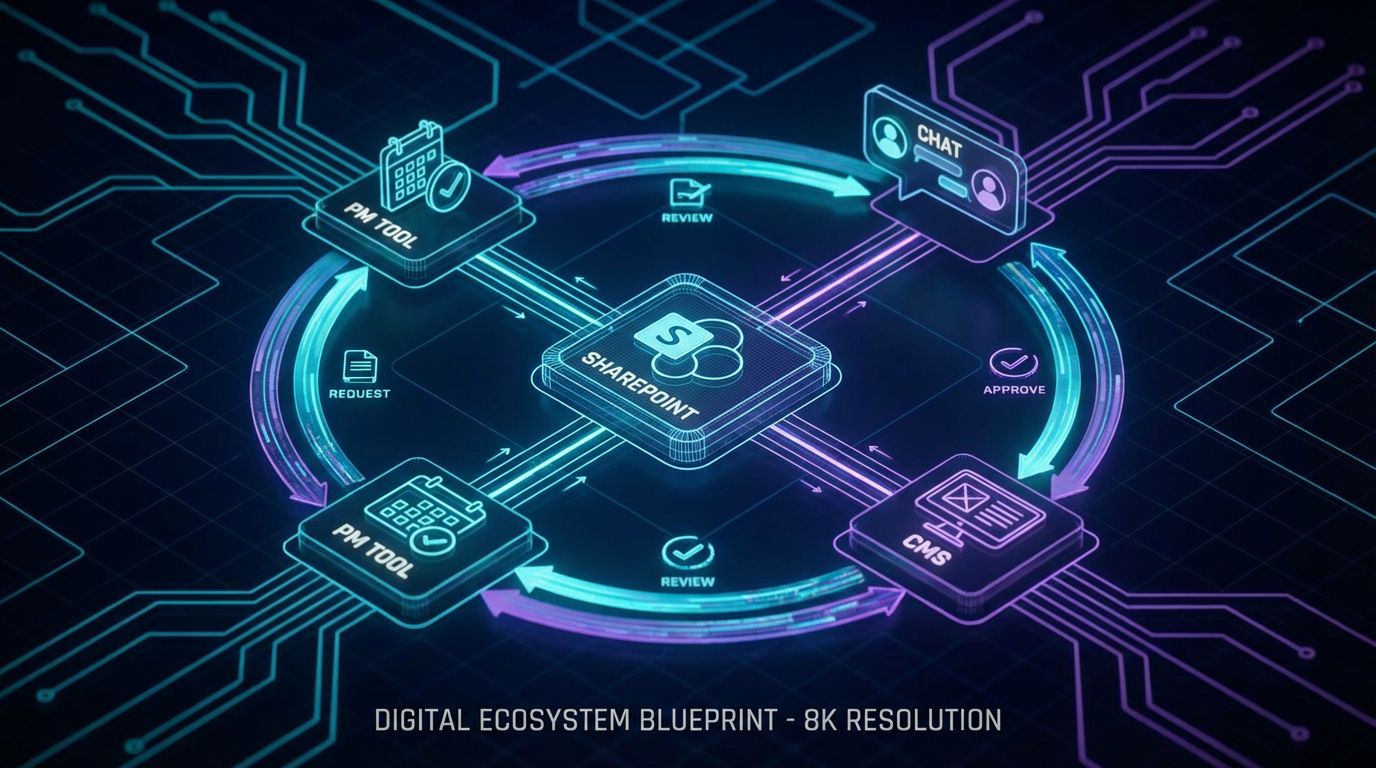
It’s easier to see the value when you walk through a specific flow. Let’s take a typical B2B blog post or campaign asset from brief to publish in an automated system.
A Step-by-Step Example Flow
1. Brief & Draft Created. A strategist creates a brief and initial draft in SharePoint or Google Docs and tags it with client, campaign, channel, and risk level. Saving that file to the right folder or list automatically triggers the workflow.
2. Automation creates tasks and SLAs. An automation platform creates a task in your PM tool, assigns the right editor based on client and workload, and sets default SLAs (for example, 24 hours for editorial review, 24 hours for brand review). No one has to remember to “add it to the tracker.”
3. Ready for Review triggers notifications. When the writer moves the item to “Ready for Review” in the PM tool or SharePoint metadata, automation posts a message to the relevant Teams/Slack channel, pings the editor, and sends an email summary. Everyone sees one canonical link to the draft.
4. Feedback stays centralized. Editors and stakeholders comment directly in the doc or CMS, with the PM tool reflecting status but not duplicating feedback. Automations prevent new versions from being created outside the system, reducing version confusion.
5. Conditional routing to Legal or additional approvers. Once brand approves, automation checks metadata like industry or risk level. If content is flagged as high-risk or in a regulated vertical, it routes to Legal/Compliance for required sign-off. If not, it moves directly to the final approver, often the client or marketing lead.
6. Smart reminders and escalation. If any approver hasn’t acted within X hours, the system sends automatic reminders. After a defined SLA breach, it escalates to a backup approver or manager. The approval can’t simply “fall through the cracks” because a single person is busy or out of office.
7. Auto-tagging and publishing queue. On final approval, automation tags the asset, updates status to Approved, and pushes it into your CMS or social scheduler as a ready-to-schedule item. From there, your social media scheduling tools or CMS workflows handle timing without re-entering data.
Roles, Versioning, and Audit Trails
In a mature system, not everyone can move content between every state. Creators can mark items Ready for Review, editors can send content back or forward, and only designated approvers can mark assets as Approved or Published. That role-based control prevents accidental publishing and keeps approvals meaningful.
Versioning is enforced through the underlying document platform and linked IDs. There is always a single canonical URL attached to the task and approval records, so nobody approves “v7_final_FINAL” from their downloads folder.
Audit trails show who changed what, when, and why. This is essential for legal and compliance teams, but it also reduces internal blame games because the system holds the history, not individual inboxes.
Smart Reminders, SLAs, and Escalations
Instead of coordinators pinging people manually, the workflow itself enforces timelines. Approvers receive an initial notification with the context they need, followed by structured reminders at defined intervals. If they still don’t respond, the system escalates to a backup approver or a manager automatically.
AI can add leverage here without taking over decision-making. For example, an AI service can summarize key changes between versions so approvers see a concise diff instead of reading the entire piece again. It can also highlight potential risk areas, like new claims added since the last legal review, echoing the concepts we explore more deeply in our article on AI post maker tools.
The goal is simple: reduce the cognitive load on approvers so they can make faster, better decisions without sacrificing control.
Why DIY Workflow Setup Usually Fails
Most teams assume they can “just configure” better content approval workflows inside their existing tools over a weekend. Six months later, they are still chasing approvals the same way as before, just with a more expensive tool stack.
The Illusion of “We’ll Just Configure This in a Weekend”
The hard part isn’t clicking settings; it’s mapping reality. You have different approval chains for each client, product line, geography, and channel. Urgent crisis comms need a fast lane, while thought leadership pieces need more eyes.
Teams often underestimate the complexity of exceptions: who can override legal in a time-sensitive situation, what happens if the brand owner is away, or how you handle content already mid-flight during a process change. Without a clear design, you end up with a generic workflow nobody fully trusts.
That’s why “we’ll figure it out as we go” usually means “we will never fully standardize this.” The result is partial automation that breaks on edge cases.
Hidden DIY Costs: Meetings, Misconfigurations, and Stall-Out
DIY efforts generate endless meetings about who approves what, how strict SLAs should be, and which tool should own which step. Meanwhile, content volume doesn’t slow down. People end up running the old process and the new one in parallel, doubling confusion.
Misconfigurations create silent failures: notifications don’t fire, tasks don’t get created, or approvals get bypassed. After a few scares, teams quietly revert to email while the “workflow” sits unused in the background.
The hidden cost is high: leaders and specialists burn dozens of hours on system design instead of strategy, and your investment in tools like Planable, Kontent.ai, or Smartsheet never pays off because adoption stalls out before the workflows are truly reliable.
Strategy vs Tool: Why Software Alone Isn’t the System
Buying another platform does not equal having a well-designed approval system. Tools are just building blocks; the system is the combination of process design, automation logic, training, and governance.
For complex teams, getting this right means understanding both editorial reality and technical constraints. You need clear roles, exception handling, reporting, and a change management plan, not just toggles in a settings panel.
AiBizBuild’s stance is simple: you don’t need “more software.” You need workflow design, cross-tool automation, and adoption support wrapped together so your team can operate the system without ever touching its internals.
Agency Use Case: Multi-Client Approval Flow Built on SharePoint

To make this concrete, here’s a composite scenario drawn from multiple B2B agencies we’ve worked with. The specifics vary, but the patterns are the same.
The Before State: SharePoint Folders and Spreadsheet Trackers
This agency manages content for 15+ clients. Each client has a SharePoint folder structure with subfolders for blogs, social posts, and campaign assets. Writers save drafts there and notify account managers via Teams or email.
The team uses an Excel file (sometimes synced as a SharePoint list) to track titles, due dates, and statuses. Approvals happen through email threads and comments in docs, with clients occasionally editing directly in Word attachments.
Bottlenecks are predictable: late client approvals, confusion about which version is final, and no central visibility for the head of content. When leadership asks “What’s blocking Q3 campaign content for Client X?”, the answer requires manual archaeology across inboxes and files.
The After State: Automated, Role-Based Approvals Across Clients
We keep SharePoint as the primary content repository but standardize a metadata template for every asset: client, content type, channel, risk level, due date, and required approvers. Saving a draft with that metadata automatically spins up a structured workflow.
For example, Client A’s assets require two internal approvals (editor + account director) plus legal. Client B only needs brand and client sign-off. Automation reads the metadata and dynamically applies the right path, creating PM tasks, due dates, and notifications for each role.
Teams and clients receive notifications in Teams/Slack with clear “Review” buttons and direct links to the correct doc. Dashboards show approval lead time by client, number of items in each stage, and where things are consistently getting stuck.
Measurable Outcomes
After rollout, average approval cycle time drops from 5–7 days to 36–48 hours for standard assets. High-risk or heavily regulated content might still take longer, but now that’s by design and visible on dashboards.
Because every task is linked to a single canonical doc and status, rework from wrong-version approvals falls by roughly 30%. Writers spend more time creating new content and less time reconciling conflicting edits.
Account managers reclaim 5–10 hours per week that used to be spent chasing stakeholders and updating spreadsheets. Leadership gains a realistic view of capacity and bottlenecks, making it easier to commit to launch dates with confidence.
Implementation Roadmap: 3-Week Automation Blueprint
You don’t need a six-month transformation project to fix approvals. A focused three-week blueprint gets you from chaos to a working system for your highest-impact content types.
Week 1 – Discovery, Mapping, and Quick Wins
Week 1 is about understanding reality and aligning on design. We interview stakeholders across content, account management, legal/compliance, and leadership, as well as a few key clients if approvals cross organizational boundaries.
We inventory your current tools: SharePoint or other document systems, CMS, PM tools, chat platforms, and email patterns. Then we map existing approval paths per content type and client, identifying quick-win automations such as standardized intake forms or automatic task creation.
Deliverables include draft workflow diagrams for each major path and a prioritized automation backlog. You leave Week 1 knowing exactly what “done” will look like and which pieces will move first.
Week 2 – Build, Integrate, and Test
In Week 2, we turn diagrams into working automation. We configure the core workflows in your chosen low-code automation layer and connect it to SharePoint, your PM tool, and notification channels like Slack or Teams.
We define roles, states, SLAs, and conditional logic based on metadata such as client, content type, and risk level. This includes exception handling for urgent items and alternative paths when specific approvers are unavailable.
Deliverables are a working prototype for one or two key content types, such as blogs and social campaigns, plus a pilot group actively testing them. Issues discovered here get fixed before you scale.
Week 3 – Rollout, Training, and Optimization
Week 3 expands successful patterns to more content types and brands or clients. We finalize configurations, apply reusable templates, and ensure your content approval SharePoint structure and PM tool stay in sync.
Training is lightweight and practical: short Loom walkthroughs, role-based checklists, and clear SOPs so people know exactly how to submit, review, and approve content. We focus on what changes for each role, not how the wiring works underneath.
Deliverables include a fully deployed approval workflow for defined content types, dashboards for monitoring approval times and bottlenecks, and an optimization plan. This three-week blueprint is essentially what AiBizBuild delivers when you book a Workflow Audit plus implementation.
How AiBizBuild Builds & Maintains Your Approval System
AiBizBuild isn’t another SaaS product. We are the team that designs, wires, and maintains your approval system so your people can focus on content, not configuration.
Our Done-For-You Workflow Automation Services
For agencies and B2B teams, SEO Content & Blog Automation is the core service that includes designing and automating approval workflows for blogs, landing pages, and other SEO content. We take your existing tools and build a coherent, enforceable process around them.
If your bottlenecks are primarily around social campaigns, we extend the same approach through our Social Media Workflow Automation service. That covers ideation, drafting, approvals, and handoff into scheduling tools without manually copying content into multiple systems.
In both cases, AiBizBuild creates the content approval blueprint, implements the automations across your stack, and provides ongoing maintenance and optimization as your brands, clients, and requirements evolve.
From Manual Approvals to a Measurable Content Engine
Automated content approval workflows are a foundation, not an endpoint. Once approvals are reliable, approved content can flow directly into publishing pipelines with minimal friction.
Blog content moves from Approved to live in your CMS with pre-populated metadata and tags. Social content flows into your scheduling layer so that your social media scheduling tools can operate at scale without last-minute copy-paste scrambles.
We also build dashboards that expose metrics leadership actually cares about: average approval time, throughput per team, bottleneck stages, and SLA adherence. Your content operation becomes measurable, not anecdotal.
When to Bring in an Automation Agency vs Going It Alone
DIY can work for small teams with simple approval chains, low content volume, and minimal compliance risk. If you have one brand, one approver, and a handful of monthly pieces, heavy automation may be overkill.
AiBizBuild is the right fit when you have multiple approvers, multiple brands or clients, or regulatory obligations that make missed steps unacceptable. At that scale, the cost of getting it wrong outweighs the cost of bringing in specialists.
If you want to see what an automated approval system would look like for your stack, the next step is straightforward: Book a Workflow Audit or Request a Demo of a sample flow. We’ll map your current process, design a tailored blueprint, and show you the ROI of automating it—before you commit to a full build.
FAQs on Automated Content Approval Workflows
How long does it take to design and implement an automated content approval workflow?
For most agencies and B2B teams, a focused implementation follows the three-week blueprint outlined above. Week 1 covers discovery and mapping, Week 2 handles build and integration, and Week 3 focuses on rollout and optimization.
Extremely complex setups with many brands or heavy compliance needs can take longer, but you should still expect a usable first version in weeks, not months. The key is prioritizing a few high-impact content types instead of trying to automate everything on day one.
Can we keep our existing content approval SharePoint setup and still automate approvals?
Yes. In many cases, we keep SharePoint as the primary repository and layer automation around it. The goal is not to rip out your content approval SharePoint site but to make it behave like part of a real workflow instead of a static file store.
We standardize metadata, connect SharePoint events to your PM tool and notification channels, and ensure that every asset follows a consistent, trackable path from draft to publish. You get the benefits of automation without retraining everyone on a new storage tool.
How secure are automated content approval workflows for sensitive or regulated content?
Security is handled at multiple layers. Workflows run inside or on top of tools you already trust, with role-based access controls and permissions enforced by platforms like SharePoint, your PM tool, and your CMS.
Audit trails record every status change and approval, which is crucial for legal and compliance teams. We design flows so sensitive content never leaves your secure environment; automation orchestrates actions but doesn’t expose data to unnecessary systems.
Do we need developers or technical staff to manage these workflows after they’re built?
No, not in the traditional sense. We build on low-code/no-code automation platforms and native integrations, so most day-to-day changes are configuration, not custom code.
AiBizBuild can handle maintenance and iteration for you, or we can train an internal owner to manage small tweaks. Your content and marketing teams operate the workflows through normal tools and forms, without touching the underlying automation logic.
What measurable improvements can we expect from automating our content approval workflows?
Typical gains include cutting approval lead times from 5–7 days to 36–48 hours for standard assets, especially in multi-stakeholder environments. Teams also see 20–30% reductions in rework because version control and approval paths are enforced.
On the capacity side, account managers and project leads often reclaim 5–10 hours per week that were previously spent chasing approvals and updating trackers. More importantly, your team ships more campaigns on time, with clearer accountability and lower risk.
Next Step: If you’re ready to turn approvals from a black box into a predictable system, book a Workflow Audit with AiBizBuild or request a demo of an automated approval flow similar to what you’ve seen here. We’ll handle the wiring so your team can focus on content and clients.